• Use for purposes other than those
described in the operating manual.
Scope of delivery
• Safe
• Installation and operating manual
(on request).
Technical description
The control panel has a display and a key
pad for entering the code. A master code
is available for opening in an emergency.
The model can be identified from the type
plate.
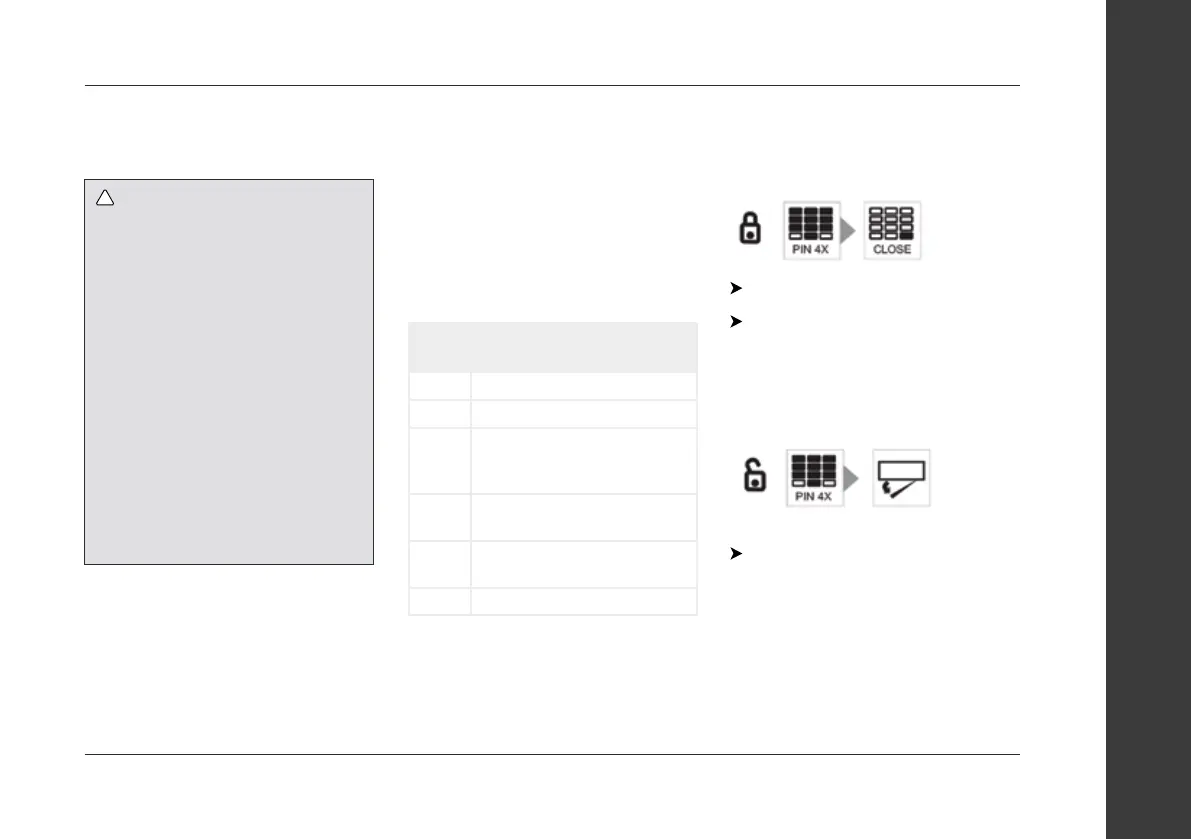
Control elements
No. in
fig.1
Description
1 Display
2 Number keys
3 CLOSE button
Closes the safe lock after code
is entered
4 CLEAR button
Cancels the code entered
5 Lock for master key (behind
cover)
6 Locking mechanism cover
Using the safe
Closing the safe
Enter a four digit code.
Press the CLOSE button.
The display shows the message
CLOSED.
Opening the safe
Enter the correct four digit code.
✓ The code entered is shown in the
display.
✓ The safe will open.
✓ The display shows the message OPEN.
Care of your caravan
152www.coachman.co.uk
Owners handbook 2022
Coachman Caravan Company Limited, Amsterdam Road, Sutton Fields Industrial Estate, Hull, HU7 0XF
Warning
• This device can be used by children
aged 8 years or over, as well as by
persons with diminished physical,
sensory or mental capacities or a
lack of experience and knowledge,
providing they are supervised,
or have been taught how to use
the device safely and are aware of
the resulting risks.
• Only use the product as intended.
• Do not make any modifications or
alterations to the product.
NOTICE:
• No unauthorised persons should have
access to the master code.


 To Next Page