Connecting services - Control panel
55
Owners handbook 2022
• Mains current
• Solar current
• Internal temperature
• Water level
• Battery source
• Pump source
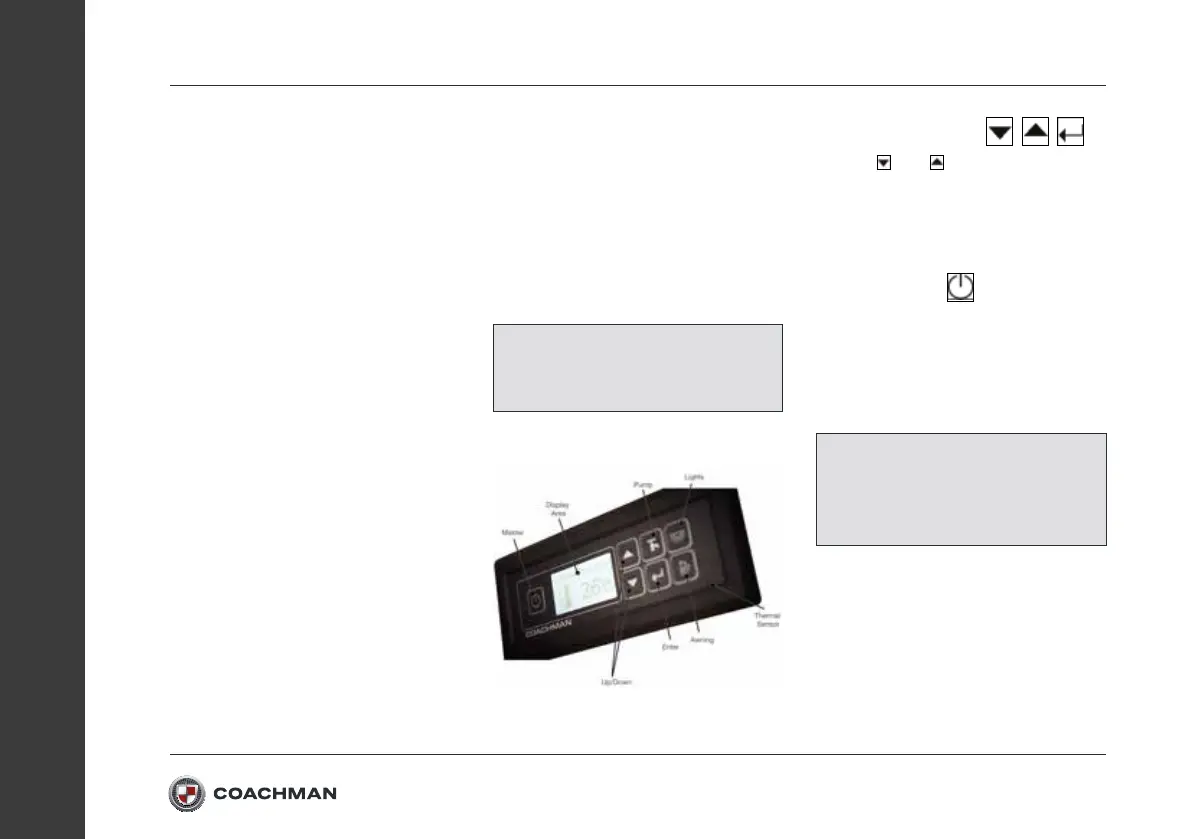
The Seattle control panel also allows
the user to:
• Switch on/o all non-essential
electrical appliances/accessories
• Switch on/o the lights
• Change the pump mode
• Switch on/o the pumps
• Force the internal pump to run
(For purging pipes)
• Switch on/o the awning light
• Calibrate water/waste probes
The Seattle control panel also has
optional audio and visual warnings for:
• Battery overvoltage/current alarms
• Battery under voltage alarms
• High solar current alarm
• Communication error
• Empty water tank
• Fuse blown alarms
Function Buttons:
Navigation Buttons:
Use the
and buttons to navigate
up and down through menus. Pressing
the button will allow the user to enter
menus or change settings (If further
settings are available).
Master Button:
When the Master Button is pressed the
control panel will switch power to all
non-essential accessories. Some
features require the Master Button to be
switched on to be enabled.
NOTE: Some of the options or
features highlighted above are not
available on selected models.
NOTE: Essential appliances may
remain powered when the master
switch is o, for example the Alarm
or Fridge.


 To Next Page