Refrigerator operation
95
Owners handbook 2022
Component RMD10.5T
and RMD10.5XT
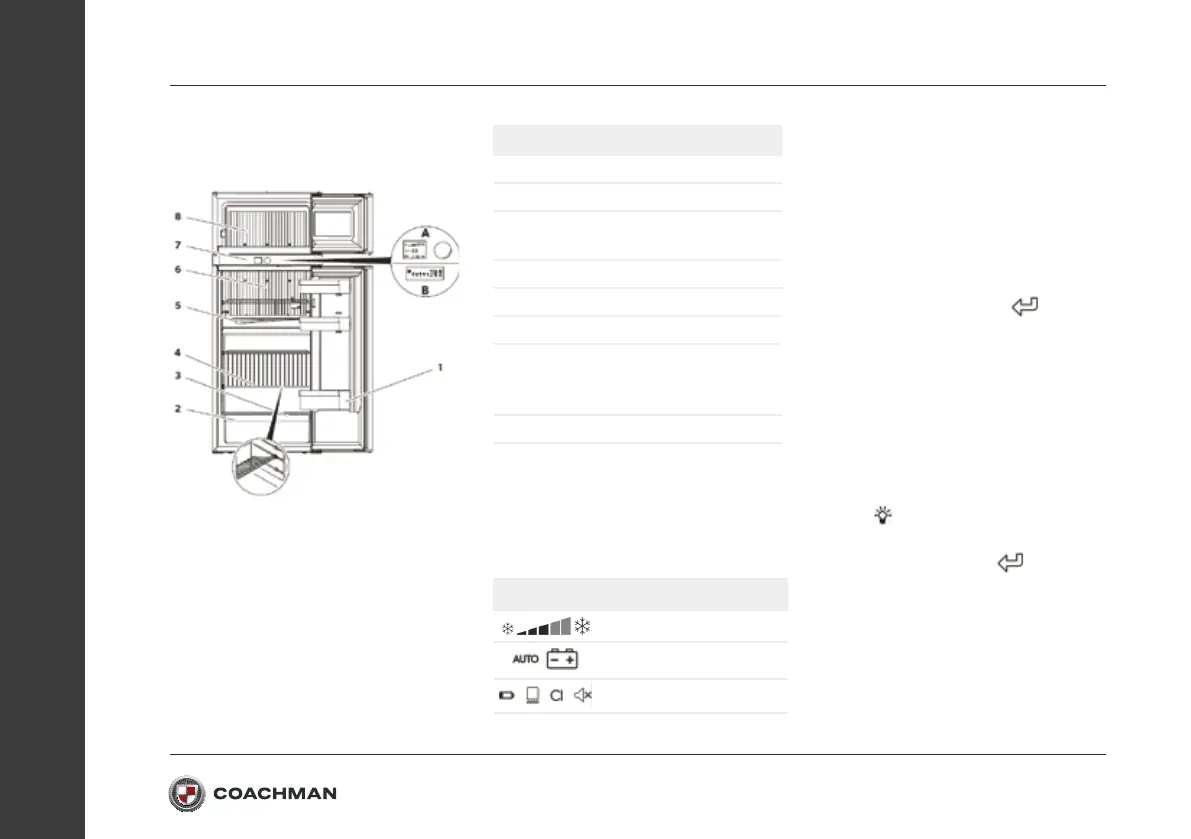
Description
1 Tray
2 Vegetable compartment
3 Type plate (behind the vegetable
compartment)
4 Shelf
5 Thawed water drain
6 Evaporator for cold storage
7 Control elements
A: RMD10.5T and RMD10.5XT
B: RMD10.5 and RMD10.5X
8 Ice compartment
Menu navigation and operation
Press the control knob to activate the
TFT display.
The main menu is divided into three lines:
Main menu
Details menu
Cooling capacity menu
Operating mode menu
Settings menu
• Turn the control knob to select the
desired detail menu.
• Press the control knob to open the
selected detail menu.
•
Turn/press the control knob to navigate
through the detail menu and find settings.
Selected settings are displayed in blue.
• Confirm the selection with
This will return you to the main menu.
Setting the dimming function
The TFT display has a dimming function.
After 30 seconds, the brightness of the
display is reduced to the set level.
Select the setup menu
• Select
• Set the required brightness level.
• Confirm the setting with
Activating/deactivating the
frame heater
The refrigerator has a frame heater
in the area of the display to reduce
condensation.


 To Next Page