Refrigerator operation
96www.coachman.co.uk
Owners handbook 2022
Coachman Caravan Company Limited, Amsterdam Road, Sutton Fields Industrial Estate, Hull, HU7 0XF
NOTE
• In gas mode, the frame heater must be
activated manually via the setup menu.
• A permanently switched on frame heater
can lead to a faster discharge of the battery.
• Select the setup menu.
• Activate/deactivate the frame heater
• Confirm the setting with
Switching o the acoustic signal for
error messages and warning messages
• Select the setup menu.
• Activate
• Confirm the setting with
RMD10.5T and RMD10.5XT
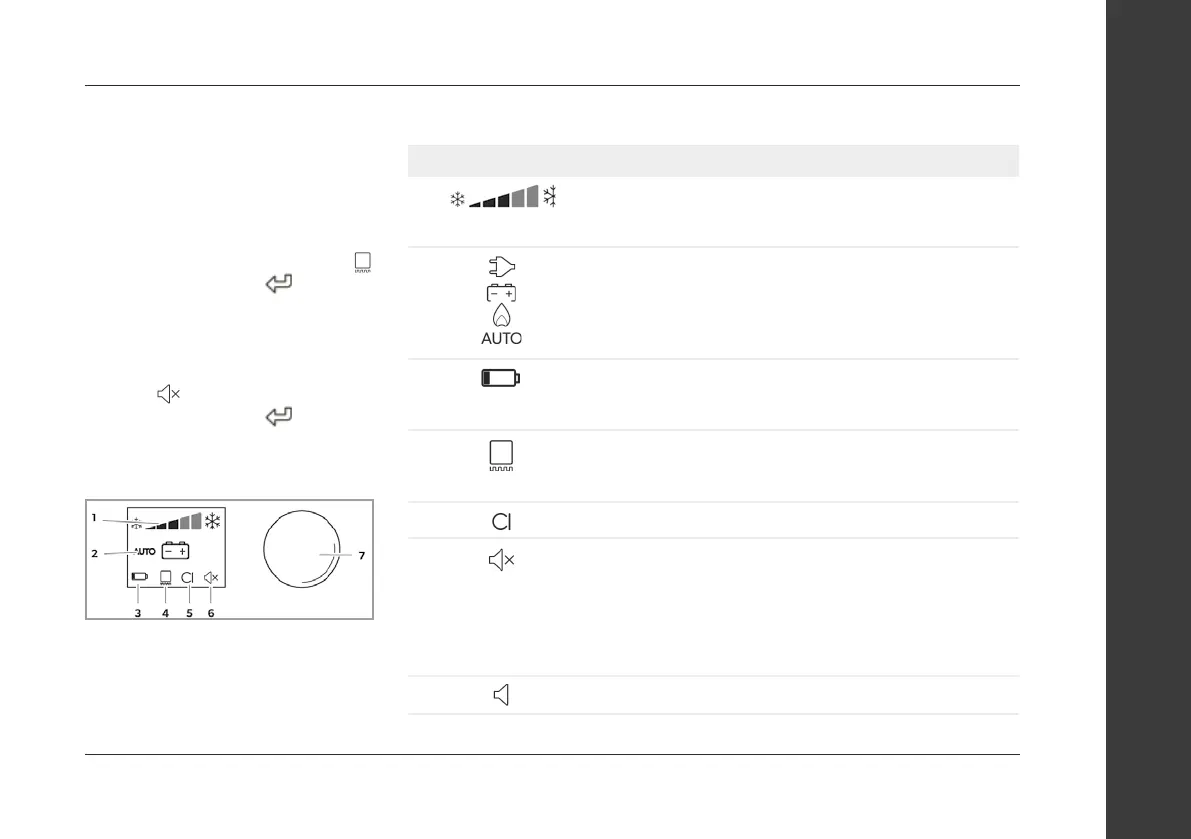
Control and display elements
The RMD10.5T and RMD10.5XT refrigerator
has a TFT display and a control knob in the
divider between the main compartment
and the freezer compartment.
TFT display
Symbol Description
1
Cooling capacity indicator:
Lowest position: lowest cooling (warmest internal temperature)
Highest position: highest cooling (coldest internal temperature)
2
Selected operating mode:
AC power
DC power
Gas
Automatic
3
Battery:
Symbol lights up when the battery packs (optional) are
inserted and the device is in stand-alone gas mode.
4
Frame heating of the freezer compartment:
Symbol on: in operation
Symbol o: not in operation
5
Symbol lights up when the refrigerator is connected to the CI bus.
6
Beep sound o:
Error messages and warnings are not signaled acoustically
Door left open period is signaled acoustically.
Beep sound on:
Error messages, warning messages and door left open are
signaled acoustically.
7
Control knob


 To Next Page