2
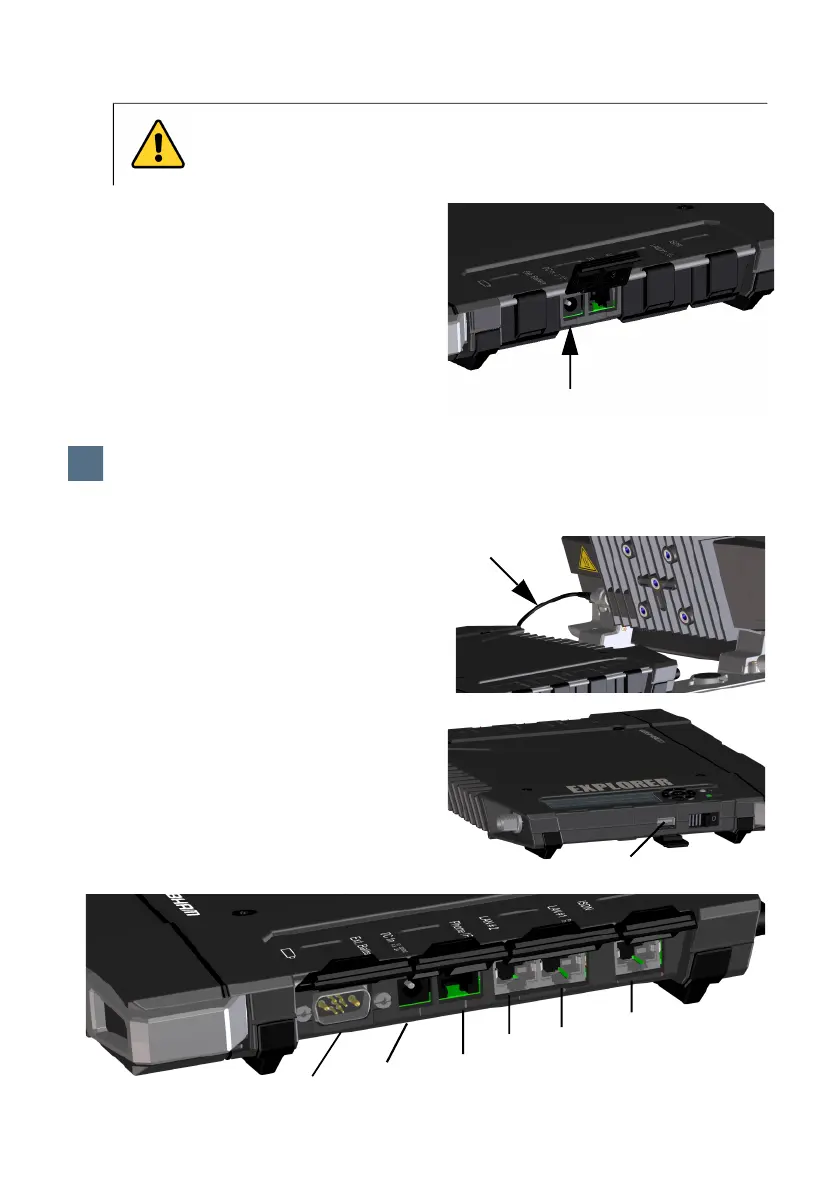
External power
To power the terminal or to charge the
battery, connect one of the following
external power sources to the DC input:
• 10-32 VDC
• The supplied AC/DC adapter connected to
100-240 V Mains.
• A solar panel (min. 65 W, 10-32 VDC)
The antenna cable is connected at
delivery.
NOTE: If you want to use the antenna
separated from the transceiver, use a longer
antenna cable and remove the transceiver
from the antenna bracket. See the next
section.
Connect your equipment to the relevant
connector(s) on the transceiver.
NOTE: The USB interface is a Host interface,
used e.g. for charging phones or tablets (up
to 2 A) or for software update using a USB
memory stick.
CAUTION! Close all covers for unoccupied connectors as shown in the
picture below. Reason: If you accidentally connect the DC power cable to the
External battery connector you may cause damage to the terminal!
DC input
3
Connect user equipment
3
USB (Host)
External battery
DC in
Phone/
LAN2
ISDN
LAN1
Fax
(PoE)



 To Next Page