Chapter 1: Introduction
SAILOR 6300 MF/HF DSC 5
1111
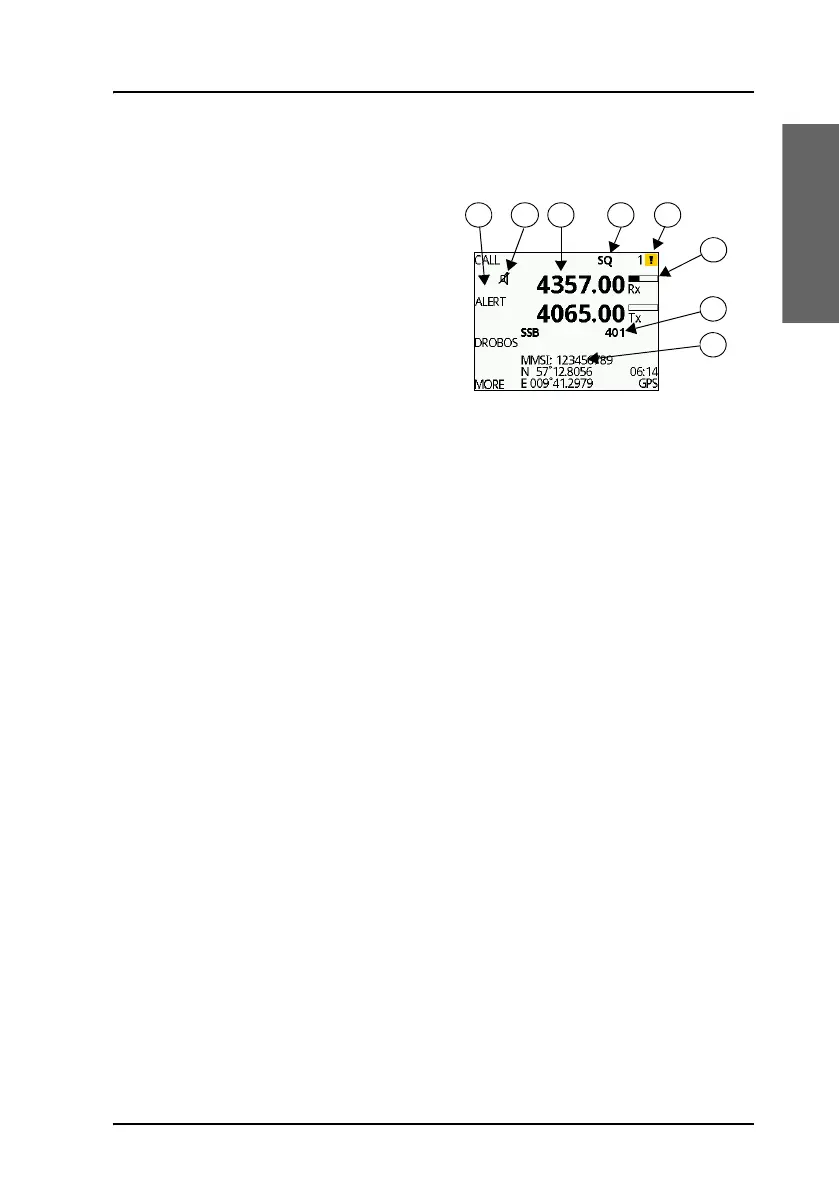
Display overview
The picture shows the display after
start-up. The display holds various
fields of information, depending on
the currently selected function.
1. Functions you can select with
the soft keys. If there are more
than 4 functions in the list push
the soft key MORE to display
further functions.
2. Icon for speaker muted. Only shown when the speaker volume is turned
down to zero. This icon does not apply to audible alarms, only to
normal speaker sound.
3. Current receive and transmit frequency in kHz.
4. System property icons and engagement status.
5. Alert icon (check mark if no alerts).
Push and hold Mode/BAM button to see a list of active alerts.
The number next to the alert icon shows the number of unread alerts.
6. Channel properties with status and indicators for received signal
strength (Rx) and transmission power (Tx).
7. Service line containing mode of operation and channel number.
8. DSC window with MMSI number, position information and source.
For a detailed description of the information shown for each of the
functions available see the chapter Operation on page 9.



 To Next Page