Chapter 2: Operation
22 DSC calls
Own Distress — sending, acknowledging and canceling
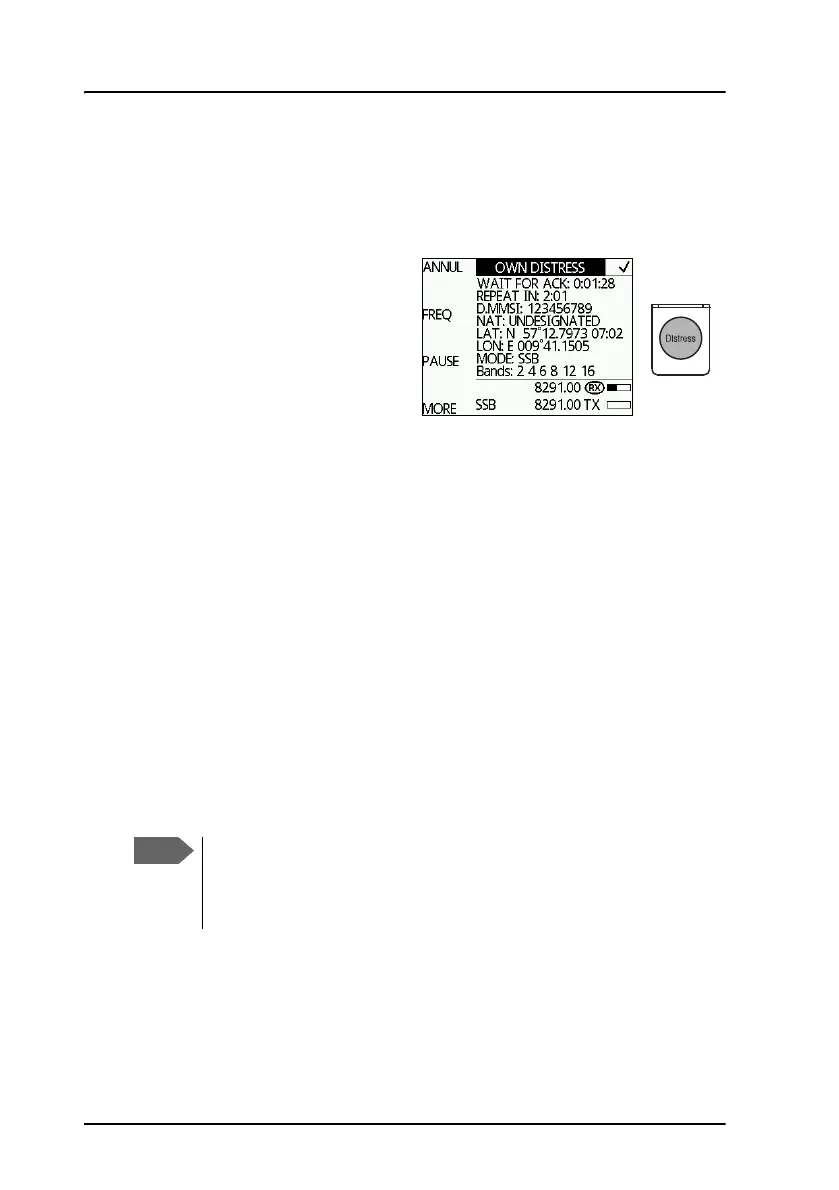
To send a Distress alert
1. Lift the cover of the red
Distress button and push and
hold the Distress button for
longer than 3 seconds. For
short step-by-step
instructions how to proceed
when sending a Distress
message see Emergency calls
on page vi. When the Distress signal is sent, SSB, and TX appear in the
display. A two-seconds beep tone is heard and the channel that is
currently sent appears in the display. The MF/HF radio displays the
bands in which the Distress has been transmitted. Sending multi
channels distress requires HF DSC option.
If you inadvertently transmit a DSC Distress alert push the soft key
ANNUL. For detailed instructions how to cancel all Distress alerts see
To cancel own Distress on page 24.
2. Push the soft key FREQ if you want to specify a certain band out of the
6 available as the next distress frequency. Thereafter all 6 distress
frequencies are transmitted.
3. Push the soft key VIEW (push MORE to advance to VIEW) to see
details and start radio communication on the frequency 2182 kHz
(automatically set) to inform about your Distress situation. (For a HF
radio communication the frequency is on 8291 kHz)
For an undesignated Distress message the subsequent communication is
always voice communication.
Automatic retransmission: If no Distress acknowledgment is
received within a period of 3.5 to 4.5 minutes, the Distress
message will automatically be retransmitted. Transmitting order: 2
MHz, 4 MHz, 6 MHz, 8 MHz, 12 MHz, 16 MHz.



 To Next Page