Chapter 2: Operation
DSC calls 37
2222
hold can receive calls that are pertinent to the session, even when the
session is not displayed.
To close a session, the session must be active, then push the soft key QUIT.
In case there are simultaneous alarms, they are sorted according to their
priorities, the most important ones are shown first. In some cases alarm or
pop-up messages terminate automatically, then the display messages and
audible alarms also disappear automatically.
Geographical area calls
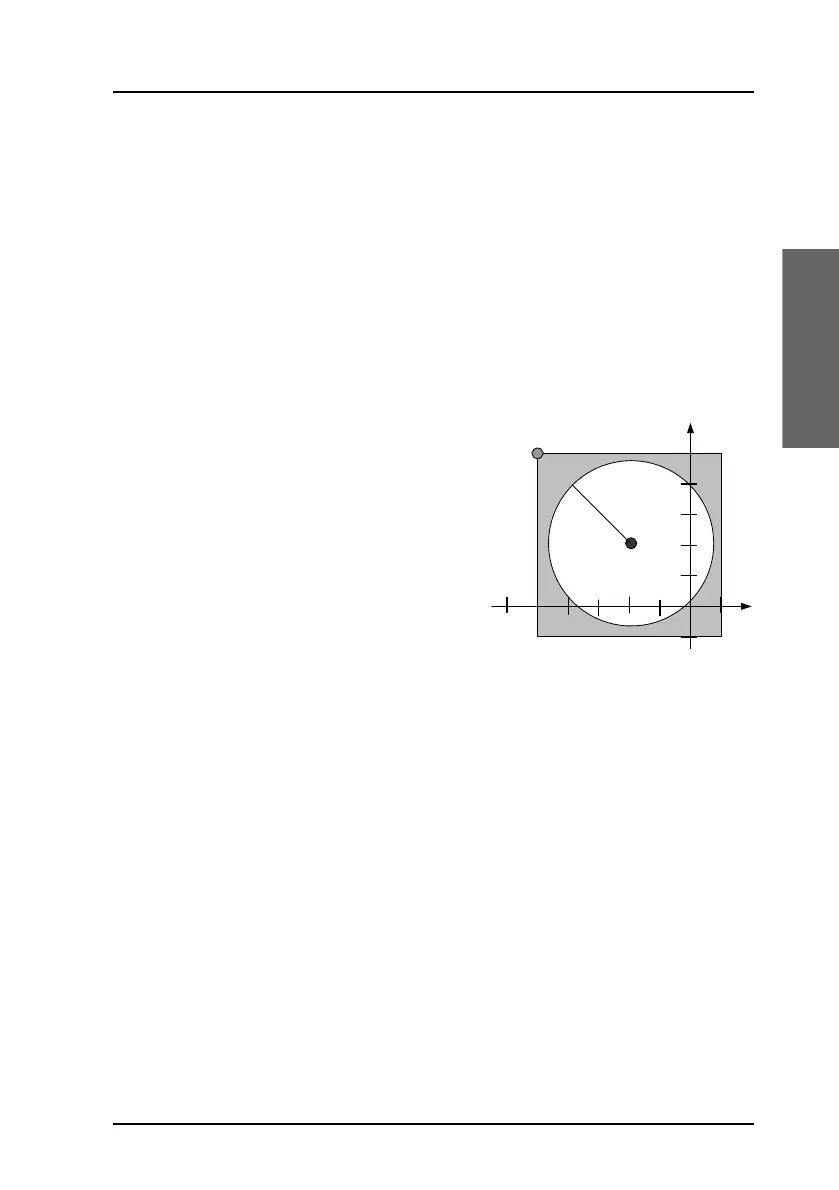
When making a DSC area call, enter the
position of the ship (x,y) and the radius
of interest r. This information is
transformed to a square with a corner
point (a,b) and the length of its sides, a
and b. Then the DSC message is
transmitted. The illustration on this
page shows the relation between the
user input — the white circle — and the
information transmitted —the gray
square. The center point is the position
of the ship measured in degrees and minutes, whereas the radius of interest
is in nautical miles.
The corner point of the square (a
2
,b
2
) and the length of its sides is given in
degrees. Note that these values are rounded to degrees, and due to the
requirement that the square shall include the entire circle; this will result in a
slightly larger area than defined by the user input.
Attention when close to the poles: If the latitude of the corner point ‘a’ is
transformed to a value greater that 90° then it is set to 90° and the length
b is reduced correspondingly. If the length a is greater than 90° then a
is set to 90°.
(x,y)
r
(a
2
,b
2
)
b
2
a
2
a
1
b
1
a
2
-a
1
b
2
-b
1



 To Next Page