Chapter 2: Operation
44 Setup
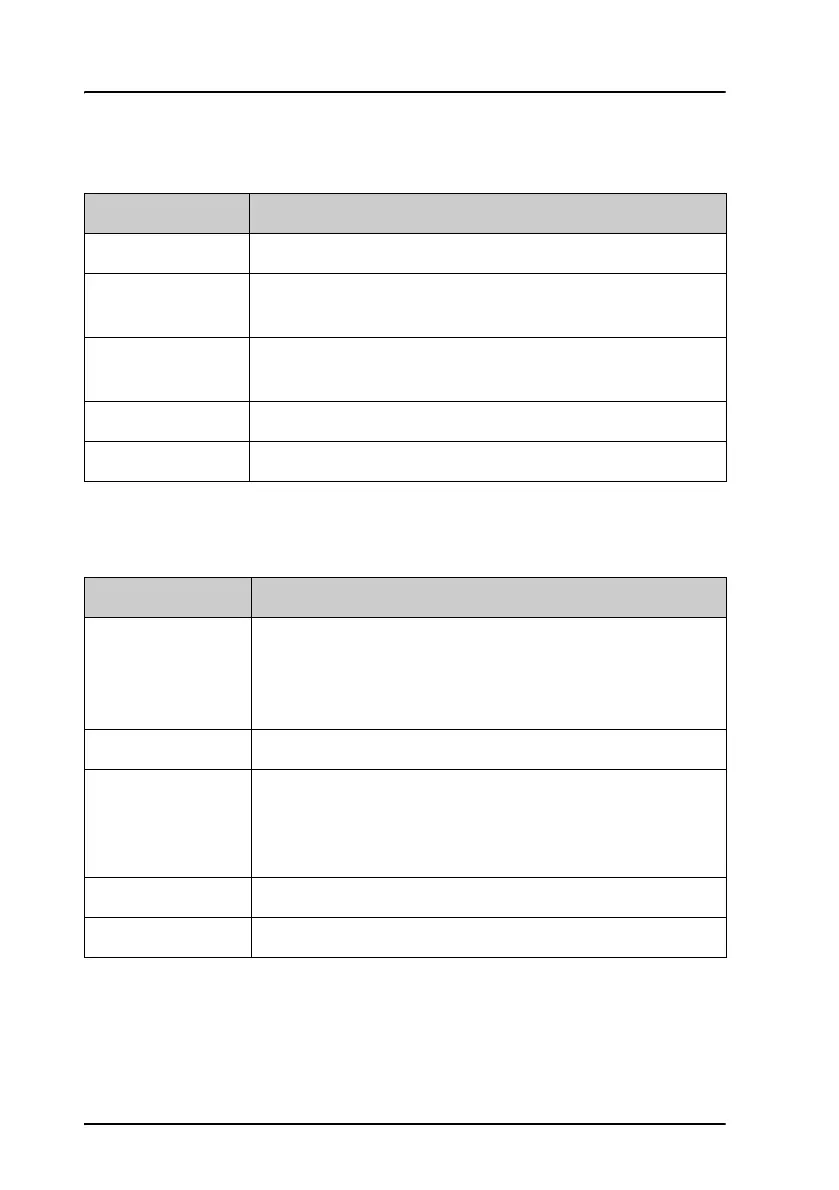
Power Supply
DSC setup
Item Description
Supply Voltage Shows the voltage on the supply terminals.
Charger Monitor Set to ENABLED to monitor charging information from a
connected SAILOR 6081 Power Supply Unit and Charger.
Status Visible if ENABLED. Current status of the connected
power supply.
Battery Voltage Visible if ENABLED. Current battery voltage.
Charging Current Visible if ENABLED. Current charging current.
Item Description
Position & MMSI Available position information.
Here you can enter position data and UTC time manually.
See also Position and MMSI Information on page 14 for a
step-by-step description.
DSC Groups Create, view, and filter DSC groups.
Auto-Ack Test Auto-acknowledgment of test DSC messages
• OFF – Disabled
• ON – Enabled (default)
Auto-Ack Polling ON or OFF
Auto-Ack Position ON or OFF



 To Next Page