Page 14 Coby Electronics Corporation
English
DVD968 at a Glance
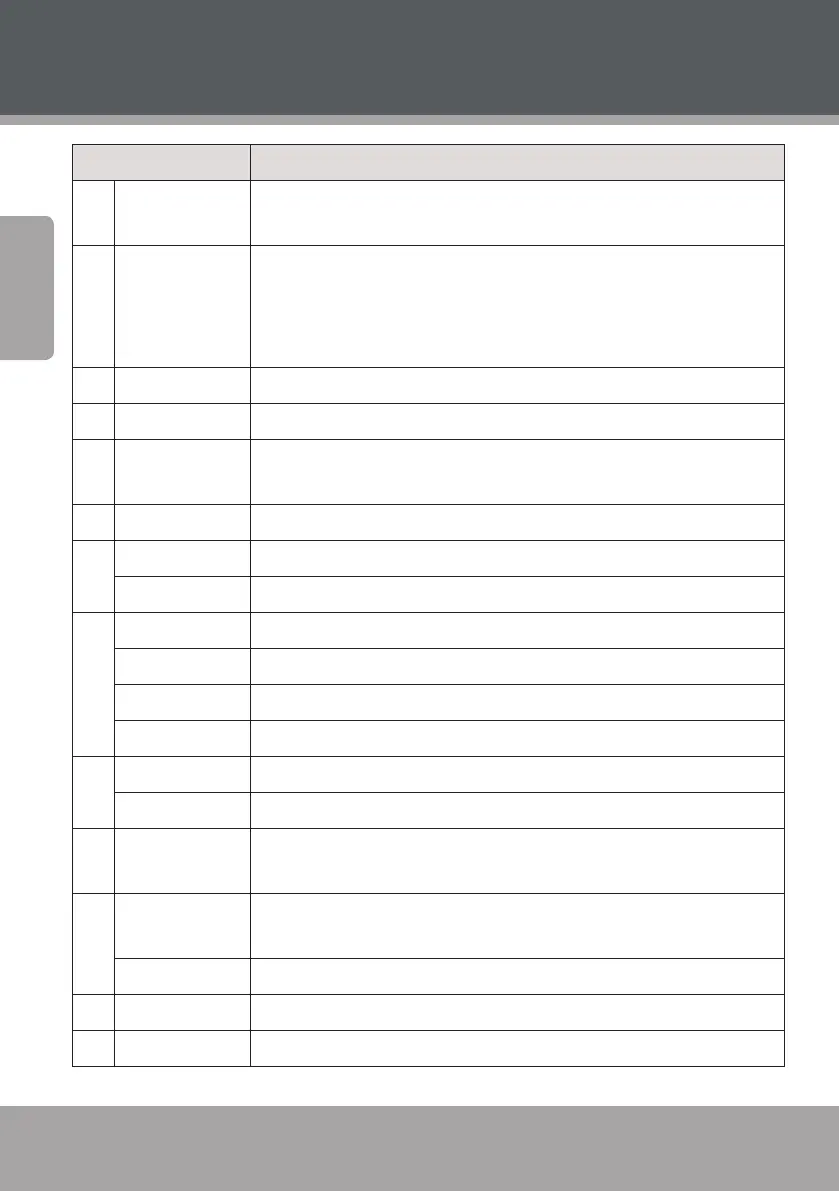
Name Description
1 Standby Turn the unit on or o (standby). The Main Power switch on the rear
panel must be set to the ON position.
2 Numeric
Keypad
<0-9, 10>: Use the numeric keypad to input numbers where appropri-
ate.
<+10>: Add 10 to input numbers higher than 10. For example, press
<+10> twice and then press <5> to input the number “25”.
3 GOTO Enter Direct Access mode to go to a specic part of a movie.
4 SETUP Enter the main setup menu of the unit.
5 AUDIO OUTPUT
MODE
Press to switch the audio mode between 5.1-CHANNEL OUTPUT and
STEREO OUTPUT.
6 PROG Enter Program mode to create a custom playlist.
7 VO L+ Increase the volume level.
VO L– Decrease the volume level.
8 FORWARD Video & Music] Increase the rate of forward playback (fast-forward).
SEARCH + [Radio] Tune to a higher station frequency.
REVERSE [Video & Music] Increase the rate of reverse playback (rewind).
SEARCH – [Radio] Tune to a lower station frequency.
9 TITLE [DVD] Enter the DVD Title menu.
AM/FM Radio: Change between the AM and FM bands.
10 Navigation
Keypad
<Arrow Keys>: Navigate on-screen menus.
11 AUDIO [DVD] Change the DVD audio channel (requires a DVD featuring mul-
tiple audio channels).
MEMORY [Radio] Manually save the current frequency as a preset station.
12 S.EFFECT Change the sound eect options.
13 STEP [DVD} Play DVD video frame by frame.



 To Next Page