www.cobyusa.com Page 15
English
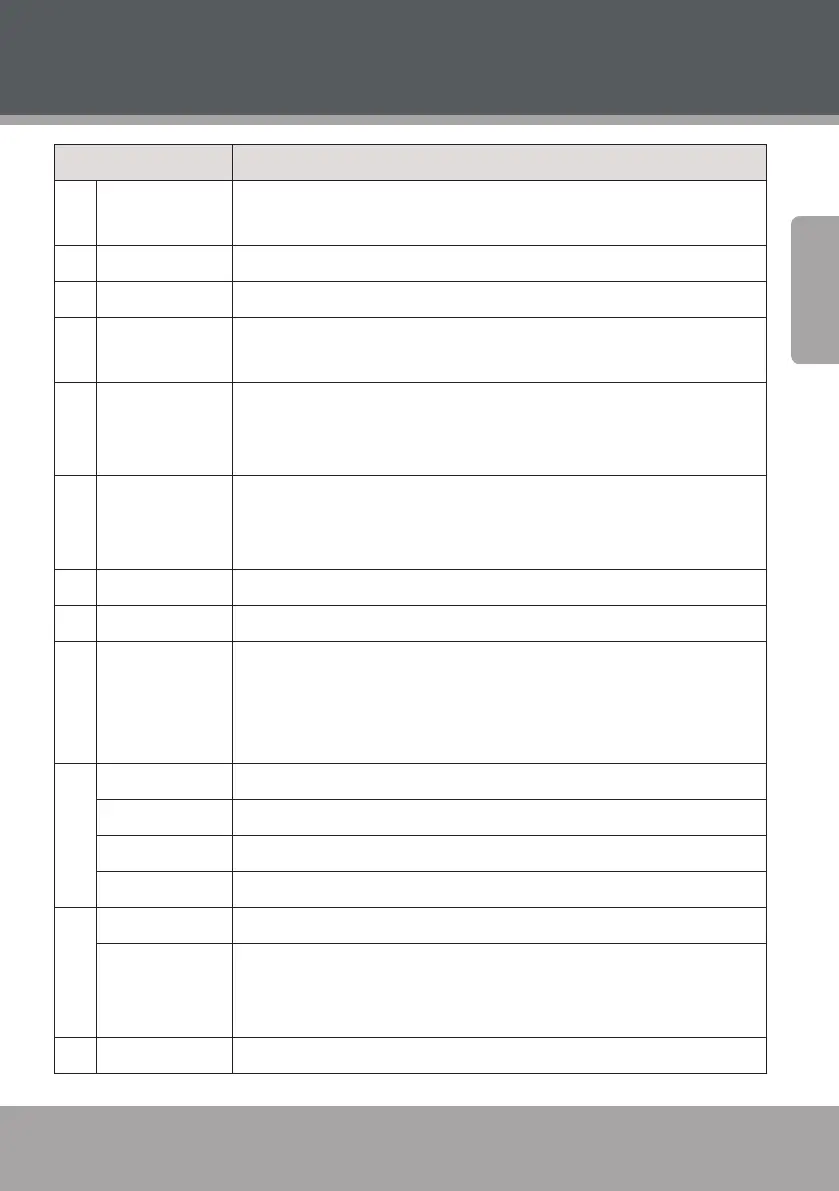
DVD968 at a Glance
Name Description
14 ANGLE [DVD] Change the angle view (requires a DVD featuring multiple
camera angles).
15 REPEAT Change the repeat playback options.
16 OPEN/CLOSE Open/Close the disc tray.
17 SOURCE Change the source input mode of the unit (e.g., DVD-VIDEO, LINE,
TUNER).
18 USB Change the source input mode between DVD, USB, and CARD. Press
<SOURCE> to place the unit in DVD mode rst to access the USB and
memory card source modes.
19 V-MODE Change the video output mode of the unit to match the video con-
nection used. Select CVBS for 480i composite video, YUV for 480i
component video, or P-YUV for 480p component video.
20 PLAY/PAUSE Play or pause the disc.
21 OSD Toggle on-screen information display.
22 STOP Press once to stop disc playback. The player will save and resume
playback from the stop location.
Press twice to stop disc playback completely. The player will resume
playback from the beginning of the disc.
23 NEXT [Video & Music] Skip to the next track.
RADIO + [Radio] Tune to a higher station preset.
PREVIOUS [Video & Music] Skip to the previous track.
RADIO – [Radio] Tune to a lower station preset.
24 MENU [DVD] Return to the DVD Root menu.
AUTO [Radio] Automatically scan for and save stations within reception as
preset stations. Using this function will over-ride and erase all previ-
ously saved presets.
25 ENTER Conrm a selection.



 To Next Page