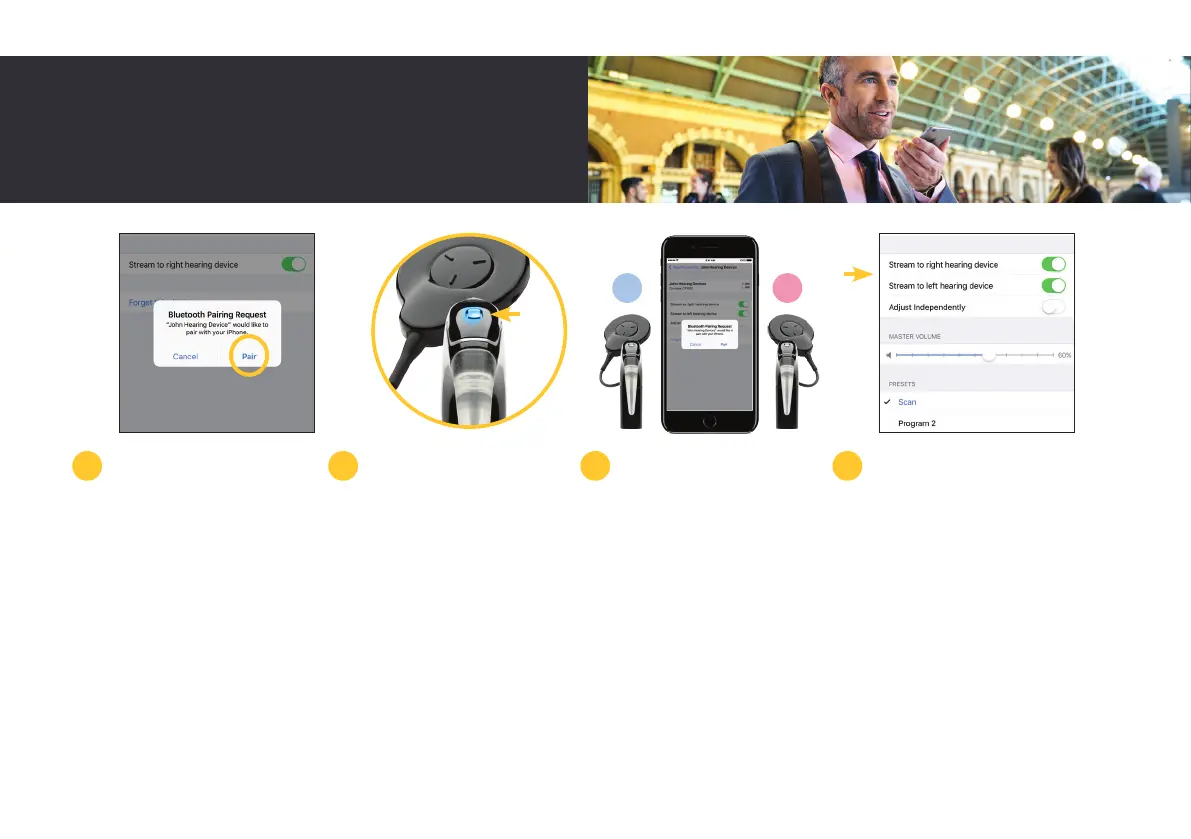
When it appears on-screen,
select the name of your
sound processor and tap
‘Pair’.
When pairing starts, you
will hear six beeps and your
sound processor LED will
flash blue.
Paring may take up to 120
seconds. Once paired your
sound processor LED will
flash blue again.
Once successfully paired
you will hear a ripple tone
and your sound processor
LED will again flash blue.
Your processor will be listed
under ‘Your Hearing Device’
and you should now be able
to stream sound directly to
your processor.
If you have two sound
processors, both must be
paired during the same
pairing window.
To do so, turn each sound
processor off and back on
again. Your compatible
Apple device will search
for and display your sound
processors as a pair in the
‘Devices’ section.
Select the name of your
processor and then tap
‘Pair’ for each side to begin
pairing both your Nucleus 7
Sound Processors with your
compatible Apple device.
Make sure to confirm
pairing is finished as
previously described for
each processor.
5 6 7
L R
8
19



 To Next Page