Pairing with the Cochlear
Wireless Mini Microphones
While charging, the LED on
top of the Mini Microphone
2/2+ is red. When fully
charged, it is green with red
flashes every two seconds.
Before using your Mini
Microphone 2/2+ for the
first time, make sure it has
been charged for at least
three hours, even if the light
indicates a full charge.
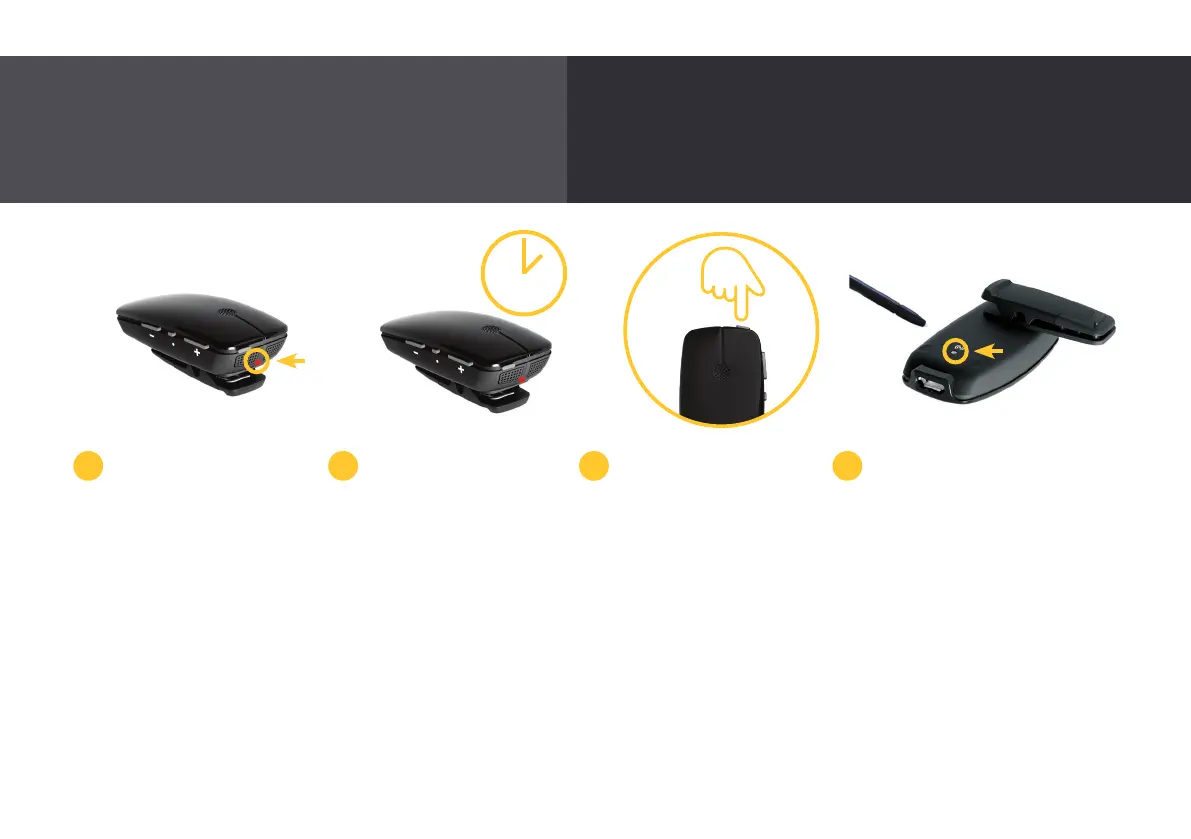
To pair your Mini
Microphone 2/2+ with your
Nucleus 7 Sound Processor,
remove and turn off your
sound processor.
Power on your Mini
Microphone 2/2+ by
pressing and holding the
on/off button for two
seconds until the LED turns
green.
To begin pairing, press the
pairing button on the back
of the Mini Microphone
2/2+ using the tip of a pen
or similar object.
The LED on top of the Mini
Microphone 2/2+ will blink
yellow every two seconds
for 20 seconds to indicate
it is in pairing mode. During
these 20 seconds, switch on
your sound processor.
2 sec
2 3 41
Designed to help you hear better over distance and in noisy
listening situations.
3 hrs
24



 To Next Page