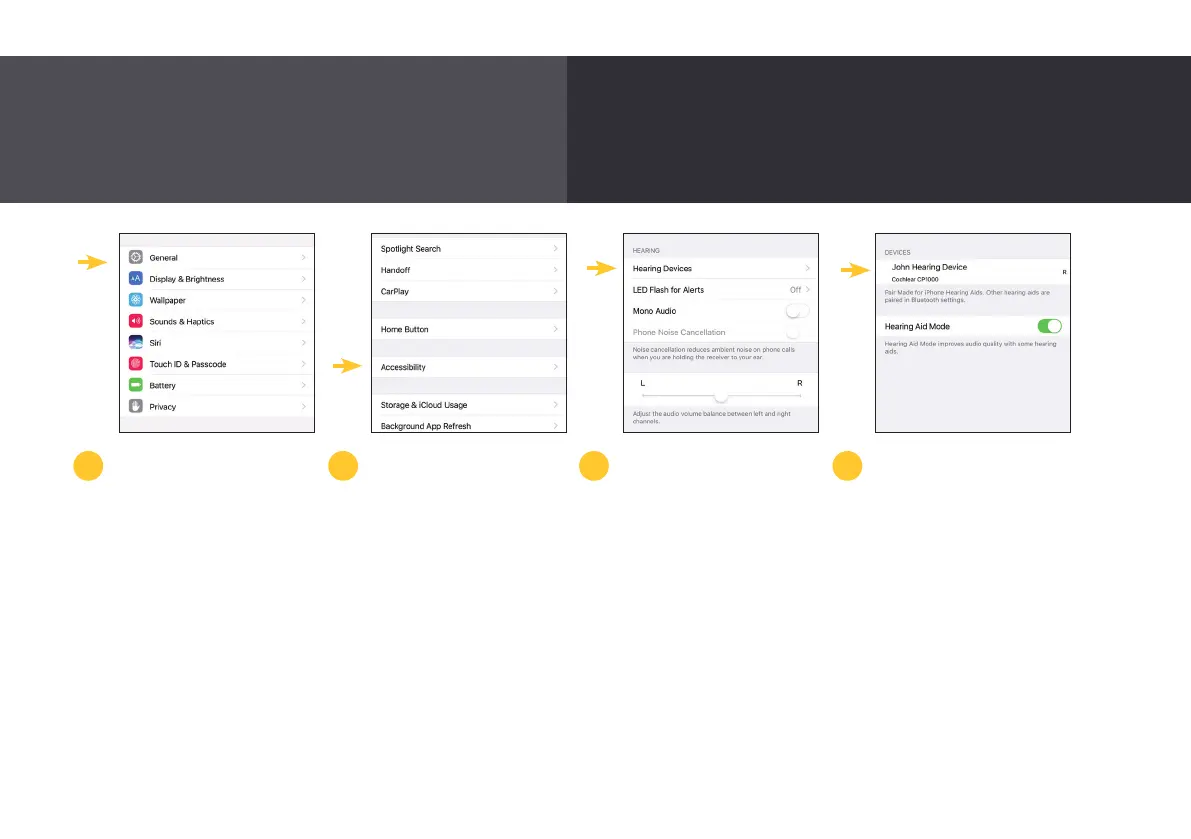
Pairing with a compatible
Apple
®
device
*
To pair your sound
processor with your
compatible Apple
®
device,
ensure Bluetooth
®
is
enabled. Then, open
the ‘Settings’ menu.
Then tap ‘General’,
then ‘Accessibility’.
Scroll down and select
‘Hearing Devices’.
Next, turn your sound
processor off and back
on again.
Your Apple device will
then search for your sound
processor and display it in
the ‘Devices’ section.
If bilateral or bimodal, you
will turn on both devices.
2 3 41
Rediscover your favorite music, videos and entertainment –
stream directly from your compatible Apple device.
For more information about pairing your Nucleus 7 Sound Processor, see www.nucleussmartapp.com/pair
* Please refer to the back page for detailed device compatibility information.
18



 To Next Page