EasyManua.ls Logo

Cocoon CWS 4000 - Performance Inspection

Cocoon CWS 4000
26 pages
Print Icon
To Next Page IconTo Next Page
To Previous Page IconTo Previous Page
Loading...
Care
Essentials
CWS4000
Cocoon
Warming
System
Service
Manual
4.3.
Performance
Inspection
Care
Essentials
recommend
that
the
CWS4000
receive
at
least
an
annual
performance
inspection
to
verify
CWS4000
functions.
The
CWS4000
does
not
require
adjustment
or
calibration.
Items
Required:
e
CWS4000
Operator
&
Service
Manuals.
»
Digital
Thermometer.
STEP
PROCEDURE
1
If
you
have
not
already
done
so,
read
the
CWS4000
Operator
and
Service
Manuals.
2
e
Place
the
CWS4000
on
a
firm,
level
surface.
e
Do
not
connect
the
delivery
hose
to
a
warming
blanket.
e
Connect
the
CWS4000
to
mains
power.
3
Familiarise
yourself
with
the
operation
of
the
CWS4000
by
operating
the
CWS4000
with
reference
to
the
CWS4000
Operator
and
Service
Manuals.
4
The
temperature
control
system
is
verified
as
follows:
e
Ensure
the
delivery
hose
cover
is
undamaged
and
that
it
covers
the
entire
hose.
e
Ensure
that
the
environmental
conditions
are
20°C
to
22°C,
30%
to
70%
relative
humidity,
non-
condensing.
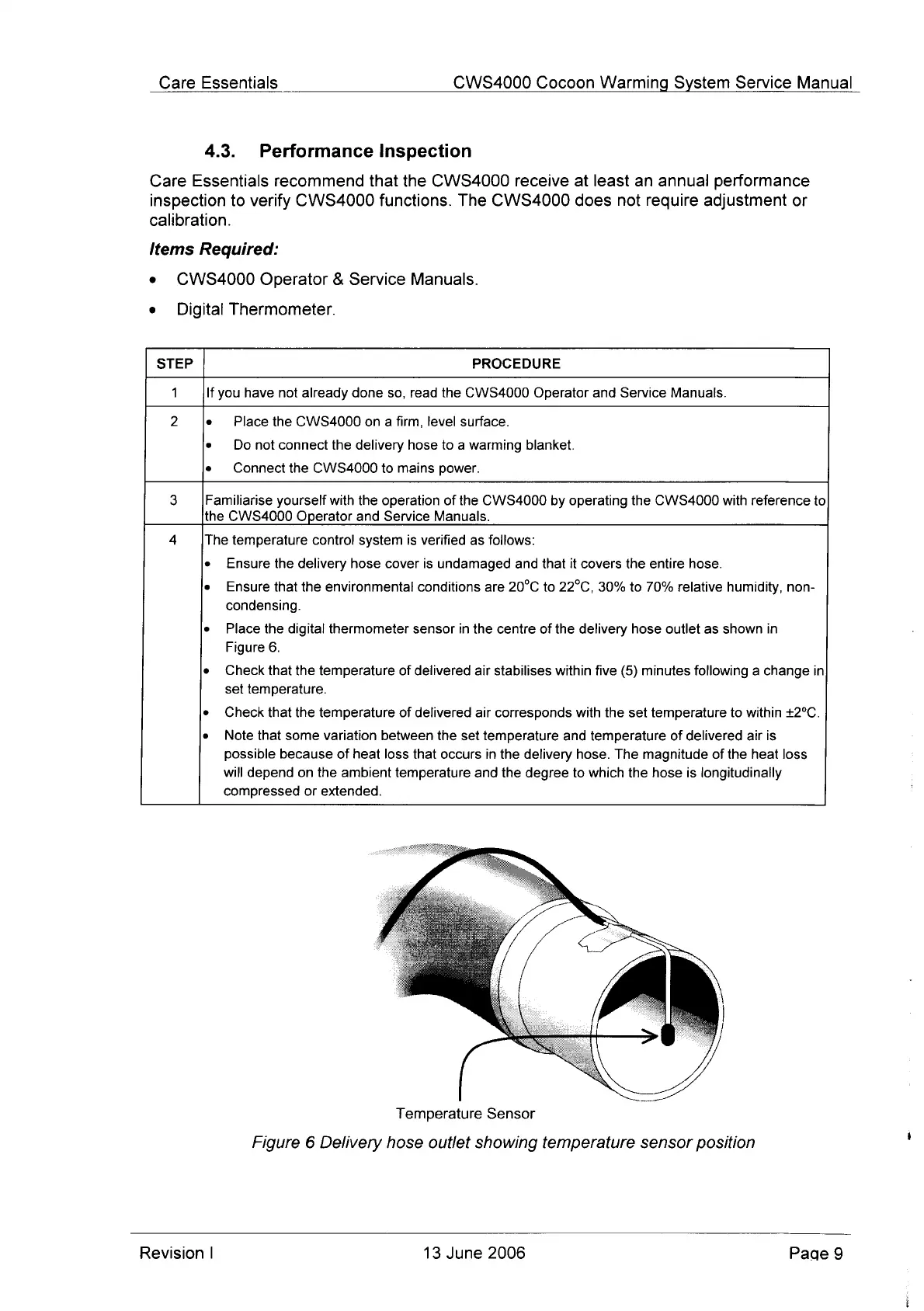
e
Place
the
digital
thermometer
sensor
in
the
centre
of
the
delivery
hose
outlet
as
shown
in
Figure
6.
«
Check
that
the
temperature
of
delivered
air
stabilises
within
five
(5)
minutes
following
a
change
in
set
temperature.
e
Check
that
the
temperature
of
delivered
air
corresponds
with
the
set
temperature
to
within
+2°C.
e
Note
that
some
variation
between
the
set
temperature
and
temperature
of
delivered
air
is
possible
because
of
heat
loss
that
occurs
in
the
delivery
hose.
The
magnitude
of
the
heat
loss
will
depend
on
the
ambient
temperature
and
the
degree
to
which
the
hose
is
longitudinally
compressed
or
extended.
Temperature
Sensor
Figure
6
Delivery
hose
outlet
showing
temperature
sensor
position
Revision
|
13
June
2006
Page
9

Other manuals for Cocoon CWS 4000

Related product manuals