EasyManua.ls Logo

Cocoon CWS 4000 - Getting Started; Unit Operation Procedure

Cocoon CWS 4000
26 pages
Print Icon
To Next Page IconTo Next Page
To Previous Page IconTo Previous Page
Loading...
Care
Essentials
CWS4000
Cocoon
Warming
System
Service
Manual
F
Output
Temperature
Seiection
Indicators
|
Symbols
See
section
2.4
Fault
Alarm
Indicator
Standby
Indicator
Filter
Status
Indicator
A+
Standby
Button
Output
temperature
Ambient
Temperature
selection
buttons
Output
Button
Ambient
Temperature
Output
Indicator
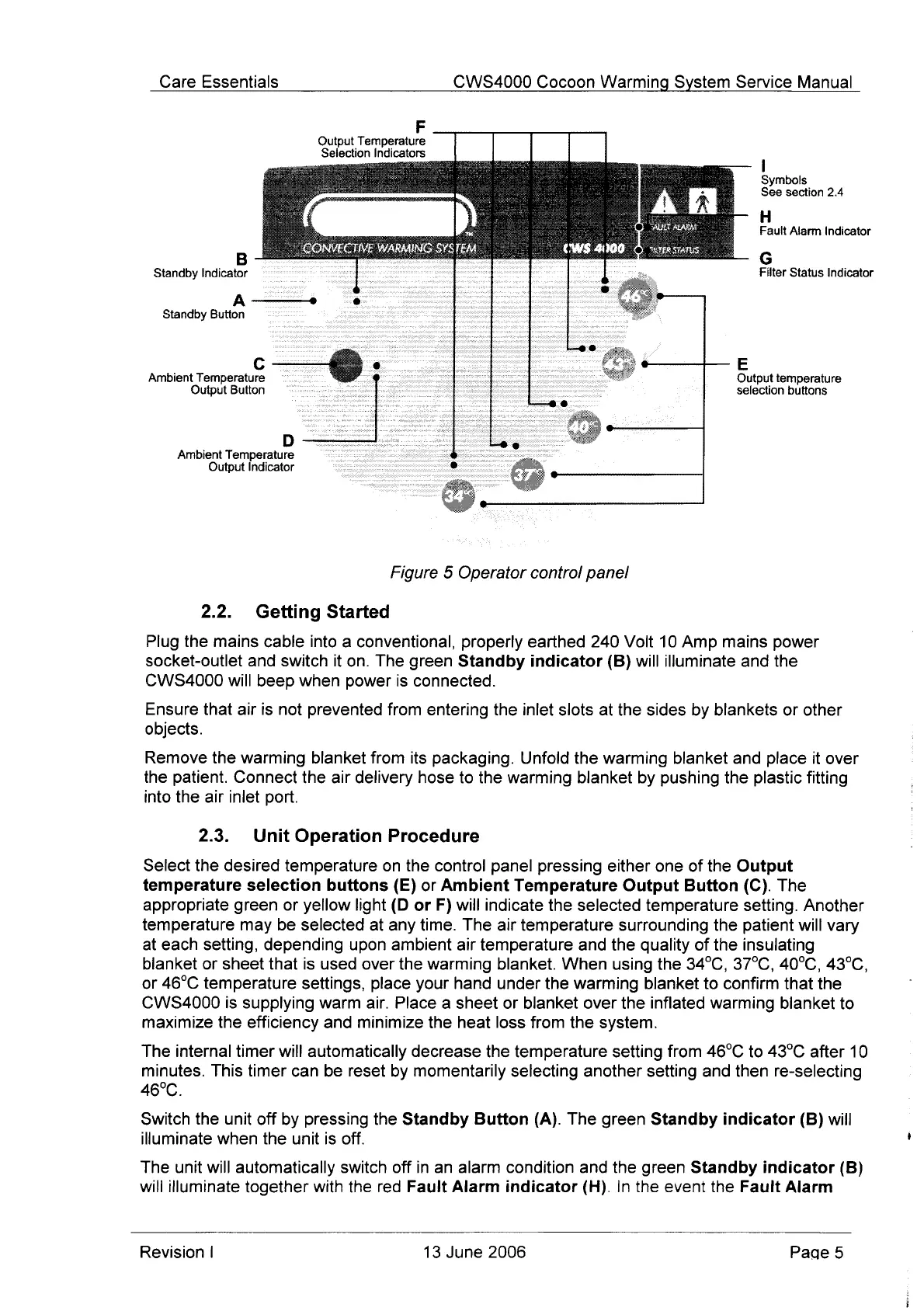
Figure
5
Operator
control
panel
2.2.
Getting
Started
Plug
the
mains
cable
into
a
conventional,
properly
earthed
240
Volt
10
Amp
mains
power
socket-outlet
and
switch
it
on.
The
green
Standby
indicator
(B)
will
illuminate
and
the
CWS4000
will
beep
when
power
is
connected.
Ensure
that
air
is
not
prevented
from
entering
the
inlet
slots
at
the
sides
by
blankets
or
other
objects.
Remove
the
warming
blanket
from
its
packaging.
Unfold
the
warming
blanket and
place
it
over
the
patient.
Connect
the
air
delivery
hose
to
the
warming
blanket
by
pushing
the
plastic
fitting
into
the
air
inlet
port.
2.3.
Unit
Operation
Procedure
Select
the
desired
temperature
on
the
control
panel
pressing
either
one
of
the
Output
temperature
selection
buttons
(E)
or
Ambient
Temperature
Output
Button
(C).
The
appropriate green
or
yellow
light
(D or
F)
will
indicate
the
selected
temperature
setting.
Another
temperature may
be
selected
at
any
time.
The
air
temperature
surrounding
the
patient
will
vary
at
each
setting,
depending
upon
ambient
air
temperature
and
the
quality
of
the
insulating
blanket
or
sheet
that
is
used
over
the
warming
blanket.
When
using
the
34°C, 37°C,
40°C,
43°C,
or
46°C
temperature
settings,
place
your
hand
under
the
warming
blanket
to
confirm
that
the
CWS4000
is
supplying
warm
air.
Place
a
sheet
or
blanket
over
the
inflated
warming
bianket
to
maximize
the
efficiency
and
minimize
the
heat
loss
from
the
system.
The
internal
timer
will
automatically
decrease
the
temperature
setting
from
46°C
to
43°C
after
10
minutes.
This
timer
can
be
reset
by
momentarily
selecting
another
setting
and
then
re-selecting
46°C.
Switch
the
unit
off
by
pressing
the
Standby
Button
(A).
The
green
Standby
indicator
(B)
will
illuminate
when
the
unit
is
off.
The
unit
will
automatically
switch
off
in
an
alarm
condition
and
the
green
Standby
indicator
(B)
will
illuminate
together
with
the red
Fault
Alarm
indicator
(H).
In
the
event
the
Fault
Alarm
Revision
|
13
June
2006
Page
5

Other manuals for Cocoon CWS 4000

Related product manuals