
 Need help?
Do you have a question about the Cocoon Skyview HE170642 and is the answer not in the manual?
Instructions on how to register the product for updates and information.
Details the 12-month warranty against defects in workmanship and parts.
Explains consumer rights regarding product failures under Australian law.
Provides contact information for customer support and inquiries.
Emphasizes reading the manual, safe operation, checking components, and following rules.
Covers safe handling, charging, and disposal of batteries to prevent hazards.
Highlights that the quadcopter is not a toy and can cause injury if misused.
Lists the product's compliance with AS/NZS safety standards.
Outlines legal requirements for flying drones in Australia, including line-of-sight and distance rules.
Mentions the requirement for unmanned operator's certificate for commercial flights.
States the operator's duty to check and follow current rules and regulations.
Clarifies that the product is not affiliated with GoPro Inc.
Provides advice on reading the manual and visiting the website for support.
Lists essential precautions for handling, charging, and storing rechargeable and non-rechargeable batteries.
Lists all items included in the package, such as the quadcopter, remote, battery, and accessories.
Details technical data for the quadcopter, including battery, frequency, control distance, and flying time.
Lists specifications for the remote control, including battery type and power input/output.
Highlights core functionalities like auto hover, control distance, and headless mode.
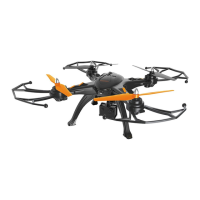
Identifies and illustrates the main parts of the quadcopter, such as propeller guards and landing gear.
Explains the function of each button and control on the remote control for operating the quadcopter.
Step-by-step guide on how to insert AA batteries into the remote control.
Instructions for charging the quadcopter's lithium battery, including indicator lights and time.
Procedure for attaching the landing gear to the bottom of the quadcopter.
Steps to securely attach the propeller guards to the quadcopter arms.
Guide for optionally installing the camera and gimbal, including MicroSD card insertion and cable connections.
Detailed steps for connecting the rechargeable battery to the quadcopter's circuit board.
Instructions on how to correctly attach and replace the quadcopter propellers, noting directionality.
Steps to establish a wireless connection between the quadcopter and its remote control for flight.
How to enable the quadcopter's flight controls using the remote control sticks.
Advice for beginners on choosing a safe flying area and practicing controls.
Guidelines on safe flying locations, distances from people, airports, and maximum altitude.
Tips on using the coloured LEDs on the quadcopter's base to determine its facing direction.
Instructions on how to ascend, hover, and control the quadcopter's basic movements.
Steps to safely bring the quadcopter down to the ground and shut it off.
Identifies the LED flashing pattern indicating low battery and advises immediate landing.
Explains how to control the quadcopter's vertical movement and rotation using the left stick.
Details how to move the quadcopter forward, backward, left, and right using the right stick.
How to use the auto trim feature to stabilize the quadcopter during flight.
Instructions on how to change between different flight speed modes and associated warnings.
Explains how to use the single button for automatic takeoff and landing.
Describes the headless mode feature, how to activate/deactivate it, and its benefits for beginners.
Step-by-step guide on how to execute 360-degree flips in different directions using the stunt button.
How to capture still images using the quadcopter's camera.
Instructions for recording video footage with the quadcopter's camera.
Steps for transferring photos and videos from the MicroSD card to a computer.
Guide on attaching an external action camera, like a GoPro, to the quadcopter.
Solutions for common problems like the quadcopter not pairing with the remote control.
Advice on what to do if the quadcopter is unresponsive or slow to respond.
Instructions on how to access and view video footage captured by the quadcopter.
Explanation of LED flashing patterns indicating low battery and the need to land.
Information on where to buy replacement parts and accessories for the quadcopter.
Instructions on how to properly dispose of the product and its packaging according to environmental regulations.
Essential checks for the drone's body, propellers, battery, screws, and wiring before maintenance.
Guidelines for cleaning the drone with a dry cloth and storing it in a suitable environment.
Advises users to back up data before sending the product for repair, as data may be lost.
Informs customers that refurbished goods or parts may be used for repairs, meeting quality standards.
Provides contact details to escalate repair or service complaints if the handling is unsatisfactory.
 General
| Brand | Cocoon |
|---|---|
| Model | Skyview HE170642 |
| LED Lights | Yes |
| Category | Quadcopter |
| Age Recommendation | 14+ |

 To Next Page