12
1300 663 907
Model Number
HE17064
customercare@win
lus.com.au
After Sales Support
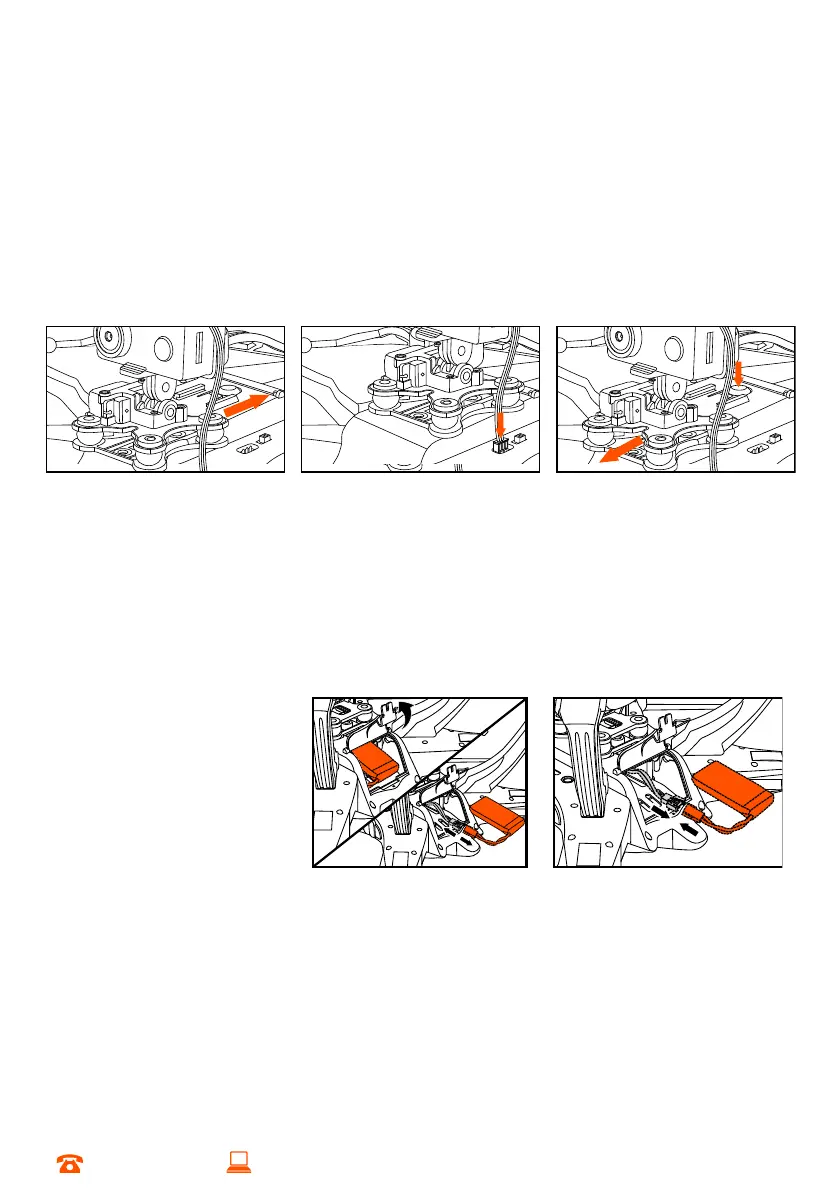
2.5 Installing the Camera (optional)
a. Insert the MicroSD card into the camera
b. Insert the camera into the gimbal. The latch at the top of the camera mount will
lock the camera in place
c. Slide the gimbal into the base of the Skyview HD Quadcopter
PLEASE NOTE: Camera needs to face the front of the Skyview HD Quadcopter
d. Plug both data cables into the corresponding plugs near the Skyview HD
Quadcopter’s on/off switch
e. When you need to uninstall the camera, unplug the data cables and push the
latch at the top of the camera mount up. Pull the camera forward to remove
2.6 Insert the Rechargeable Battery into the Skyview HD Quadcopter
a. Unscrew and open the battery cover on the Skyview HD Quadcopter and locate
the circuit board plug with the red and black wires. You may need to gently pull
the wire out if it is not immediately visible
b. Connect the battery plug to the circuit board plug, inside the Skyview HD
Quadcopter
c. Gently place the battery and wiring back inside the Skyview HD Quadcopter
and close the cover
d. Screw the battery cover
back into place


 To Next Page