16
1300 663 907
Model Number
HE17064
customercare@win
lus.com.au
After Sales Support
FLYING THE SKYVIEW
4.3 Flight Controls
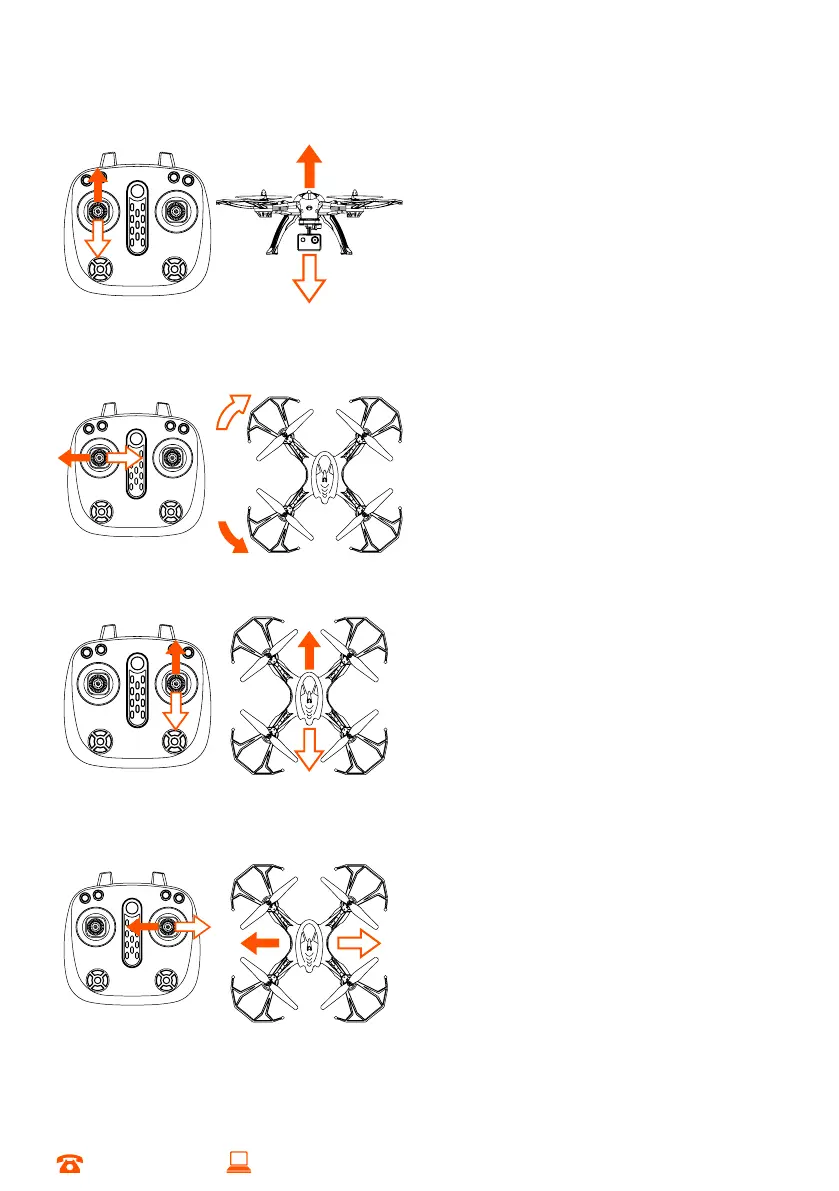
Ascending and descending
Push the throttle stick up (left stick) and the
speed of the main blades will increase
making the Skyview HD Quadcopter ascend
Pull the throttle stick down, and the spinning
speed of the main blades will decrease.
The Skyview HD Quadcopter will begin to
descend
Turning Left and Right
Push the rudder stick to the left, and the
Skyview HD Quadcopter will turn to left.
Push the rudder stick to the right, and the
Skyview HD Quadcopter turn will turn to
right
Moving Forward and Backwards
When the rudder stick is pushed upward,
the Skyview HD Quadcopter swashplate will
down tilt and advance forward
When the rudder stick is pushed downward,
the Skyview HD Quadcopter will uptilt and
recede
Moving Left to Right
When the right rudder stick is pushed to the
to the right, the Skyview HD Quadcopter
will fly to the right
When the right rudder stick is pushed to the
to the left, the Skyview HD Quadcopter will
fly to the left


 To Next Page