10
1300 663 907
Model Number
HE17064
customercare@win
lus.com.au
After Sales Support
1.2 Remote Control
2
3
1
15
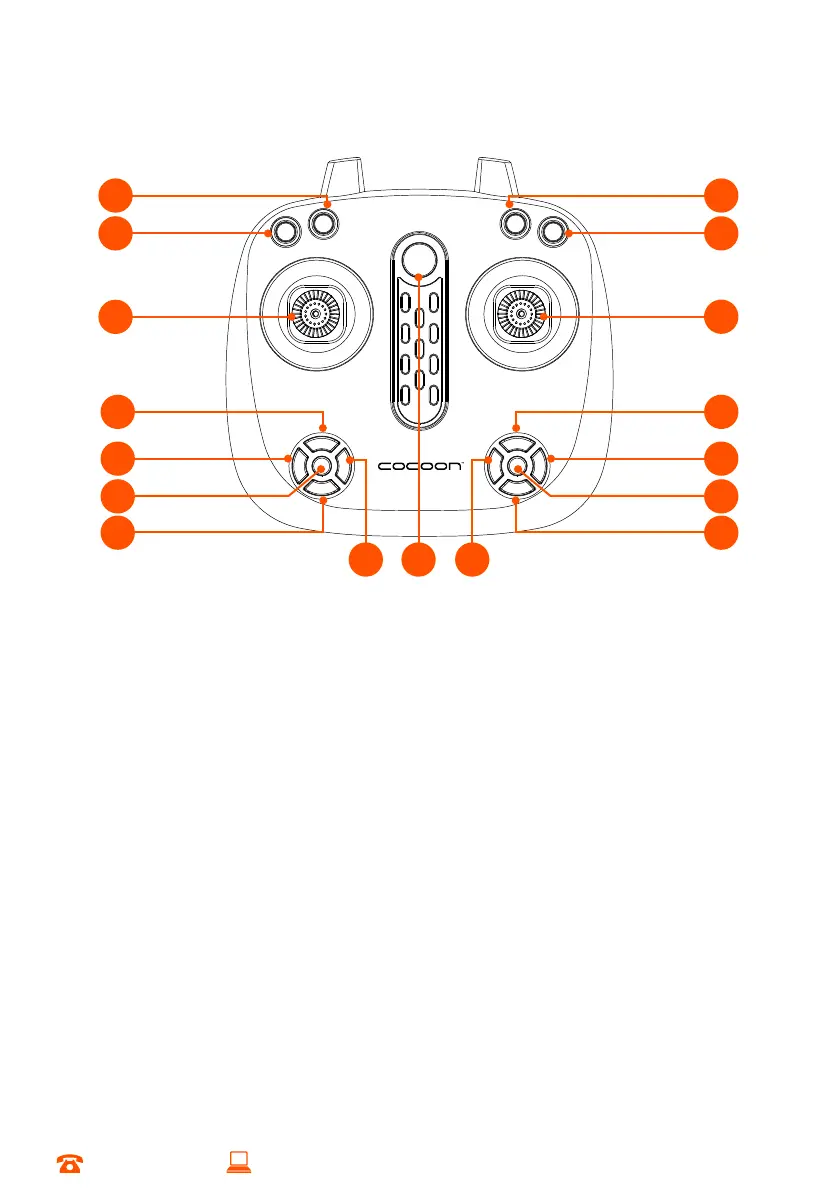
1. Photo/Video - Tap to take a photo, hold for 3 seconds to start recording video, tap
again to stop recording
2. High/Low Speed - Adjust the flight speed of the Quadcopter
3. Left Stick - Ascend/descend, turn left/right
4. Trim Camera Forward - Press to angle the camera forward
5. Trim Rotate Left - Press to rotate the quadcopter to the left
6. Emergency Stop - Stop all motors immediately, pull the left stick to the lowest position,
then tap Emergency Stop Button
7. Trim Camera Backward - Press to angle the camera backward
8. Trim Rotate Right - Press to rotate the quadcopter to the right
9. Power - Turn the remote on/off
10. Trim Fly Left - Press to roll the quadcopter to the left
11. Trim Backward - Press to angle the quadcopter backward
12. Headless Mode - Press to turn on/off headless mode
13. Trim Fly Right - Press to roll the quadcopter to the right
14. Trim Forward - Press to angle the quadcopter forward
15. Right Stick - Fly forward/backward, fly left/right
16. Stunt Button - Press and then move the Right Stick in any direction to perform stunt
17. Take Off/Land - Press to perform one touch take off or landing
16
17
4
5
7
6
14
13
11
12
8 109
PRODUCT OVERVIEW


 To Next Page