11
1300 663 907
Model Number
HE17064
customercare@win
lus.com.au
After Sales Support
INSTALLATION
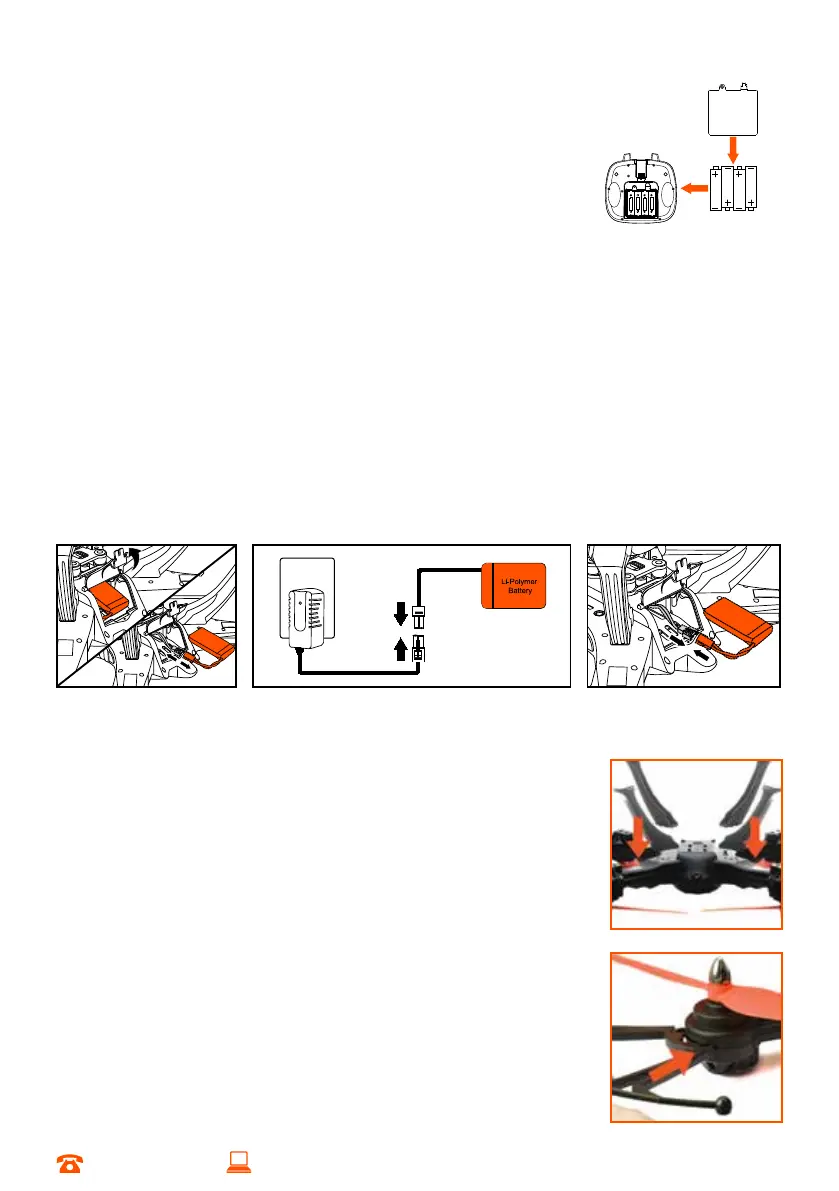
2.1 Installing the Control Batteries
a. Unscrew and remove the battery cover
b. Install 4 x AA batteries into the back of the Remote
Control, taking note of the polarity positions indicated
c. Replace the cover and screw into place
2.2 Charging the Cocoon Skyview HD Quadcopter Battery
a. Unscrew and open the Skyview HD Quadcopter battery cover and take the
lithium battery out of the battery case
b. Plug the charging adaptor into the power supply. Connect the charger cord end
of the socket to the battery socket
c. When charging, the charging adaptor’s LED light will be red. When the charging
adaptor’s LED light turns green, charging is complete
d. Charging time is approximately 180 minutes
e. When charging is complete, reconnect the battery plug to the circuit board plug,
inside the Skyview HD Quadcopter
f. Close battery cover of the Skyview HD Quadcopter and screw into place
2.3 Installing the Landing Skids
a. Insert the landing skids into the bottom of the Skyview HD
Quadcopter as shown
b. Secure the landing skids with the included screws
2.4 Installing the Propeller Guards
a. Push the propeller guard into the slot until you hear a ‘click’
b. Secure the propeller guard with the included screws


 To Next Page