Code Blue
•
259 Hedcor Street
•
Holland, MI 49423 USA
•
800.205.7186
•
www.codeblue.com
GU-157-AApage 53 of 76
CB 1 Series
Administrator Guide
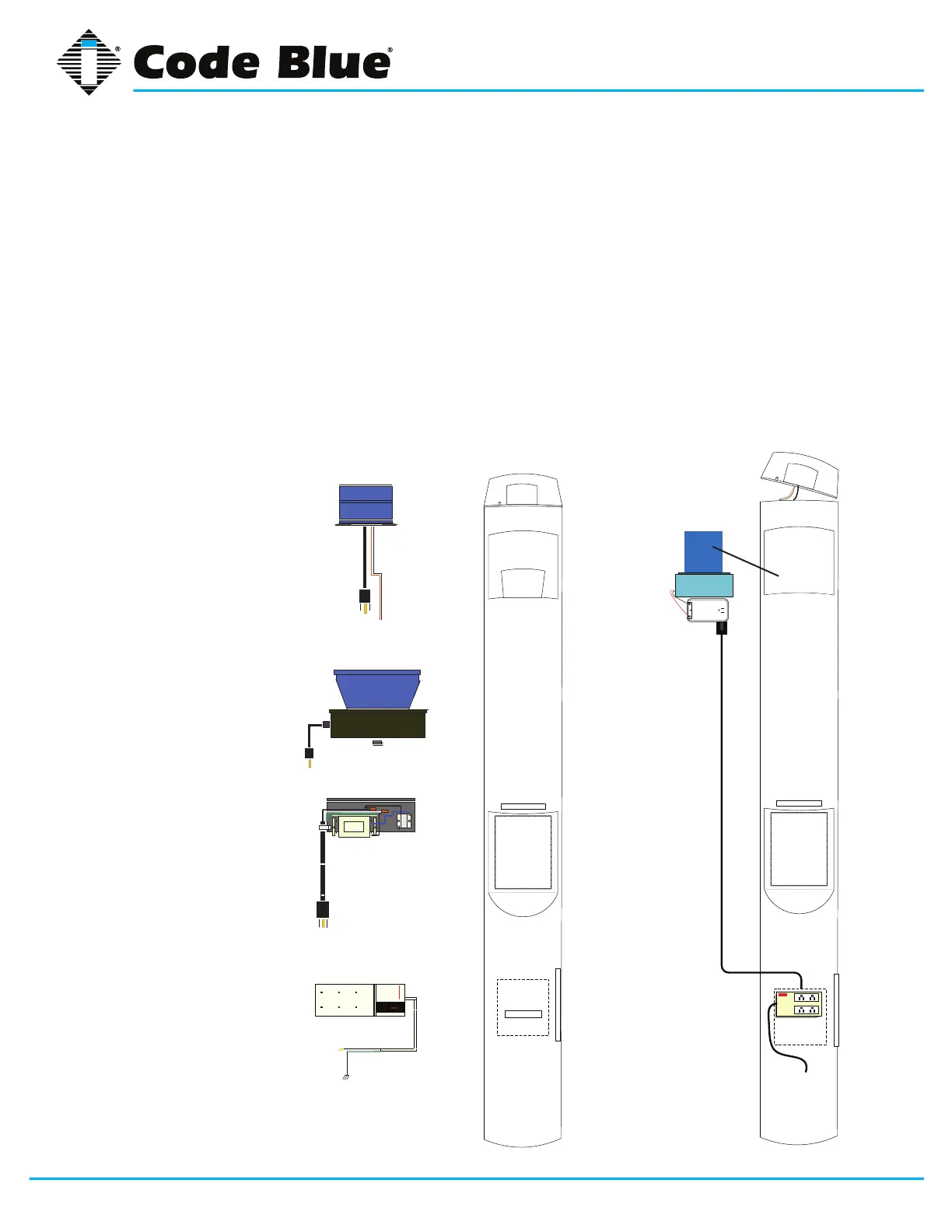
1. Remove the clear dome top lens
2. Remove strobe light Casting and set aside
3. Remove reector plate
4. Reach down, alongside the area light and
unplug the three prong plug
5. Uncouple and discard old area light
PARTS LIST
• (1) A-700 LED Area Light
• (1) Red/Black Wire Harness
• (1) Plug-in Transformer
6. Set the new LED area light in the position and
plug the transformer in (the transformer can
be located in the LED area light channel or
below on the power strip)
7. Set the new reector plate in place
8. Replace the dome top and secure
9. Replace the dome top lens and secure
10. Test unit
1. S-100 120V AC, obsolete
2. HPS Area Light,
obsolete
or
Metal Halide 120V AC,
obsolete
3. 7-watt Fluorescent
Phone Faceplate
Light, obsolete
4. 6 Plug-in Slot Power
Strip, obsolete
Fig. 2
Fig. 3
CONVERTING 120 VOLT PLUG-IN STRIP TO A-700 LED



 To Next Page