Technical Manual Page 27 CODEL
After the correct code has been entered, the user may access each of the five sub-modes (listed above) by
using the and keys and pressing ENTER when the required option is displayed.
Security Code Entry
Once the display is as shown here, to gain access to the set-up mode, press the ENTER key. The cursor will
now flash over the first digit of the presented code number, select the required first digit with the arrow keys and
press ENTER. Repeat this procedure for the four numbers. If the code is correct after the ENTER key is pressed
on the last digit, then the sequence will be continued, if it is not correct, the instrument will return to the
operating mode.
4 SET UP MODE
Security # 0000
The code number will be set to 0000 by CODEL at the factory; this should be changed by the user from within
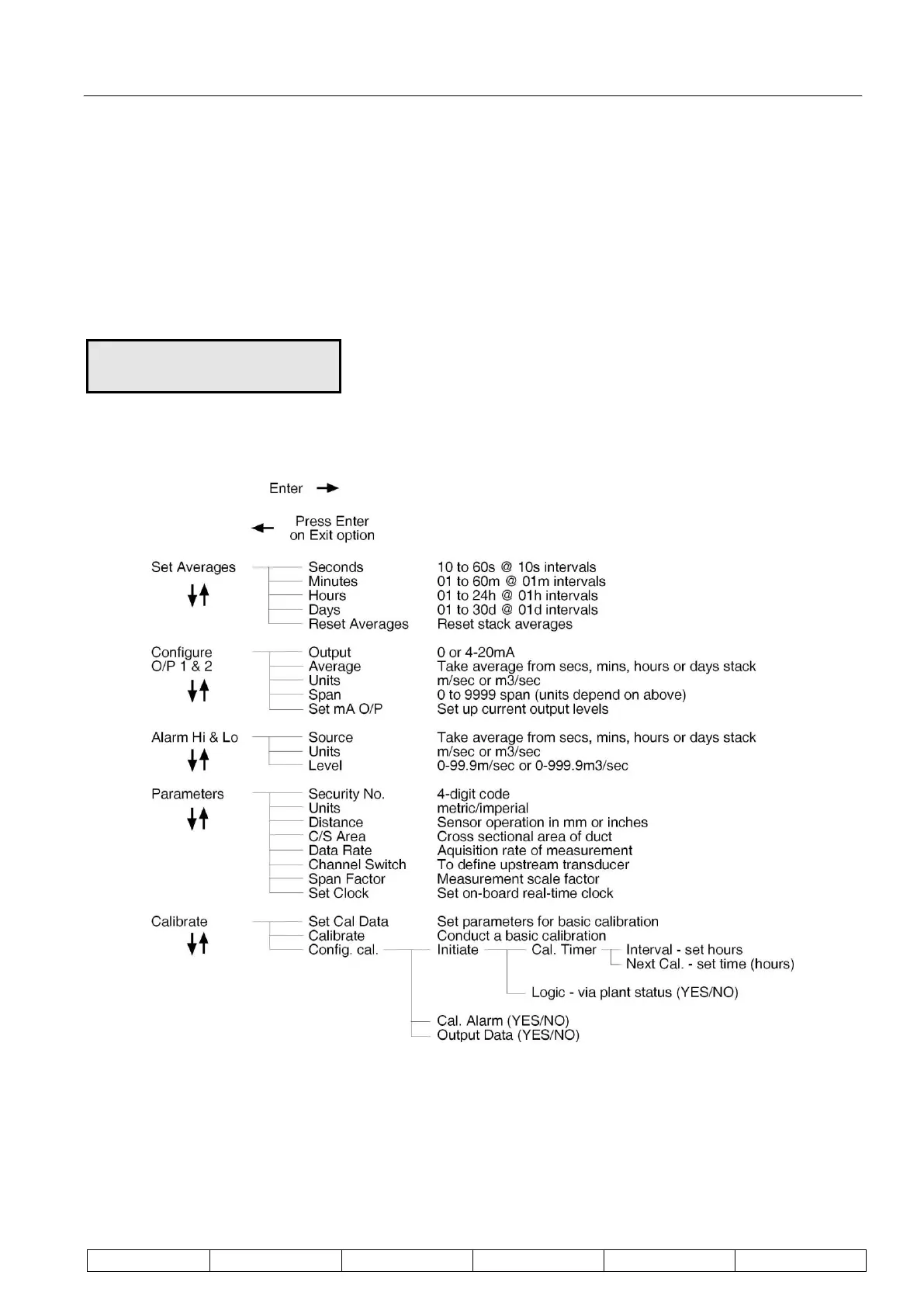
the set-up mode – see Figure 14 below.
Figure 14: Program Tree for the Set-Up Mode.
Set Averages
Four separate averages are calculated within the instrument. These are defined in units of seconds, minutes,
hours and days. Any of the four averaging stacks can be used to provide the analogue output of the instrument.
Each averaging time can be set within pre-defined limits.


 To Next Page