13
DOCUMENT NO
.
88N001G © 2016 Colortrac
2
1
3
4
5
6
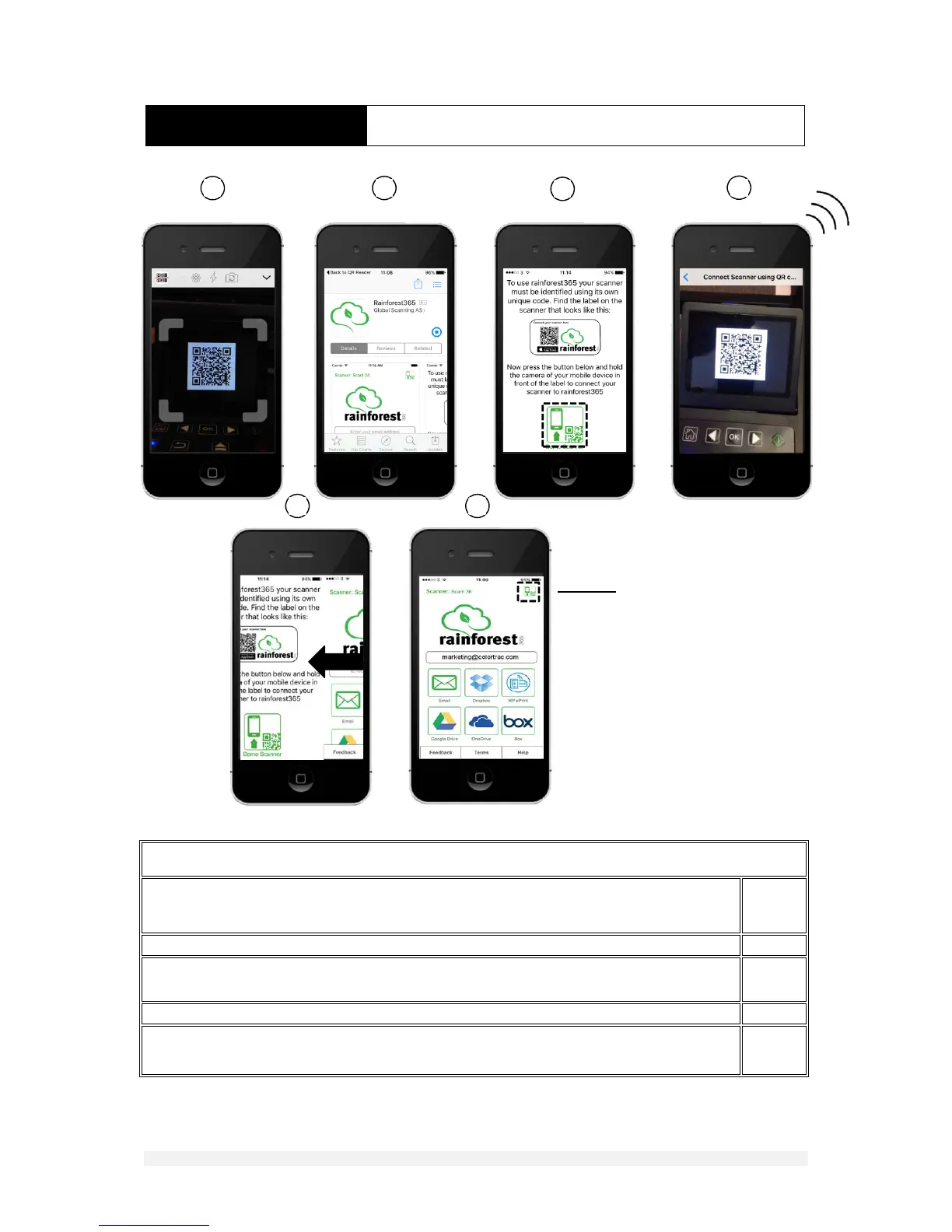
Tapthisicontore‐‘pair’your
scannertothismobiledevice
ormakeanewpairingwitha
differentscanner.
INSTALLATION SCANTOCLOUDSETUP
CONNECTINGTOTHECLOUDUSINGRAINFOREST365
Downloadrainforest365.OpentheQRcodereader(freedownload)onyourportabledeviceandpositionits
cameraoverthescannerdisplayandwaitforthecodetoberecognised.Thedevicewillnowprepareto
downloadtherainforest365application
1
PressGETtostartthedownloadofrainforest365andwaitforittocomplete
2
Runrainforest365.PressOPENwhenthedownloadiscompleteorfind rainforest365onyourdevicethen
double‐tapittorunit.Firsttapthesmallericoninthelowerpartofthescreentostartthe‘pairing’process
3
Positionthecameraof theportabledeviceovertheQRcodea secondtimetopairittothescanner
4
Whensuccessfullypairedthedevicethedevicewillreturnmomentarilytotherainforest365topscreenthen
movetothecloudoperationscreen.Youarenowreadytoscantothecloud
5,6












 To Next Page