22
DOCUMENT NO
.
88N001G © 2016 Colortrac
MAINTENANCE UPGRADINGFIRMWARE
STEPS
CheckthelatestfirmwarelevelforSmartLFScan!postedat
http://www.colortrac.com/support/software‐downloads/
SwitchonSmartLFScan!andcheckfittedfirmwarele vel
ObtainanemptyUSBflashdriveofatleast4GBcapacity.
Itisimportantthedrivecontainsnofolderorfiles.
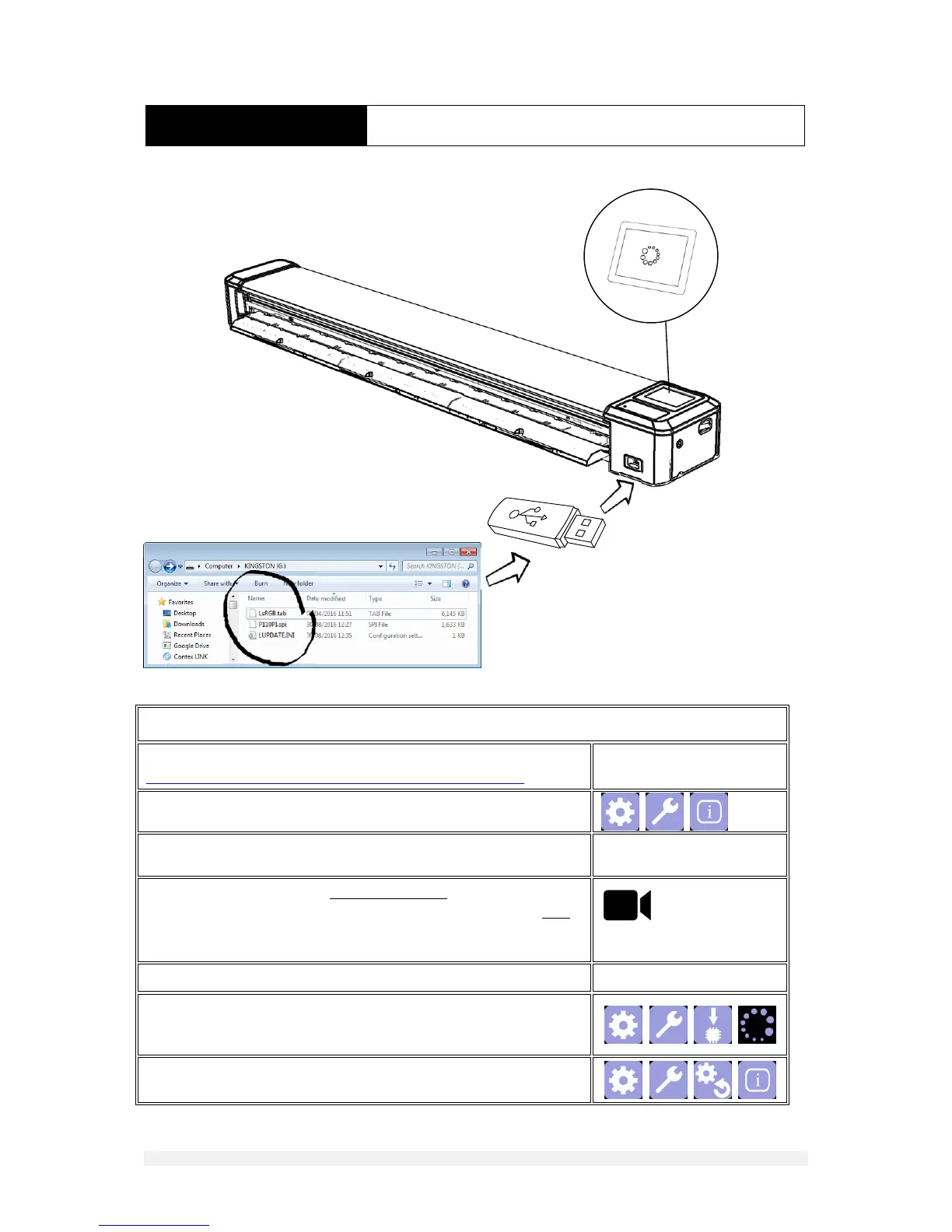
UsingaWindowscomputercopythecontentsofthefirmware
upgradezipfiletotheUSBstick.Thereshouldbethreefilesonly
ontheUSBmemorysticktoperformthefirmwareupgradeonthe
scanner.DonotcopythezipfileontotheUSBstick.
Seep.26forvideo
InserttheUSBstickintoscannerUSBsocket
FromtheupgradefirmwareiconpressOK.Upgradingtakesapprox.
20seconds.IfSmartLFScan!doesnotrestartautomaticallyswitch
theunitofffor3secondsthenswitchitonagain.
Nowresetallsettingsandcheckthefirmwarehasupdated












 To Next Page