10
EN
2002
ON
OFF
00:30
2002
ON
00:30
ON
OFF
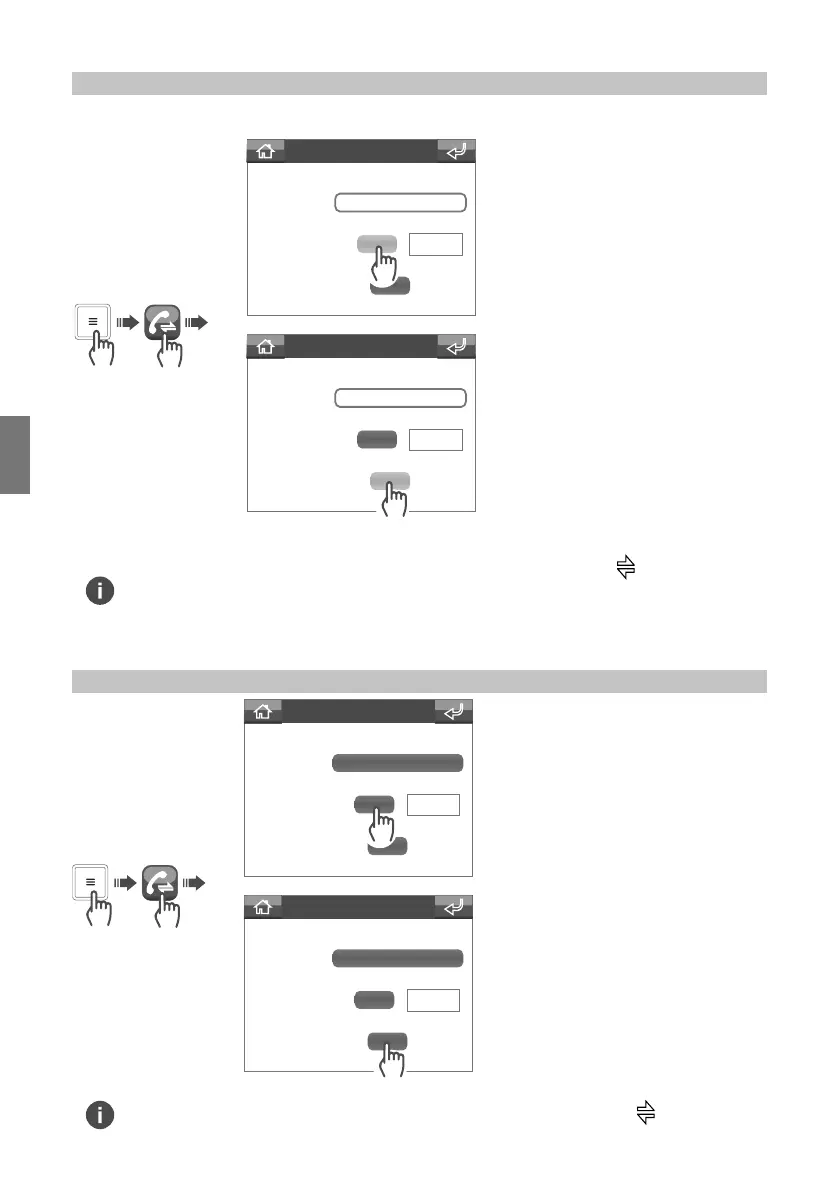
Call divert menu
Recipient
Wait time
Divert if busy
Call divert menu
Recipient
Wait time
Divert if busy
2002
OFF
OFF
00:30
2002
OFF
OFF
00:30
Call divert menu
Recipient
Wait time
Divert if busy
Call divert menu
Recipient
Wait time
Divert if busy
To enable call divert to another switchboard or door entry monitor (internal unit), proceed as follows:
To enable the divert on the basis of
wait time
To disable the divert on the basis of
wait time
To enable the divert when the unit
is already engaged in another
conversation
To disable the divert when the
unit is already engaged in another
conversation
Enabling the call divert function
Disabling the call divert function
Enabling of the call divert function is indicated by the appearance of the icon in the status
strip on the home screen.
“Call divert” cannot be enabled if “Entrance panel/Internal unit (door entry monitor) message”
(page 11) or “Audio memory” (page 12) is enabled.
Disabling of the call divert function is indicated by the disappearance of the icon from the
status strip on the home screen.


 To Next Page