22
EN
01/02/2020
07:43
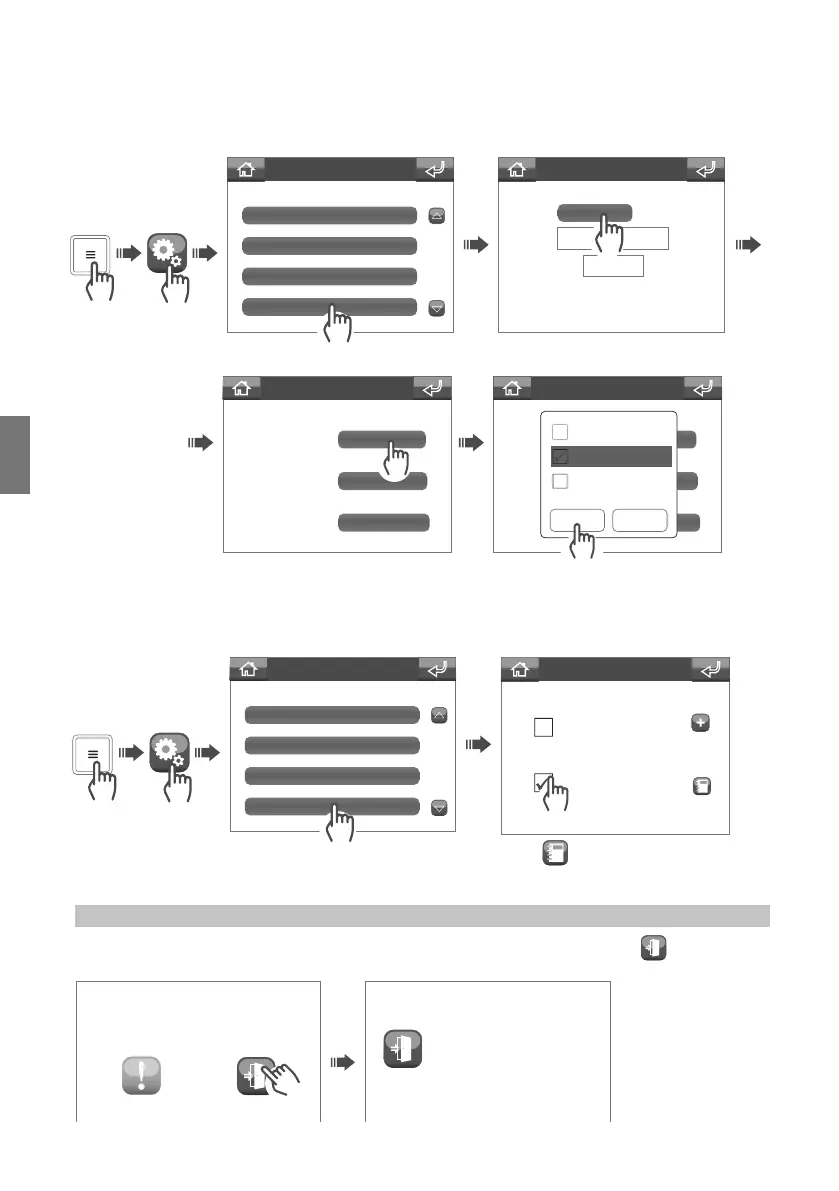
Settings menu
Volumes
Languages
Melodies
Date and time
Set date time
Date:
Time:
Advanced
/ /
Date Format:
Date Separator
Hour Format:
dd/mm/yy
24 Hour
Advanced
Date Format:
Date Separator
Hour Format:
gg/mm/aa
24 Ore
Advanced
Confirm Cancel
yy/mm/dd
mm/dd/yy
dd/mm/yy
Settings menu
Languages
Day/Night
Date and time
Door open
Door 1
Door 2
Associate Ent. Panel
06/02/20 16:40
CALLS DOORS OPEN
06/02/20 16:40
Door 1
Advanced Date and Time settings
The Advanced Date and time settings can be used to set the date and hour format and the separator used for
the date.
Setting the door open signal
This function can be used to select the entrances for which you want to detect opening.
Press
to select the entrances you
want to monitor from the directory.
If any doors are open, the “doors open” status icon will appear on the home screen; press
to view open
entrances.
Doors open display



 To Next Page