14
EN
Rubrica pulsantiere
Name
Entrance 1
Entrance 2
Entrance 3
Ent. Panels Directory Ent. Panels Directory
Entrance 2
Entrance 3
Name
Entrance 1
Actuator 1
Actuator 2
Actuator 3
Actuators Directory
Name
Actuator 1
Actuator 2
Actuator 3
Name
Actuators Directory
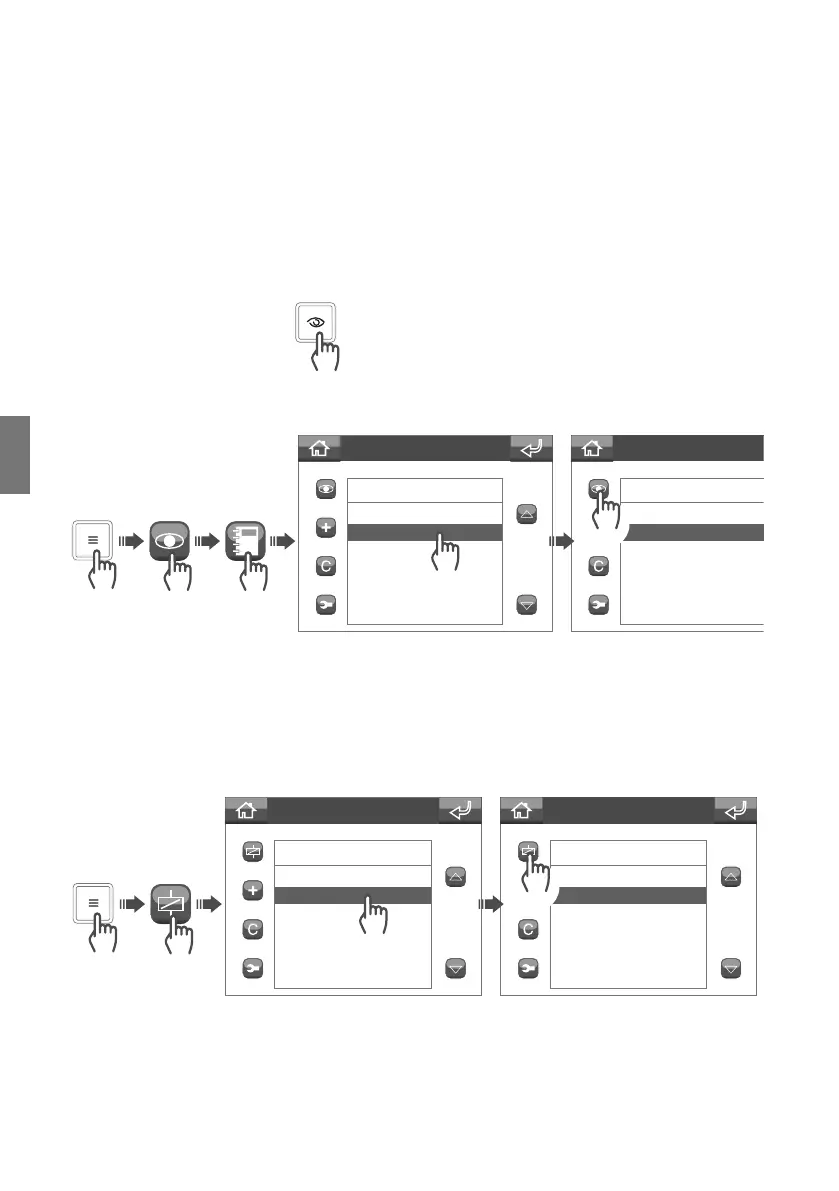
The self activation function can be used to receive images from the entrance panel (external unit) cameras or
from remote cameras.
A self activation command can be sent in 2 ways:
• Using the self activation key: press the self activation key to send the command to the associated camera.
Contact your installer for key configuration.
The actuators function can be used to drive an element (e.g.: switch on a light, open a door...)
• Via the self activation menu: to use the function via the menu, proceed as follows:
Self activation function
Actuators function


 To Next Page