2
EN
Table of contents
Conventions used in this manual 3
Description 5
5
5
5
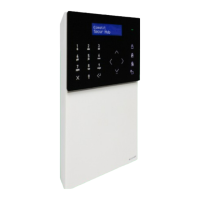
Device (see page 4
)
Keypad
Alphanumeric keypad
Description of the Interface
6
How to enter the main menu 6
Main menu 6
Status indications 7
Status menu 7
Status strip 7
Call management 8
Finding a contact in the directory 8
Making a call 8
Direct call 8
Call via directory 8
Follow me 9
Diverting calls 9
Setting the divert calls function 9
Enabling the call divert function 10
Disabling the call divert function 10
Managing the answering service 11
Entrance panel / Internal unit (door entry monitor)
message 11
Recording an entrance panel / internal unit (door entry
monitor) message 11
Enabling the entrance panel / internal unit (door entry
monitor) message 11
Disabling the entrance panel / internal unit (door entry
monitor) message 12
Audio memory 12
Enabling the Audio memory function 12
Disabling the Audio memory function 12
Using the Audio memory function 13
Self activation function 14
Actuators function 14
Editing contact names / actuators /
cameras 15
Managing messages 16
Sending messages 16
Forwarding messages 17
Deleting messages 18
Alarm / Call Log 18
Day / Night function 19
Switching between Day / Night function 19
Programming the Day / Night function timetable 19
Enabling Day / Night function timetable
programming 20
System settings 20
Volume adjustment 20
Setting Ringtones 20
Setting the menu language 21
Setting the date and time 21
Advanced Date and Time settings 22
Setting the door open signal 22
Doors open display 22
Calibration 23
Shortcut keys 23
Advanced 23
Installation notes 23


 To Next Page