7
EN
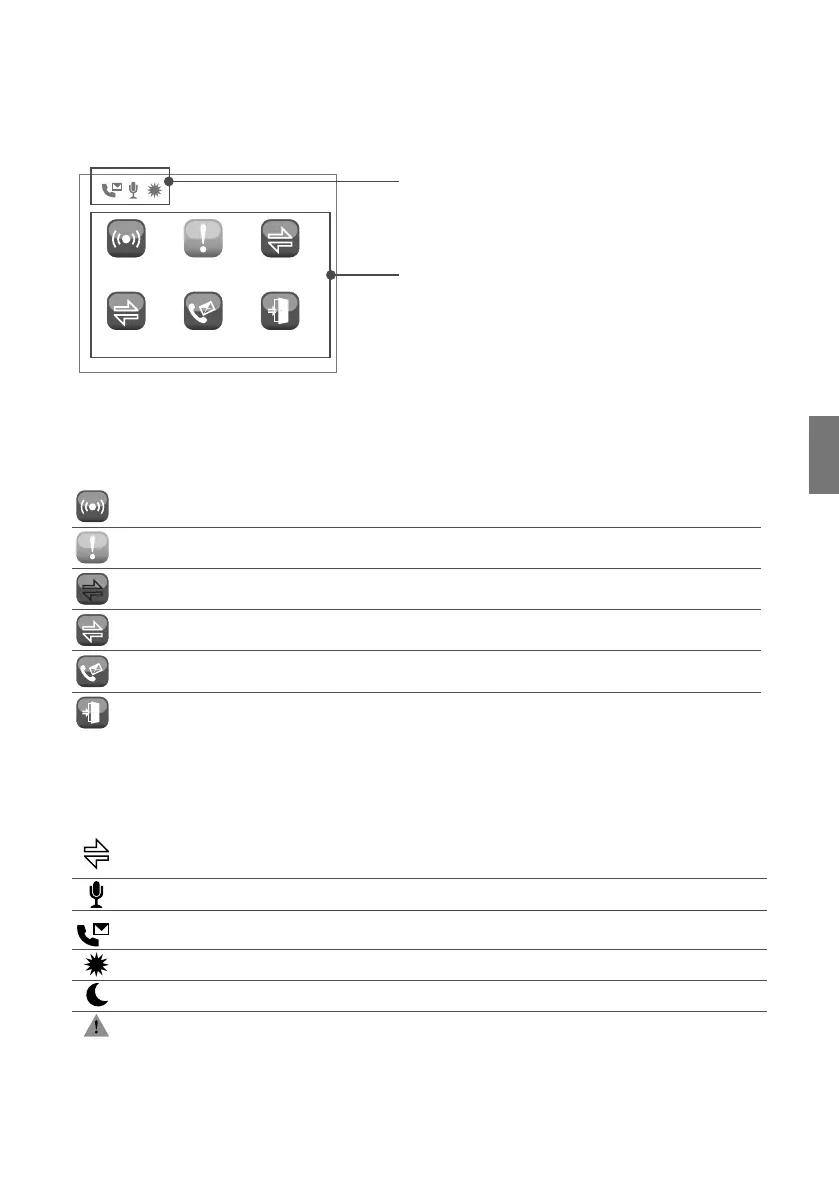
Status strip
Status menu
06/02/20 16:40
ALARMS CALLS DIVERTED ALARMS
DIVERTED CALLS
AUDIO MSG DOORS OPEN
Status indications
Status menu
The status menu appears when you press the menu button only in the following situations:
ALARMS Non-managed alarms indication
CALLS Non-managed calls indication
DIVERTED ALARMS Diverted alarms indication
DIVERTED CALLS Diverted calls indication
AUDIO MSG
Audio messages from entrance panels (external units) or door entry monitors
(internal units) indication
DOORS OPEN Doors open indication
Status strip
The status icons indicate the functions that are active on the switchboard:
Divert call enabled
Entrance panel / door entry monitor (internal unit) message enabled
Audio memory enabled
Day mode enabled
Night mode enabled
Error in Day / Night function configuration
When the display comes on, the following status indications can be viewed:


 To Next Page