23
EN
Data e ora
Porta aperta
Giorno/Notte
TSLIB calibration utility
Touch crosshair to calibrate
Settings menu
Date and time
Door open
Day/Night
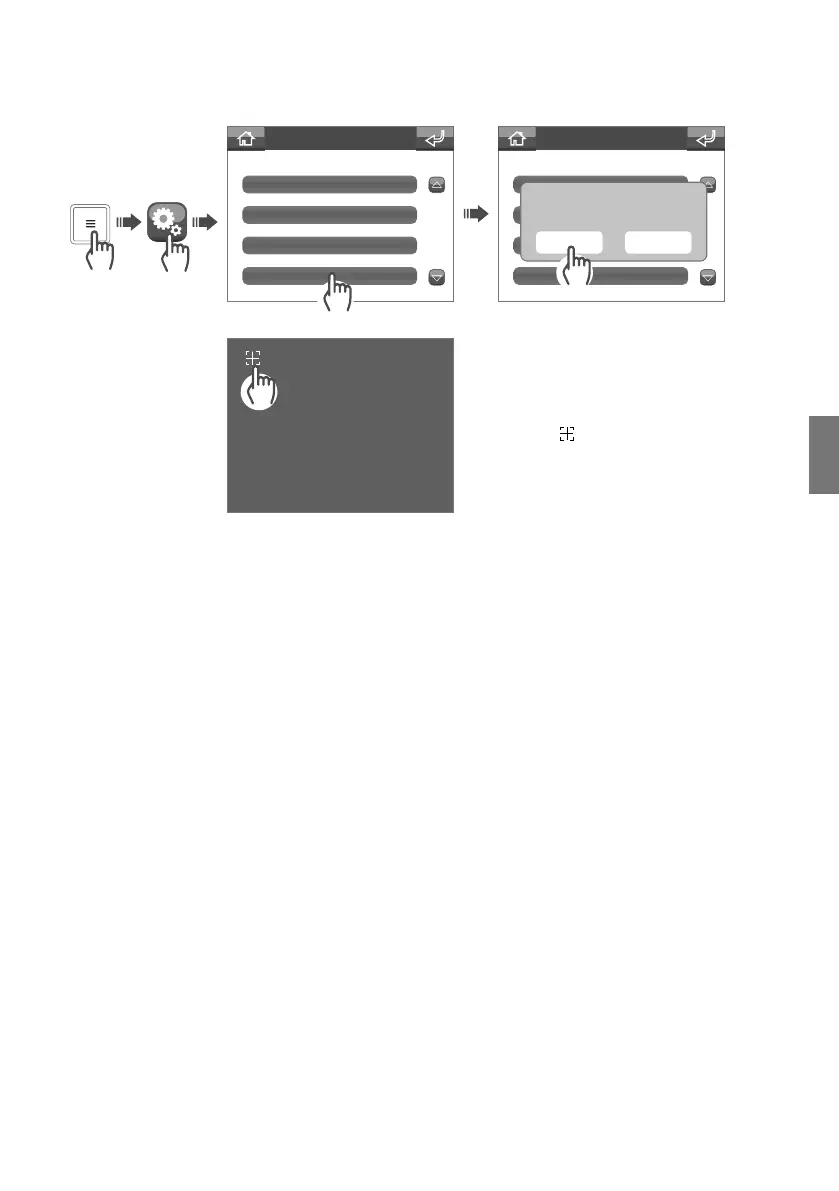
Calibration
Settings menu
Calibration
Confirm touch calibration?
YES NO
Calibration
The Calibration menu can be used to improve touchscreen precision.
Shortcut keys
Ask your installer to customise your shortcut keys.
Advanced
Advanced settings menu for the installer (default password: 0000).
Installation notes
Mounting height: the equipment is suitable for mounting at heights <= 2 m.
The equipment is certified to operate within a local system. Connection to external networks is permitted but is
not considered part of the certified system.
To calibrate the screen, press the
crosshair
until you are taken back to
the main screen.


 To Next Page