19
EN
OFF
PROG
M T W T F S S M T W T F S S
00:00
M T W T F S S
ModoOra
M M M G V S S
Ingresso 1
Ingresso 2
Ingresso 3
00:00
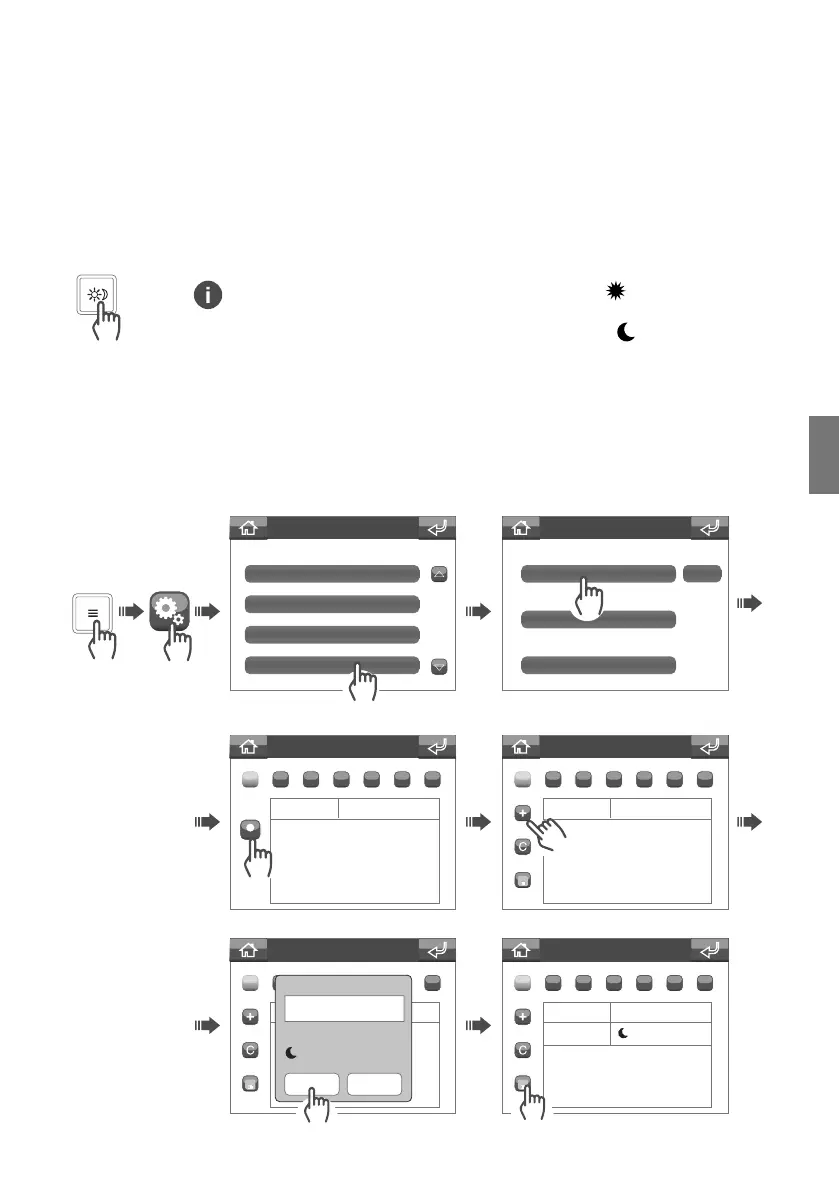
Settings menu
Melodies
Date and time
Languages
Day/Night
Day/night menu
Timetable programming
Entrance panel list
Int. unit list range
Timetable programming
ModeTime
Timetable programming
ModeTime
Timetable programming
ModeTime
Night
Timetable programming
Time
Mode
Confirm Cancel
Night
Day mode: the switchboard will intercept calls from the entrance panel (external unit) to the apartments as per
the settings (ask your installer).
Night mode:
I calls from the entrance panel (external unit) will be sent directly to the apartment called, without
passing through the switchboard.
The Day/Night function can be programmed on a weekly basis, so that it switches from one status to the other
at specific times of day.
Day / Night function
Switching between Day / Night function
Programming the Day / Night function timetable
The Day function is indicated by the appearance of the icon in the status
strip on the home screen.
The Night function is indicated by the appearance of the
icon in the status
strip on the home screen.


 To Next Page