EN
31
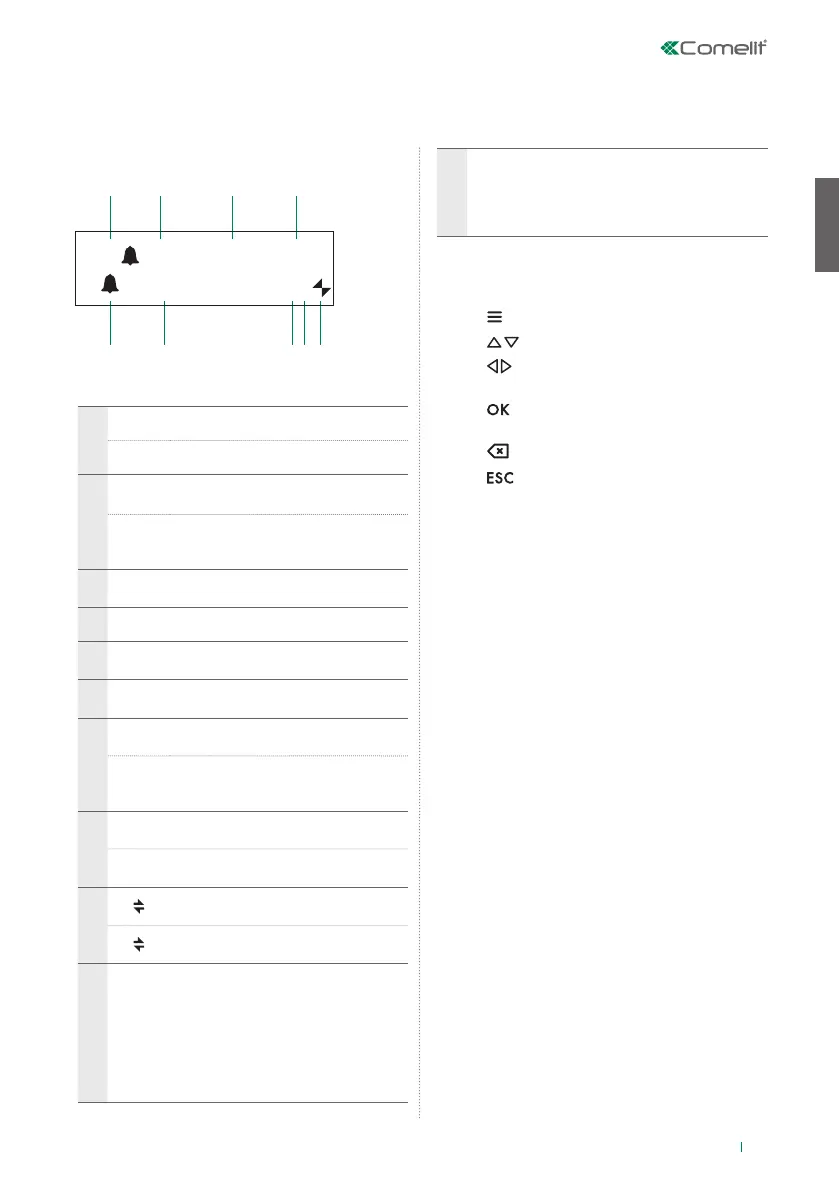
Description of the interface
1
5
6 7 8 9
2 3 4
A (--) A
UTO 14:40
MER 12/03/20 ?P
System status
1
A AUDIO mode
V VIDEO mode
2
(- -)
indicates the number of
unanswered calls in DAY mode
NIGHT
if the text NIGHT appears, this
indicates the system is operating in
this mode
3 AUTO
operation in AUTO mode is only
displayed during DAY mode
4 time (hours: minutes)
5
indication of unanswered calls in NIGHT
mode
6
day (Mon, Tue, etc.) and date (day/month/
year)
7
!
the 2 switchboards configured are
NOT compatible
?
the switchboard has not yet
detected the presence of the
remote switchboard
8
P
indicates that the switchboard is
configured in parallel
S
indicates that the switchboard is
configured in series
9
steady indicates correct operation
of the serial line
flashing indicates malfunctioning of
the serial line
LM KO
indicates a short circuit on the riser
line, the text is accompanied by a
tone which sounds repeatedly. The
switchboard rejects any attempts to
call or transfer calls to internal units;
however, all incoming calls from
the external unit will be dealt with
normally.
!PC
when the menu for point 6-
DOWNLOAD NAMES FROM PC
is activated, this indicates that the
serial port is ready and waiting to
receive data from the PC.
Menu navigation
• Press to enter the programming menu.
• Press to scroll through the menu.
• Press to move the cursor in order to change
the entered data.
• Press to confirm the displayed information or
data entered.
• Press to clear the data entered
• Press to clear the selection and/or exit the
programming menu.
Interface and navigation mode









 To Next Page