11
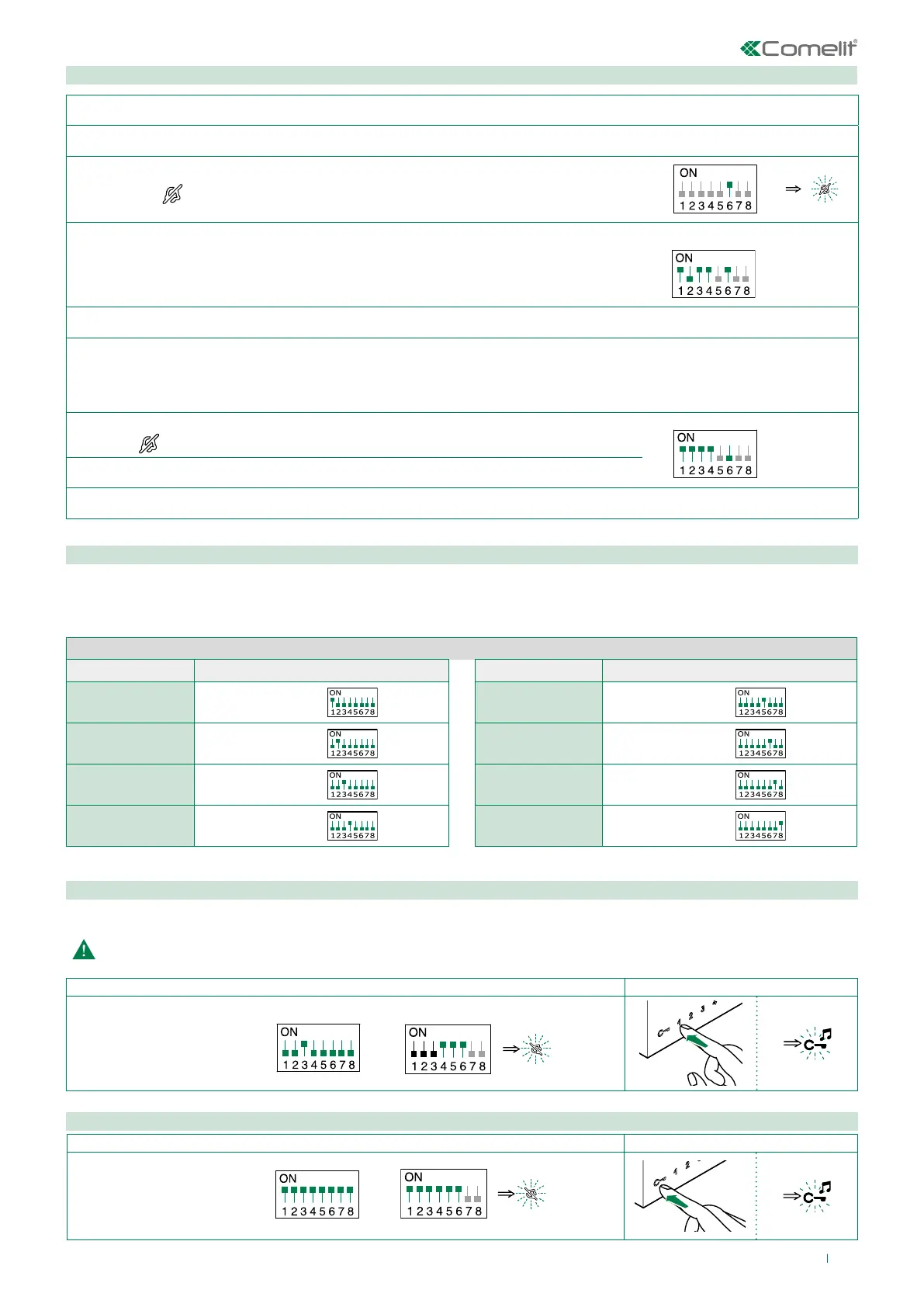
Intercom call to selective address: button programming
√ It is necessary to carry out the 3 operations described in the paragraph "Assigning a selective address to the monitor".
1.
Take note of the S1 DIP switch settings.
2. To enter programming mode, set S2 DIP switch 6 to ON.
» the LED
switches on
S2
3. Refer to the table “Basic configuration” and set on S2 a combination in which the
intercom function associated with the buttons you wish to program appears.
Example:
S2
4. Set the S1 DIP switches according to the selective address of the internal unit you wish to call. Table B.
5. Press and release the button to be associated with the function.
» Correct procedure indication: the Lock release LED flashes for a few seconds and a confirmation tone sounds.
» Procedure error indication: the Audio LED flashes for few seconds and an error tone sounds.
6. Exit programming mode by setting S2 DIP switch 6 to OFF.
» LED
switches off
S2
7. Set S2 DIP switches 1-2-3-4 to ON.
8. Return S1 DIP switches to the original combination.
Assigning a selective address to the monitor
Selective intercom address
Deleting the selective address of the monitor.
You must set the intercom address on all the internal units of the riser.
You can assign the same intercom address to a maximum of 3 internal units.
For group calls, select the desired intercom codes simultaneously (max. 3).
Assign to the monitor one of the 8 available intercom codes in TABLE B.
Take note of the S2, S1 settings and restore on completion of programming
1. 2.
Example address 3.
Follow the steps
as illustrated.
S1
S2
1. 2.
Carry out the operations
as shown in the figure.
S1
S2
TABLE B
Code S1 DIP switch ON Code S1 DIP switch ON
1 1
5 5
2 2 6 6
3 3 7 7
4 4 8 8


 To Next Page