12
Generic actuator, coded actuator
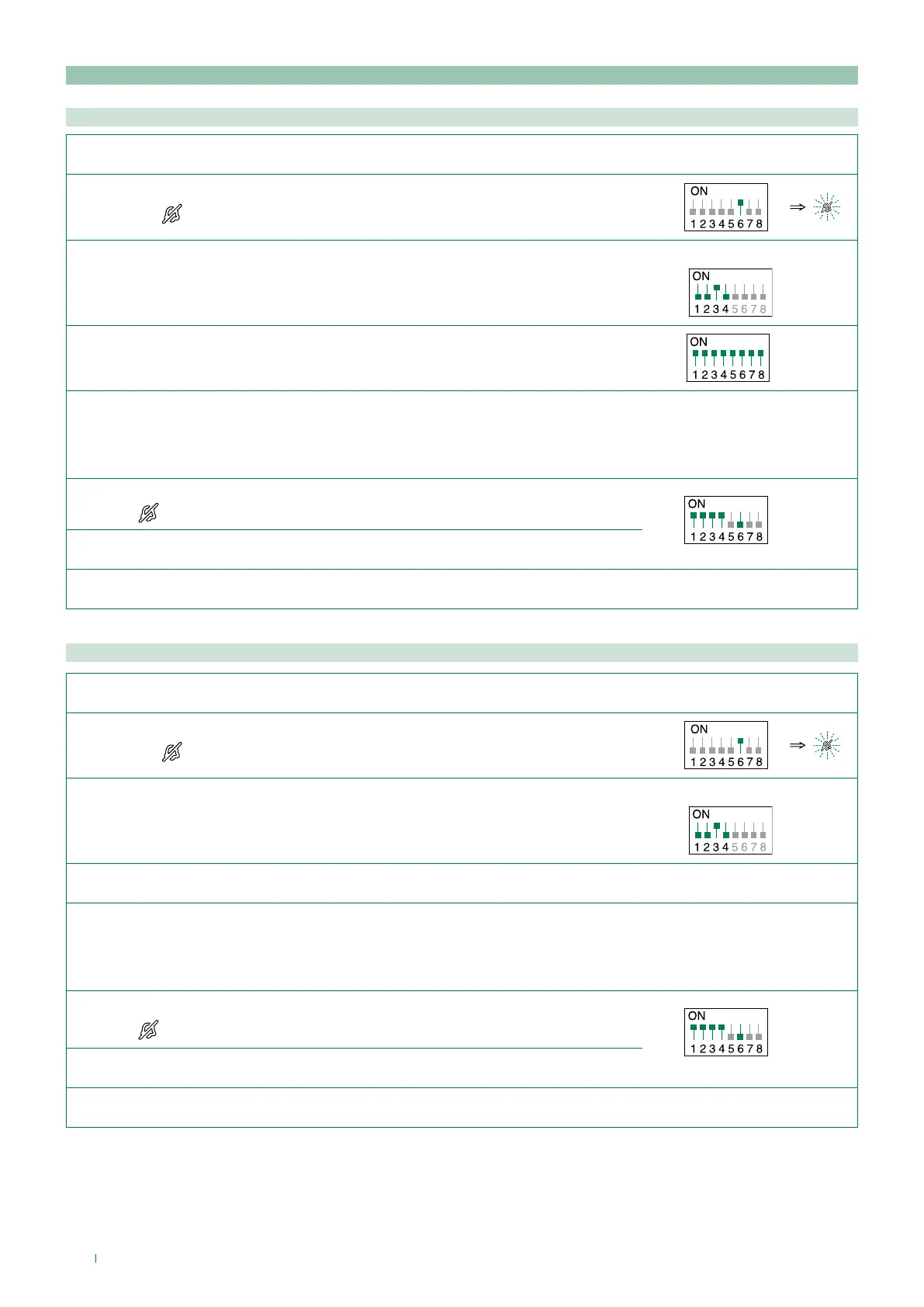
Coded actuator: button programming
Generic actuator: button programming
1. Take note of the S1 DIP switch settings.
2. To enter programming mode, set S2 DIP switch 6 to ON.
» the LED
switches on
S2
3. Refer to the table “Basic configuration” and set on S2 a combination in which the
actuator function (ACT) associated with the buttons you wish to program appears.
Example:
S2
4. Set all the S1 DIP switches to the ON position.
S1
5. Press and release the button to be associated with the function.
» Correct procedure indication: the Lock release LED flashes for a few seconds and a confirmation tone sounds
» Procedure error indication: the Audio LED flashes for few seconds and an error tone sounds
6. Exit programming mode by setting S2 DIP 6 to OFF.
» LED
switches off
S2
7. Set S2 DIP switches 1-2-3-4 to ON.
8. Return S1 DIP switches to the original combination.
1. Take note of the S1 DIP switch settings.
2. To enter programming mode, set S2 DIP switch 6 to ON.
» the LED
switches on
S2
3. Refer to the table “Basic configuration” and set on S2 a combination in which the
actuator function (ACT) associated with the buttons you wish to program appears.
Example:
S2
4. The S1 DIP switches with the desired code, according to “Addressing table”
5. Press and release the button to be associated with the function.
» Correct procedure indication: the Lock release LED flashes for a few seconds and a confirmation tone sounds
» Procedure error indication: the Audio LED flashes for few seconds and an error tone sounds
6. Exit programming mode by setting S2 DIP 6 to OFF.
» LED
switches off
S2
7. Set S2 DIP switches 1-2-3-4 to ON.
8. Return S1 DIP switches to the original combination.


 To Next Page