9
Button configuration
Basic configuration
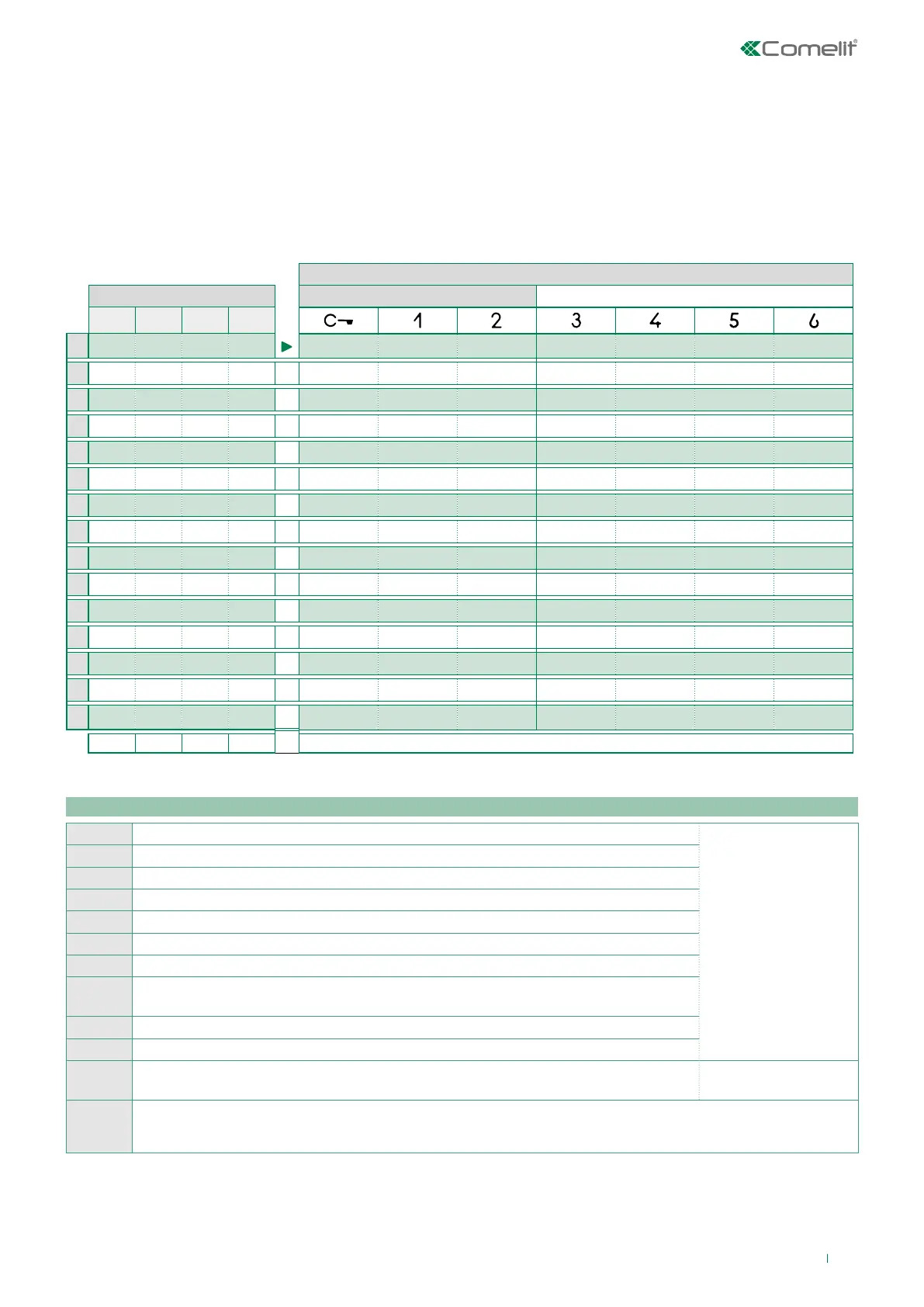
By default the buttons control the functions in row A (“Basic configuration” table).
It is possible to change the default configuration of the buttons by changing the positions of the S2 DIP switches 1-2-3-4 on the
rear of the monitor to one of the combinations (B-P) proposed in the table. All the buttons will change function.
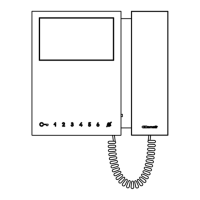
Mini 6701W/8
S2 Dip switches Mini 6701W - Mini 6701W/BM
DIP 1 DIP 2 DIP 3 DIP 4
A OFF OFF OFF OFF
APRIP
ACT AI CCS D PAN K
B ON OFF OFF OFF APRIP CCS AI INT INTb D ACT
C OFF ON OFF OFF APRIP INT AI INTb ACT CCS CCP
D ON ON OFF OFF APRIP ACT CCS CCP PAN K D
E OFF OFF ON OFF ACT ACT ACT ACT ACT ACT ACT
F ON OFF ON OFF APRIP INT ACT CCS CCP INTb PAN
G OFF ON ON OFF APRIP AI D K CCS CCP INTb
H ON ON ON OFF APRIP INTb INT AI INT PAN D
I OFF OFF OFF ON APRIP CCS PAN D AI INTb INTb
J ON OFF OFF ON APRIP K CCS PAN CCP AI INT
K OFF ON OFF ON APRIP CCP K PAN ACT INT AI
L ON ON OFF ON APRIP PAN CCP CCS K ACT D
M OFF OFF ON ON APRIP INTb AI INT ACT D CCS
N ON OFF ON ON APRIP INT INT INT INT INT INT
P OFF ON ON ON NULL NULL NULL NULL NULL NULL NULL
ON ON ON ON PROG
default
Legend
APRIP
Lock-release
Press and release key
ACT Actuator
AI ** Self Activation
CCP * Call to main switchboard
CCS * Call to secondary switchboard
K Caretaker door-entry phone call
PAN * Priority call to switchboard
INT
General or selective programmable intercom call.
Standard single-family call for KIT and Simplebus Top
INTb
Two-family intercom call - For Kit only
NULL No function
D ** Door Opening Upon Call (Doctor) Press and hold key
PROG
With these settings of the S2 DIP switches, the buttons control the programmed functions as in the "Advanced
configuration".
*
Cannot be used in kit systems
**A long press enables/disables the function.


 To Next Page