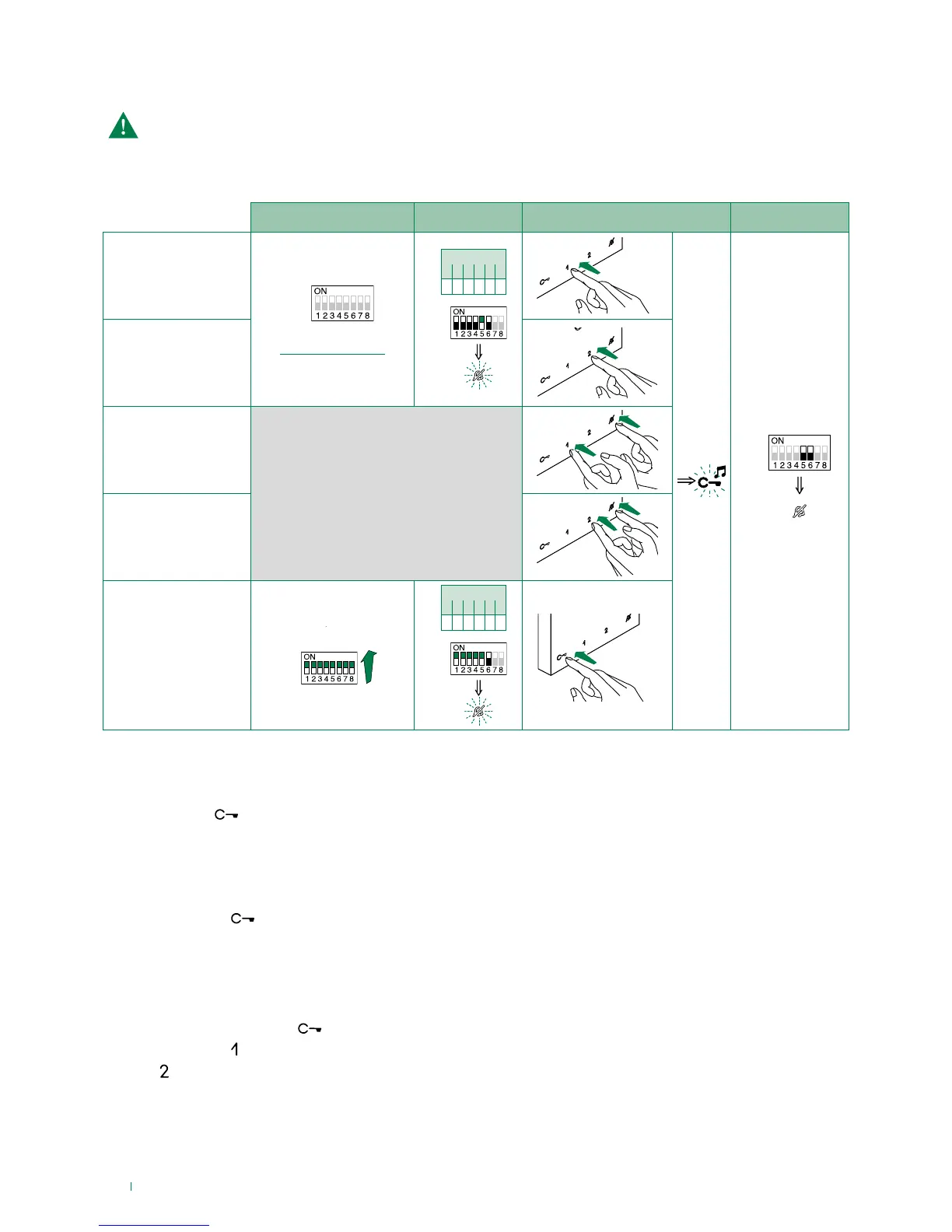
S1
S2 DIP
1 2 3 4 5 6
1 1 1 1 1 0
S2
2 sec
Carry out steps 1 to 4
Programming range
Take note of the S2, S1 settings and restore on completion of programming
1. Press and hold
for 6 sec.
» a confirmation tone will sound
» the Privacy LED will flash to indicate "programming" mode.
√ the procedure can only take place while the system is in standby; otherwise the Privacy LED will flash 4 times to inform the
user that the system is engaged.
2. Press and release
Once (1 confirmation tone is emitted) to change the ringtone for calls from the external unit.
Twice (2 confirmation tones emitted) to change the switchboard call tone
3 times (3 confirmation tones are emitted) to change the ringtone for intercom calls made from the internal unit.
4 times (4 confirmation tones are emitted) to change the floor door call ringtone.
Any further presses of button
will repeat the sequence described above.
3. Press and release
to scroll through the various available ringtones in sequence.
4. Press
to confirm selection of the last ringtone heard and to exit change monitor ringtone mode.
» one confirmation tone is emitted
» the Privacy LED switches o
Repeat steps 1 to 4 to change the other ringtones.



 To Next Page