5
Self-monitoring function
The self-dehydrating air breather has a self-monitoring
function.
Outputs
STANDARD CONFIGURATION SPECIAL CONFIGURATION
Malfunction What is detected Malfunction What is detected
POWER FAILURE - Failure of the power supply
- Failure of the electronic circuit
POWER FAILURE - Failure of the power supply
- Failure of the electronic circuit
- Failure of the heating element
- Failure of the weighing cell
SYSTEM FAILURE - Failure of the heating element
- Failure of the weighing cell
STANDARD CONFIGURATION SPECIAL CONFIGURATION
STANDARD RELAY 1 x change over contact: POWER FAILURE
(terminals 22-24-21)
1 x change over contact: SYSTEM FAILURE
(terminals 12-14-11)
1 x NC contact: POWER FAILURE
(terminals 22-21)
1 x change over contact: HEATER ON
(terminals 12-14-11)
USB type B Interface to download relevant device data interface to download relevant device data
OPTIONS ANALOG OUTPUT 4-20 mA (terminals 41-44)
(Minimum / Maximum resistance: 100 / 470 Ohm)
4-20 mA (terminals 41-44)
(Minimum / Maximum resistance: 100 / 470 Ohm)
DIGITAL OUTPUT RS-485 Digital Signal (terminals 3-4) Digital Signal (terminals 3-4)
Table 1
Table 2
When the device has got a failure, this is detected by
contacts that can be set in accordance to customer
demand on the following configuration:
Status indicators
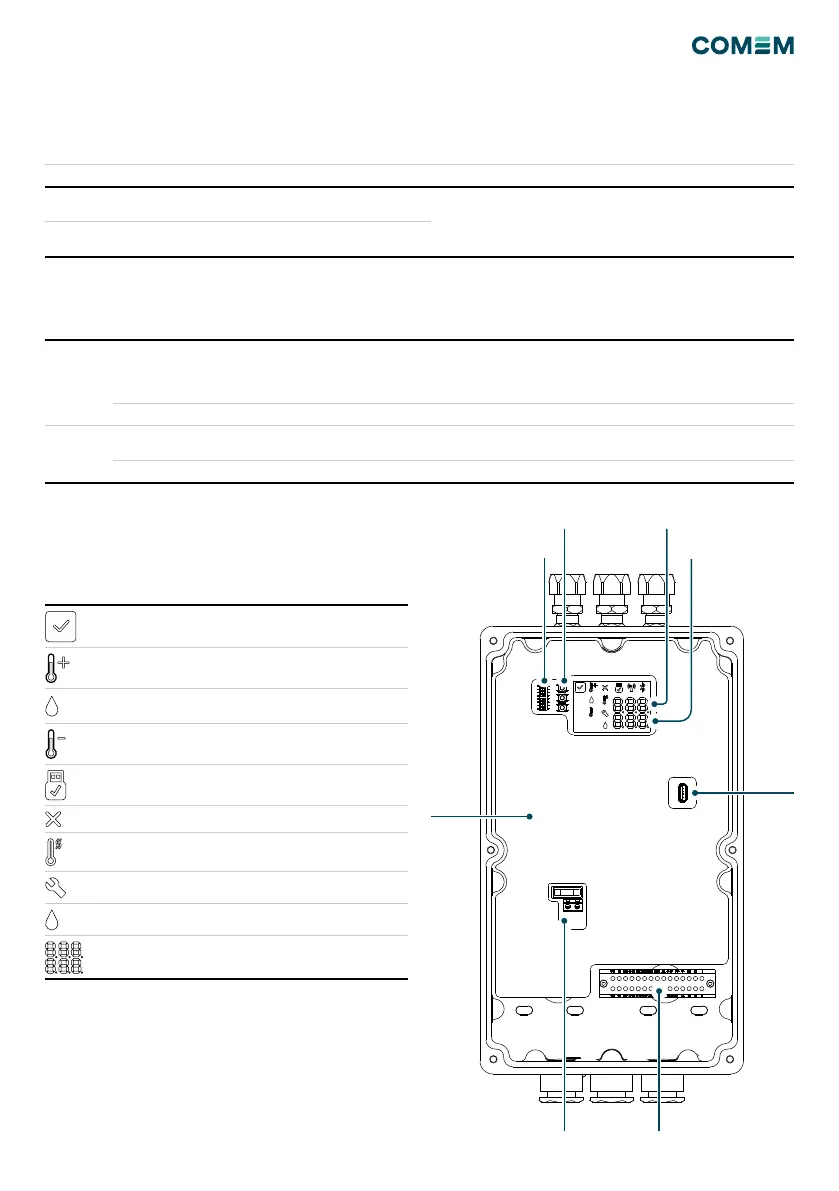
N°9 ICONs which indicate the status of the device are
installed inside the terminal box and observable through
the glass.
Figura 2
Idle - Green
Warning - Yellow
(Fixed tank 1, Blinking tank 2)
Drying - Yellow
(Fixed tank 1, Blinking tank 2)
Cooling - Yellow
(Fixed tank 1, Blinking tank 2)
USB active - Blue
Electronic board failure - Red
Heater failure - Red
Solenoid valve Failure - Red
Drying failure - Red
Sensors Reading - White
Temperature Tank °C
Salt Saturation %
Terminal Board
Board
Cover
Command Buttons
Modbus Address
Selection
USB B
Port
Overvoltage protection


 To Next Page