15
6.3.1 Parameters
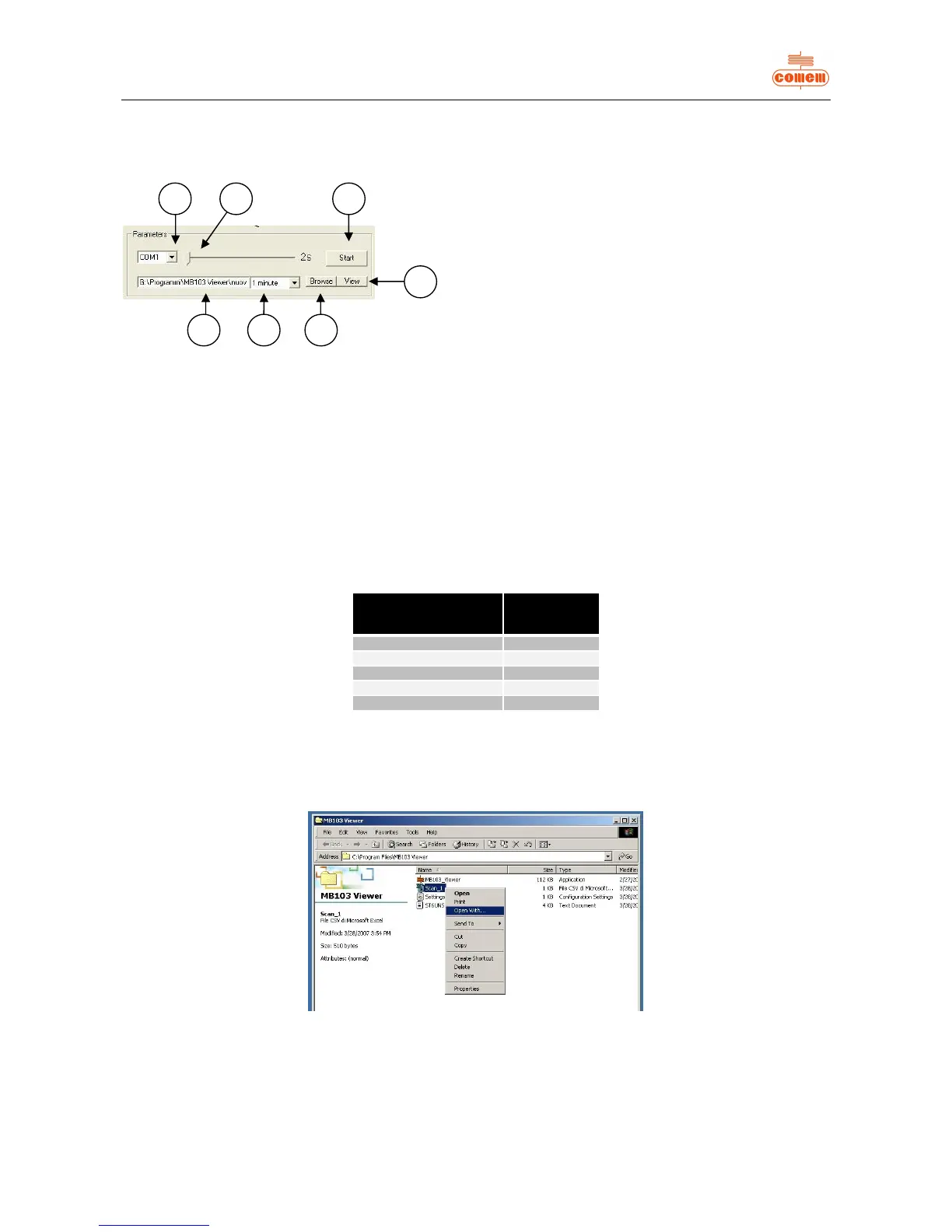
In the Parameters area (fig. 10) you can:
Fig. 10
1) choose which RS 232 to enable: COM1 or COM2;
2) establish the graph sampling time (minimum 2s and maximum 600s);
3) start acquiring data with “Start” or stop data acquisition with “Stop”;
4) display the Log File with the “View” button;
5) create the Log File with the “Browse” button;
6) select the Log File sampling time interval from the pull-down menu;
7) view the storage path of the Log File.
The data acquired during the scanning process are stored in the Log File.
The file has a “.csv” type of extension so that it can be consulted using the most widely used spreadsheets (Microsoft Excel, Calc).
In view of the limited number of lines (about 65,500), the program eliminates the oldest data and maintains the most recent ones.
For this reason, the software has been designed to regulate the sampling time interval so as to maintain the most significant data for the
user in its memory (tab. 1).
data
1 minute 45 days
2 minutes 3 months
6 minutes 9 months
9 minutes 13 months
10 minutes 15 months
Tab. 1
Once data acquisition has been stopped by pressing the “Stop” button, the Log File can be consulted by pressing “View”.
If the required spreadsheet is not displayed, the program must be defined by using “Open with” in “Explore resources” or “Computer
resources” and clicking on Log File with the right key of the mouse (fig. 11).
Fig. 11


 To Next Page