16
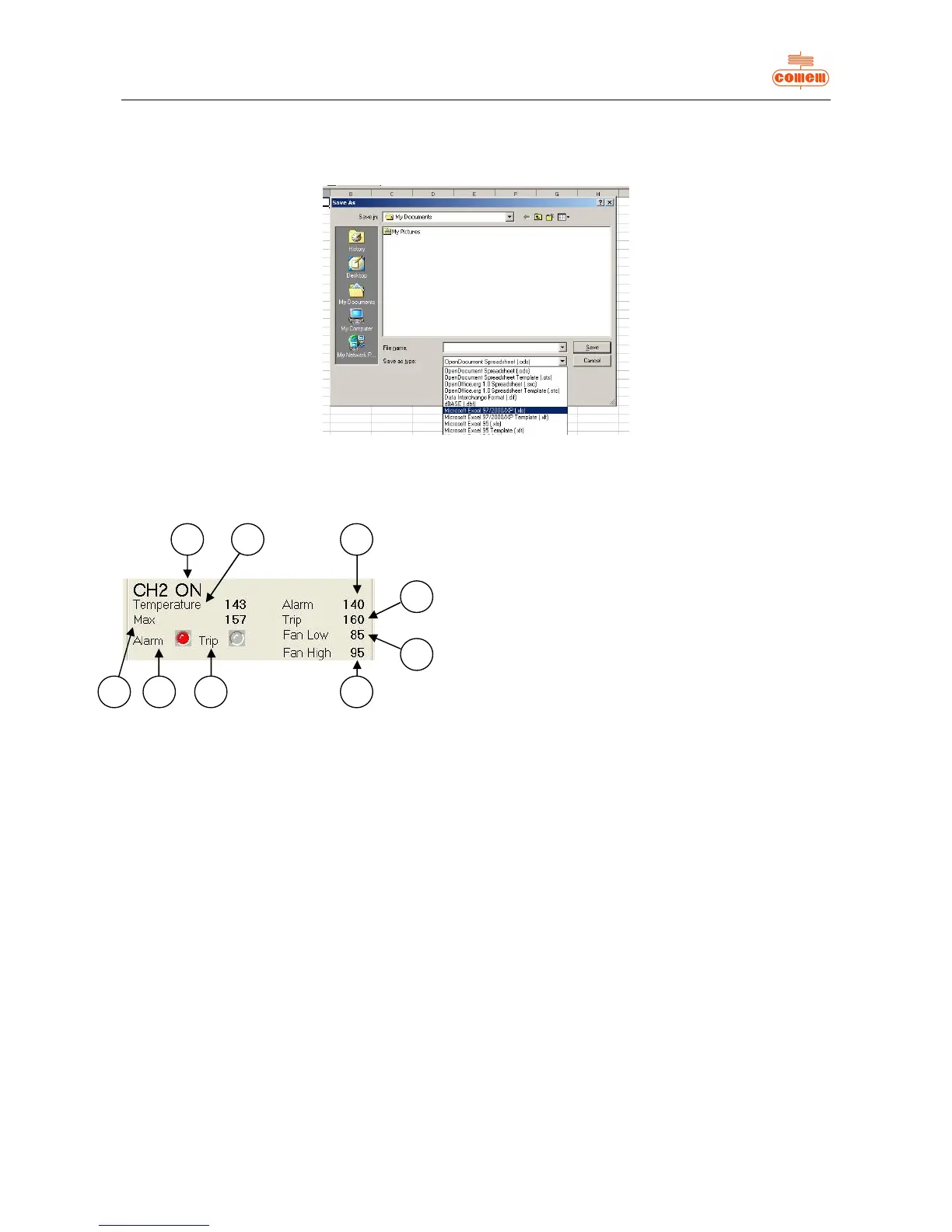
To display the Log File correctly, open the required file from “Explore resources” or “Computer resources” and then save with the
normally used spreadsheet extension, using “Save as”.
For example, Microsoft Excel uses extension “.xls” (fig. 12).
Fig. 12
6.3.2 Status
Status (fig. 13) allows you to view the settings of the MB 103:
Fig. 13
· ON will appear if the temperature detection channel 1) is activated, otherwise OFF will appear.
· The following information is displayed for each active channel:
2) the instantaneous temperature value;
3) the maximum temperature value memorized by the unit;
4) the alarm state: GREY is not active, RED if active;
5) the trip state: GREY is not active, RED if active;
6) the trip temperature of the alarm;
7) the trip temperature of the release;
8) the ventilation deactivation temperature;
9) the ventilation activation temperature;
· The letters NA will appear on a level with the Temperature 2), Max 3), Alarm 6), Trip 7), Fan Low 8), Fan High 9) values if not all
channels are active.


 To Next Page