17
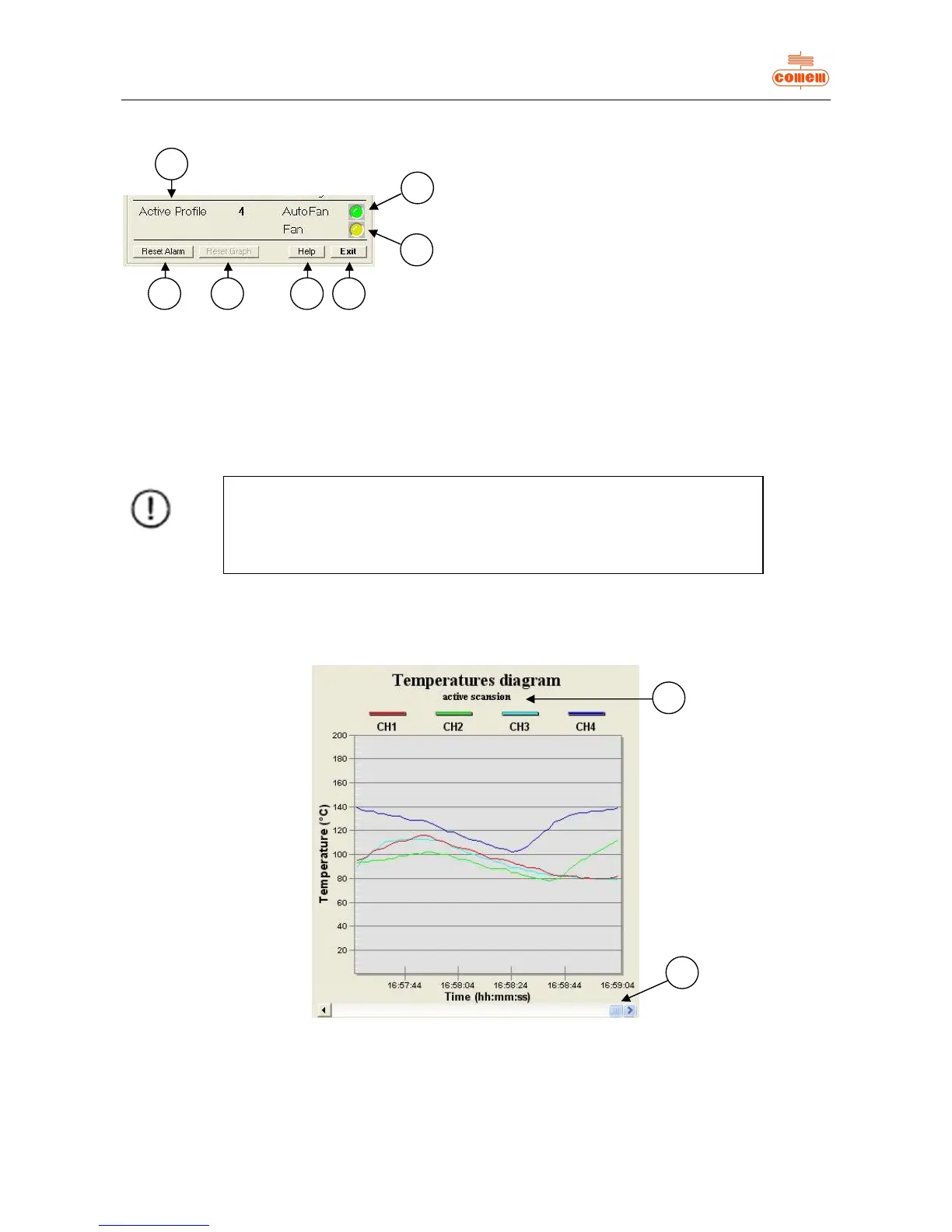
The following information appears in the lower part of the Status area (fig. 14):
Fig. 14
1) the active profile;
2) the “Reset Alarm” key: deletes the active alarms if pressed;
3) the “Reset Graph” key: deletes the data shown in the graph (Fig. 15)
4) the visual AutoFan indication: GREEN if on, GREY if off;
5) the visual F indication: YELLOW if on, GREY if off;
6) the “Help” key to access help online;
7) the “Exit” key to quit the program.
6.3.3 Temperature diagram
The temperature trend detected over time can be viewed in the Temperatures diagram (fig.15):
Fig. 15
Use the Scroll bar (1) to move the x-coordinates so as to display the instants prior to the displayed times.
Press “m” on the keyboard to zoom the graph area. Press “Esc” to go back to the main page.
The words “active scanning” (2) will appear if acquisition is activated, otherwise the message will be “no active scanning”.
If the Active Profile is number 4 and ventilation is activated (with Fan YELLOW
in colour),
then AutoFan will be GREEN.


 To Next Page