COMESTERO GROUP M21/03.02
Rev.02
of 25/09/03
Page 8 of 34
4
4
.
.
D
D
I
I
P
P
-
-
S
S
W
W
I
I
T
T
C
C
H
H
E
E
S
S
The dip-switches can carry out three different functions: STANDARD FUNCTION, 3,3 FUNCTION,
4,2 FUNCTION.
- STANDARD FUNCTION
THIS IS THE DEFAULT FUNCTION.
Using the dip-switch group it is possible to program the equipment in Self-prog mode (EXCEPT
RM5 X CC, RM5 X E0, RM5 X AT). Please refer to paragraph “ PROGRAMMING SYSTEMS”
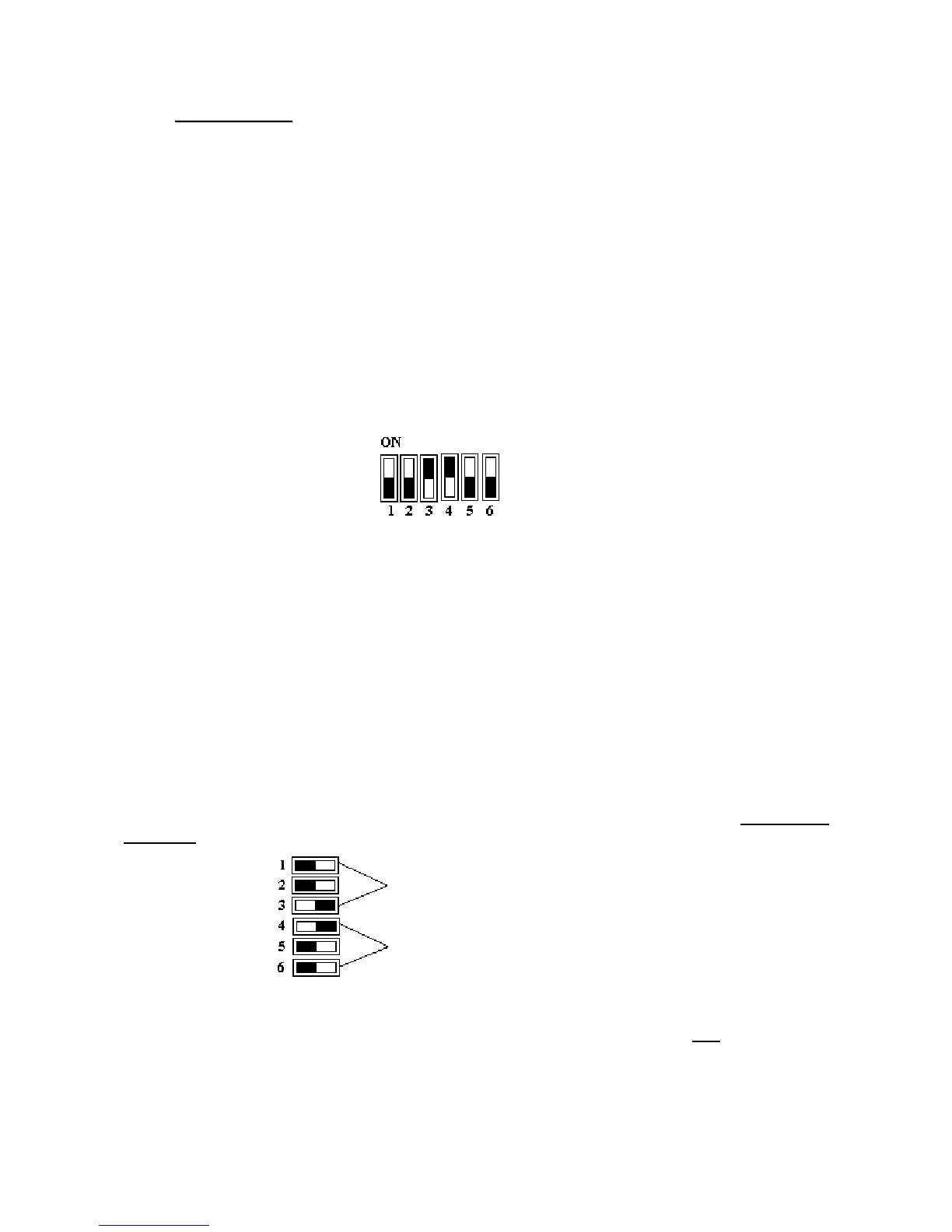
or use the same to manually inhibit five of the first six channels they are associated to.
When the dip-switch in on “ON” the channel is inhibited, when it is on “OFF” (NUMBER SIDE) it
is enabled. If for example you do not want the equipment to accept a coin, it is sufficient to look
at the adjustment channel on the label and to put the relevant dip-switch on “ON”. When you
want to re-enable it, just put the dip-switch on “OFF” again.
Channels 3 and 4 inhibited.
Channels 1,2,5,6, enabled
- 3,3 FUNCTION
It is possible to request this function in the purchase order or to set it through ”Clone5” (please
refer to paragraph “PROGRAMMING SYSTEMS”).
Using the dip-switch group, it is possible to program the equipment in Self-Prog mode (please
refer to paragraph “PROGRAMMING SYSTEMS).
In the “Totalizer” versions it is possible to set the credit price using the first 3 dip-switches while
the other three are used to set a bonus threshold (Version 20, 40, 60) or the service time
(Version 30).
PRICE AND BONUS SETTING VIA DIP-SWITCHES
When the dip-switches are disabled (all on “OFF”) the internal programming of the equipment will
apply.
When the dip-switches are set the credit cost is equivalent to the binary value of the first three
multiplied by the basic value of the equipment, while the last three dip-switches show the number
of credits after which 1 bonus is given.
Credit setting
Bonus setting
The difference with respect to the setting with RM5 PROGRAMMER or with CLONE 5 (please refer
to paragraph “PROGRAMMING SYSTEMS) is that it is possible to set only one bonus which
must however be a multiple of the basic cost of the credit.
Example: with X21 validator adjusted on 0,50 ; 1,00 ; 2,00 €.


 To Next Page