EasyManua.ls Logo

Commodore 64C - Page 23

Commodore 64C
40 pages
Print Icon
To Next Page IconTo Next Page
To Previous Page IconTo Previous Page
Loading...
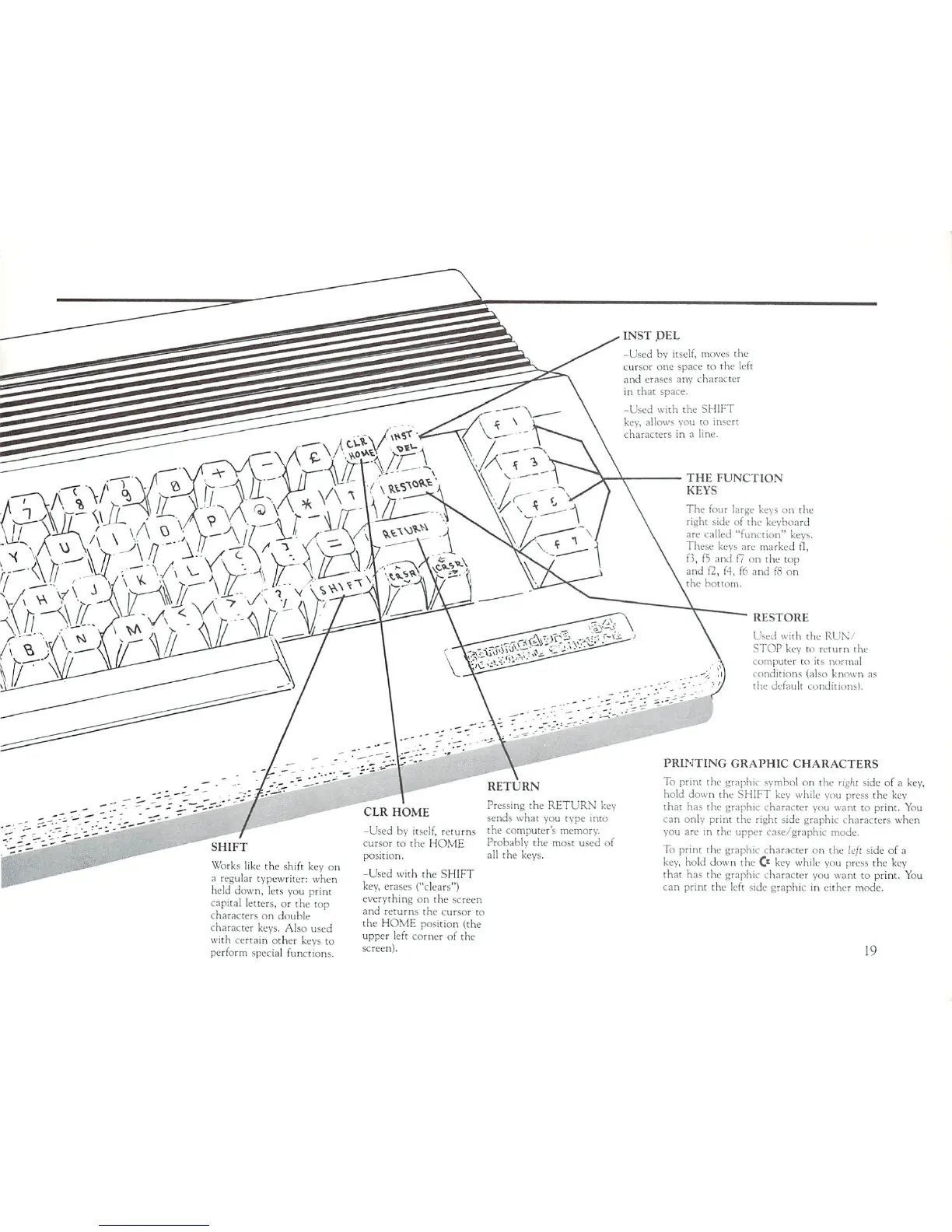
INST
PEL
-Used
by
itself,
moves
the
cursor
one
space
to
the
left
and
erases
any
character
in
that space.
-Used
with
the
SHIFT
key.
allows
vou
to
insert
characters
in
a line.
THE
FUNCTION
KEYS
The
four
large
keys
on
the
right
side
of
the
keyboard
are nailed
"function"
keys.
These
keys
are
marked
tl,
f3,
f5
and
f?
on
the
top
and
f2,
f4,
f6
and
f8
on
■>ot
torn.
Sill!
I
Works
like
the
shift
key
on
a
reguta
held
do
capital
I
characte
characte
typewriter:
when
n,
lets
you
print
tters,
or
the top
s
on
douhle
keys.
Also
used
with
certain
other
keys
to
perform
special
functions.
RETURN
Pressing
the
RETURN
key
sends
what
you
type
into
-Used
by
itself,
returns the
computer's
memory.
cursor
to
the
HOME
Probably
the
most
used
of
position.
all
the
keys.
-Used
with
the
SHIFT
key,
erases
("clears")
everything
on
the screen
and
returns
the
cursor
to
the
HOME
position
(the
upper
left
corner
of
the
screen).
RESTORE
Used
with
the
RUN/
STOP
key
to
return
the
computer
to
its
normal
conditions
(also
known
as
the
default
conditions).
PRINTING
GRAPHIC
CHARACTERS
To
print
the graphic
symbol
on
the
right
side
of
a
key,
hold
down
the
SHIFT
key
while
you
press
the
key
that
has
the
graphic
character
you
want
to
print.
You
can
only
print
the
right side
graphic
characters
when
you
arc
in
the
upper
case/graphic
mode.
To
print
the
graphic
character
on
the
left
side
of
a
key,
hold
down
the
O
key
while
you
press
the
key
that
has
the
graphic
character
you
want
to
print.
You
can
print
the
left
side
graphic
in
either
mode.
19

Related product manuals