EasyManua.ls Logo

Commodore AMIGA 1084S - Connecting the Separate Luma-Chroma-Audio Display; Connecting the Composite Display; Connecting the Monitor to the Mains

Commodore AMIGA 1084S
30 pages
Print Icon
To Next Page IconTo Next Page
To Previous Page IconTo Previous Page
Loading...
GB-8
Monitor
1084S
To
connect
the
audio,
locate
the
audio
cable
with
one
pair
of
phono
plugs
at
each
end
ofthe
cable.
One
pair
of
phono
plugs
is
plugged
into
the
AUDIO
R
and
AUDIO
L
jacks
on
the
back
of
your
monitor,
and
the
other
pair
of
plugs
is
in-
serted
into
the
Amiga's
left
and
right
audio
jacks.
3.1.1
Using
Headphones
You
can
connect
headphones
to
your
1084S
so
that
stereo
sounds
generated
by
your
Amiga
computer
can
only
be
heard
through
the
headset.
To do
this,
sim-
ply
insert
the
plug
on
the
end
of
a
standard
headphone
cable
into
the
small
silver
port
on
the
left
side
(as
you
face
the
front)
of
the
monitor's
cabinet.
The
port
is
towards
the
front
of
the
monitor.
A
headphone
cable
is
not
included
with
your
monitor
but
should
be
readily
available
at
most
computer
and
electronics
stores.
3.2
Connecting
the
Separate
Luma-Chroma-Audio
Display
(C64)
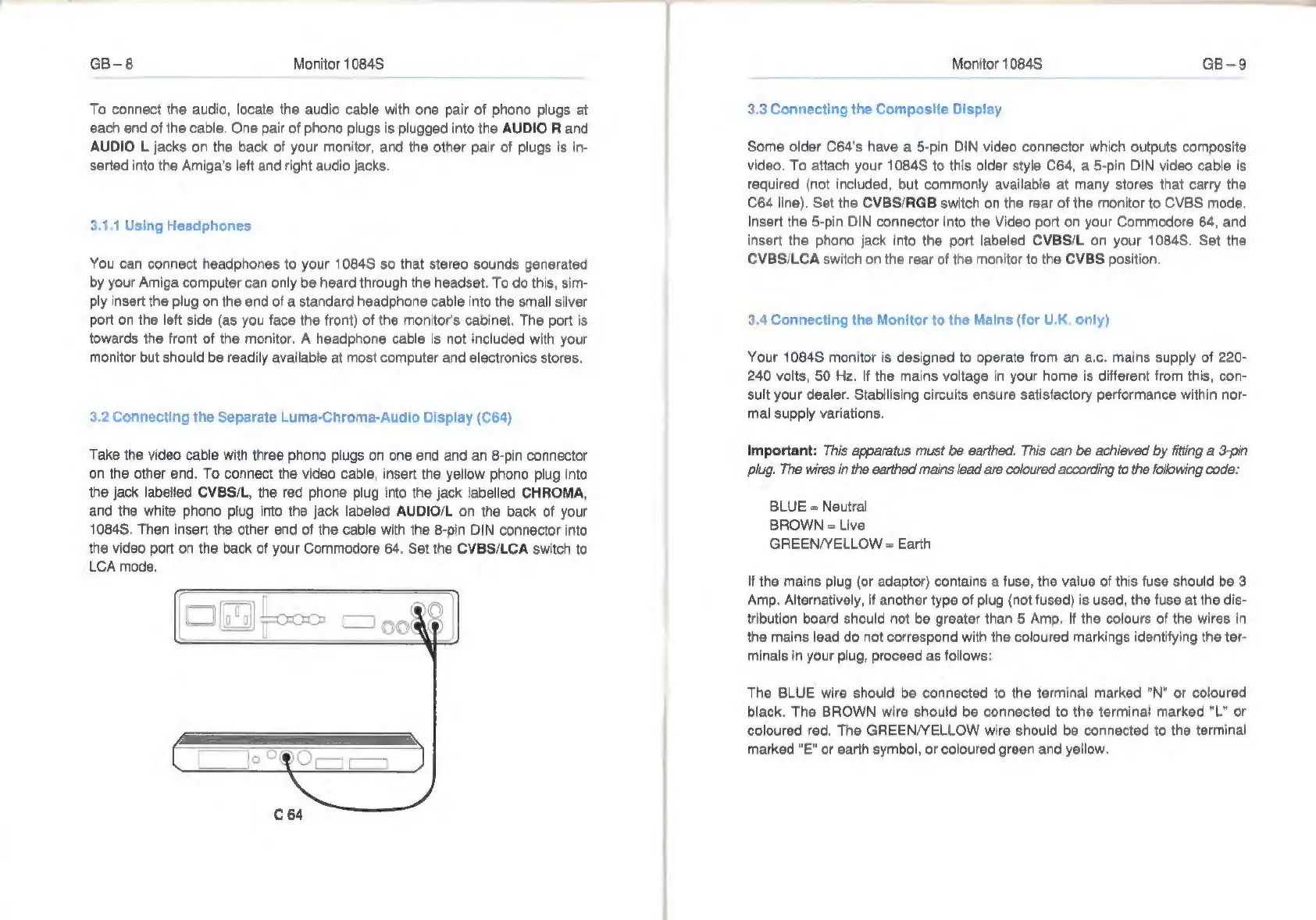
Take
the
video cable
with
three
phono
plugs
on
one
end
and
an
8-pin
connector
on
the
other
end.
To
connect
the
video
cable,
insert
the
yellow
phono
plug
into
the
jack
labelled
CVBS/L,
the
red
phone
plug
into
the
jack
labelled
CHROMA,
and
the
white
phono
plug
into
the
jack
labeled
AUDIO/L
on
the
back
of
your
1084S.
Then
insert
the
other
end
of
the
cable
with
the
8-pin
DIN
connector
into
the
video
port
on
the
back
of
your
Commodore
64.
Set
the
CVBS/LCA
switch
to
LCA
mode.
Monitor
1084S
GB-9
3.3
Connecting
the
Composite
Display
Some
older
C64's
have
a
5-pin
DIN
video
connector
which
outputs
composite
video.
To
attach
your
1084S
to
this
older
style
C64,
a
5-pin
DIN
video
cable
is
required
(not
included,
but
commonly
available
at
many
stores
that
carry
the
C64
line).
Set
the
CVBS/RGB
switch
on
the
rear
of
the
monitor
to
CVBS
mode.
Insert
the
5-pin
DIN
connector
into
the
Video
port
on
your
Commodore
64,
and
insert
the
phono
jack
into
the
port
labeled
CVBS/L
on
your
1084S.
Set
the
CVBS/LCA
switch
on
the
rear
of
the
monitor
to
the
CVBS
position.
3.4
Connecting
the
Monitor
to
the
Mains
(for
U.K,
only)
Your
1084S
monitor
is
designed
to
operate
from
an
a.c.
mains
supply
of
220-
240
volts,
50
Hz.
If
the
mains
voltage
in
your
home
is
different
from
this,
con-
sult
your
dealer.
Stabilising
circuits
ensure
satisfactory
performance
within
nor-
mal
supply
variations.
Important:
This
apparatus
must
be
earthed.
This
can
be
achieved
by
fitting
a
3-pin
plug.
The
wires
in
the
earthed
mains
lead
are
coloured
according
to
the
following
code:
BLUE
=
Neutral
BROWN
=
Live
GREEN/YELLOW
=
Earth
If
the
mains
plug
(or
adaptor)
contains
a
fuse,
the
value
of
this
fuse
should
be
3
Amp.
Alternatively,
if
another
type
of
plug
(not
fused)
is
used,
the
fuse
at
the
dis-
tribution
board
should
not
be
greater
than
5
Amp.
If
the
colours
of
the
wires
in
the
mains
lead
do
not
correspond
with
the
coloured
markings
identifying
the
ter-
minals
in
your
plug,
proceed
as
follows:
The
BLUE
wire
should
be
connected
to
the
terminal
marked
"N"
or
coloured
black.
The
BROWN
wire
should
be
connected
to
the
terminal
marked
"L"
or
coloured
red.
The
GREEN/YELLOW
wire
should
be
connected
to
the
terminal
marked
"E"
or
earth
symbol,
or
coloured
green
and
yellow.

Related product manuals