8 Operations Guide
Video modes
POWER
SWITCH
POWER
SUPPLY
SOCKET
RS
D
MONITOR
INPUT
PORT
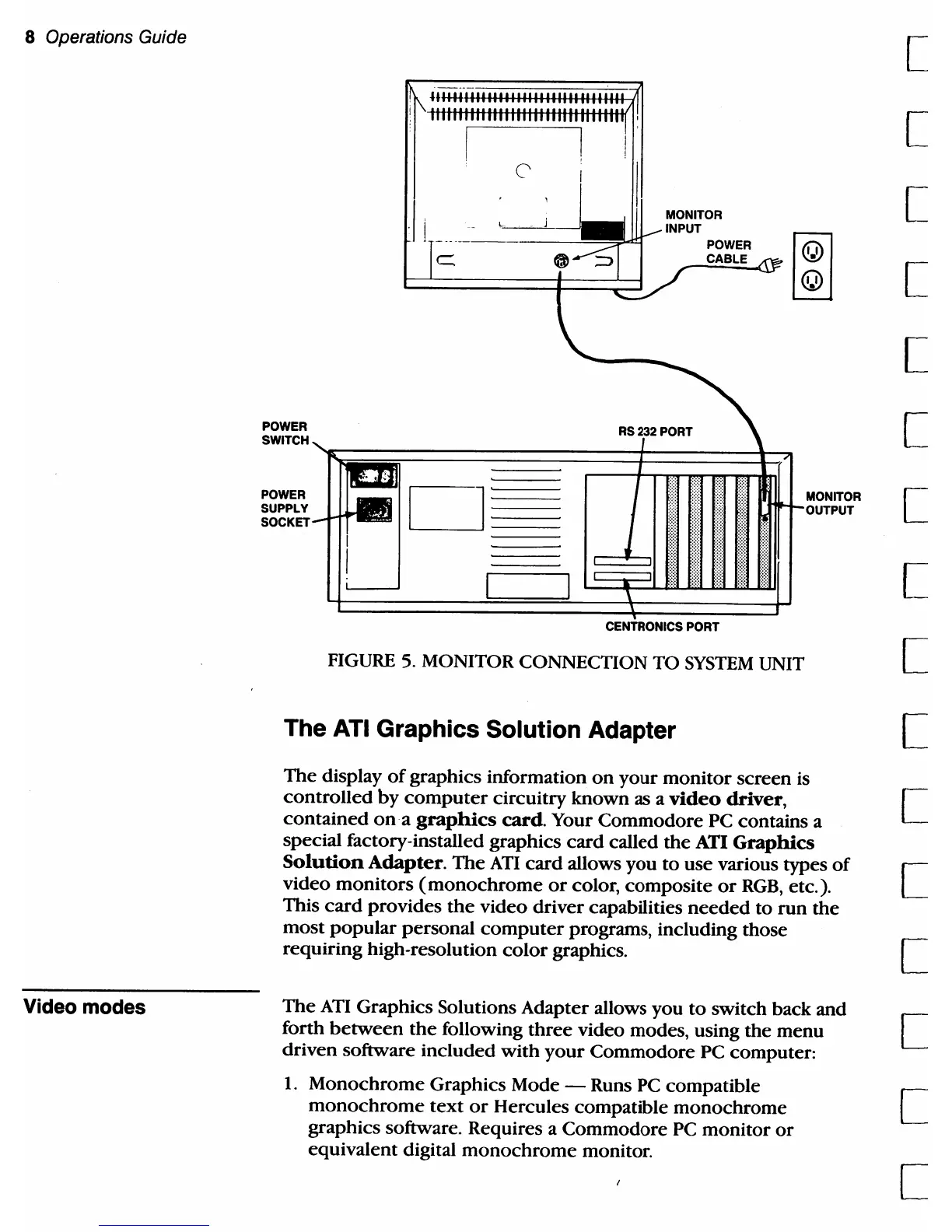
FIGURE
5.
MONITOR CONNECTION TO
SYSTEM
UNIT
The ATI Graphics Solution Adapter
MONITOR
The
display
of
graphics information
on
your
monitor
screen is
controlled
by
computer
circuitry known as a
video
driver,
contained
on
a
graphics
card.
Your
Commodore
PC contains a
special factory-installed graphics
card
called
the
ATI
Graphics
Solution
Adapter.
The
ATI
card
allows
you
to
use various types
of
video
monitors
(monochrome
or
color,
composite
or
RGB,
etc.).
This
card
provides
the
video driver capabilities
needed
to
run
the
most
popular
personal
computer
programs, including those
requiring high-resolution
color
graphics.
The
ATI
Graphics Solutions Adapter allows you
to
switch back and
forth
between
the
following
three
video modes, using the menu
driven software included
with
your
Commodore PC computer:
1.
Monochrome
Graphics Mode - Runs PC compatible
monochrome
text
or
Hercules compatible
monochrome
graphiCS software. Requires a Commodore
PC
monitor
or
equivalent digital
monochrome
monitor.
[
[
[
[
[
[
[
[
[
[
[
[
[
[
[
[



 To Next Page