EasyManua.ls Logo

Commodore PC 10 - DIP Switch Settings

Commodore PC 10
494 pages
Print Icon
To Next Page IconTo Next Page
To Previous Page IconTo Previous Page
Loading...
53
AppendixF
DIP Switch Settings
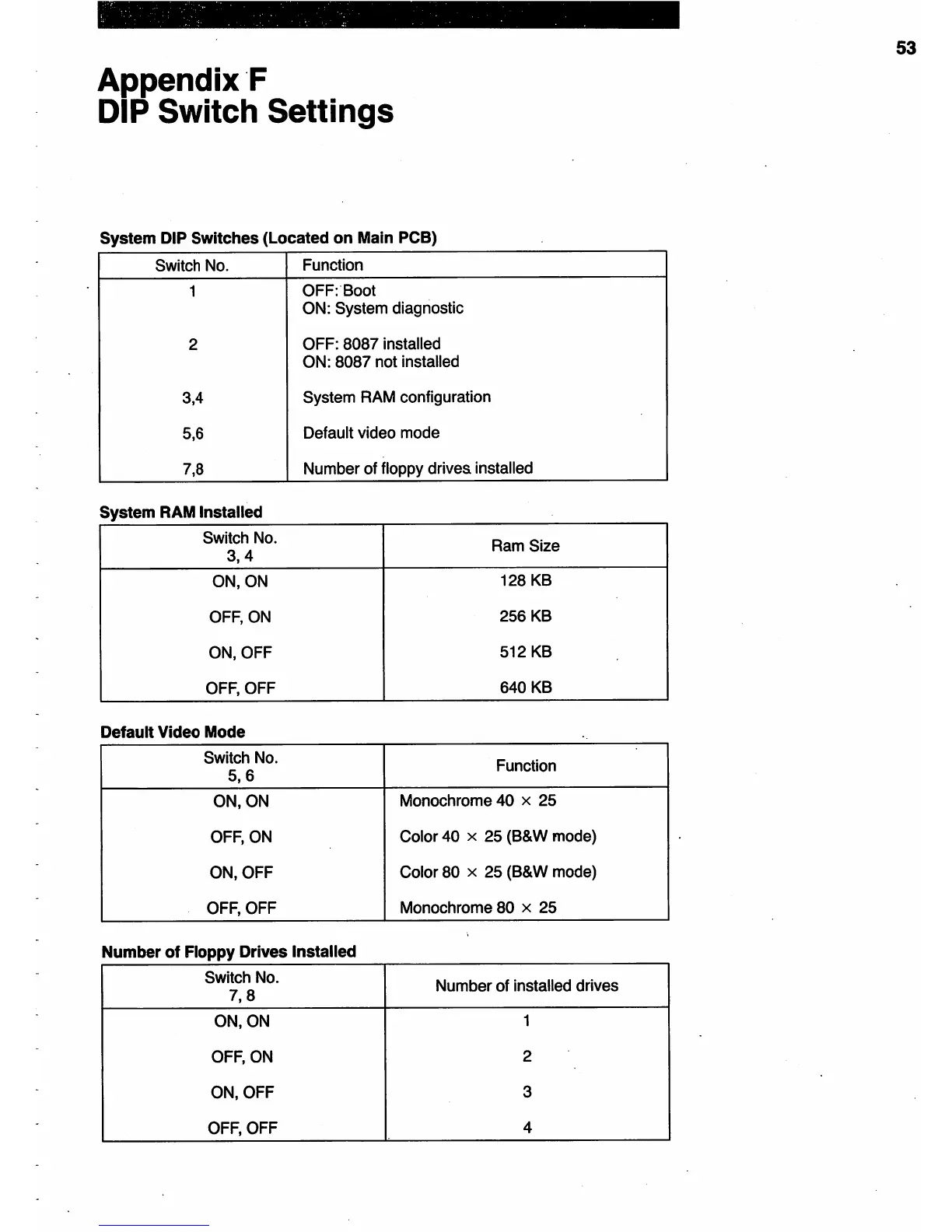
System DIP Switches (Located on Main PCB)
Switch
No.
Function
1
OFF: Boot
ON: System diagnostic
2
OFF: 8087 installed
ON: 8087 not installed
3,4 System RAM configuration
5,6 Default video mode
7,8 Number of floppy drives. installed
System RAM Installed
Switch
No.
Ram
Size
3,4
ON,ON
128 KB
OFF,ON
256KB
ON, OFF 512
KB
OFF,
OFF 640 KB
Default Video Mode
Switch
No.
Function
5,6
ON,ON
Monochrome 40 x 25
OFF,
ON
Color 40 x 25 (B&W mode)
ON,OFF
Color 80 x 25 (B&W mode)
OFF,
OFF
Monochrome 80 x 25
Number
of
Floppy Drives Installed
Switch No.
Number of installed drives
7,8
ON,ON
1
OFF,
ON
2
ON, OFF
3
OFF,
OFF
4

Table of Contents

Related product manuals