21
K09657H02 | PROC-CAL/002/03 USER MANUAL | V. 11/07/2023
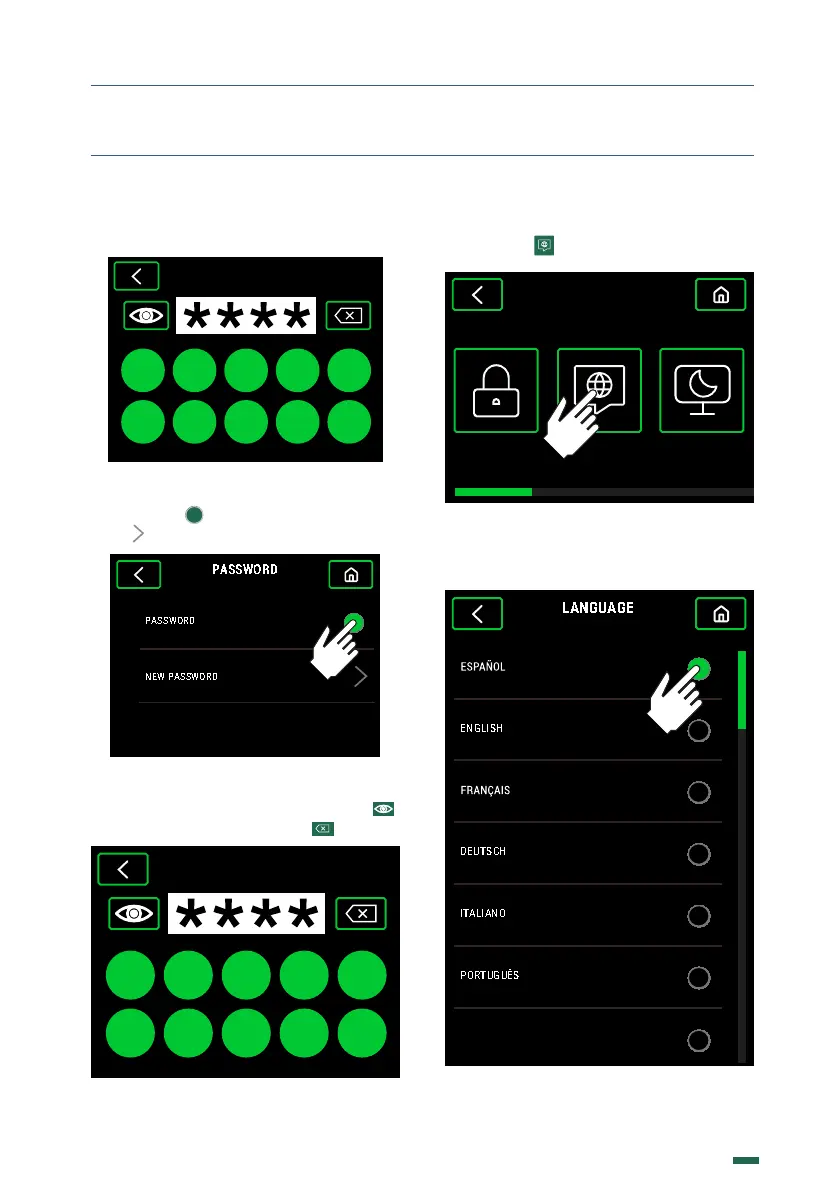
If the Password is active, enter the Default
one: 0000
PASSWORD
0 1 2 3 4
5 7 8 96
10.8.2. Activate or deactivate the Password
by pressing . To modify the Password
press
10.8.3. Enter a new 4 numbers Password.
Show or hide the numbers by pressing
or delete the numbers pressing
0 1 2 3 4
5 7 8 96
NEW PASSWORD
. SETTINGS
.. LANGUAGE
10.9.1. Press
SCREENSAVERLANGUAGEPASSWORD
GRINDER SETTINGS
10.9.2. Choose between the dierent
languages available using the vertical scroll.
한국어



 To Next Page