22
K09657H02 | PROC-CAL/002/03 USER MANUAL | V. 11/07/2023
. SETTINGS
.. SCREENSAVER
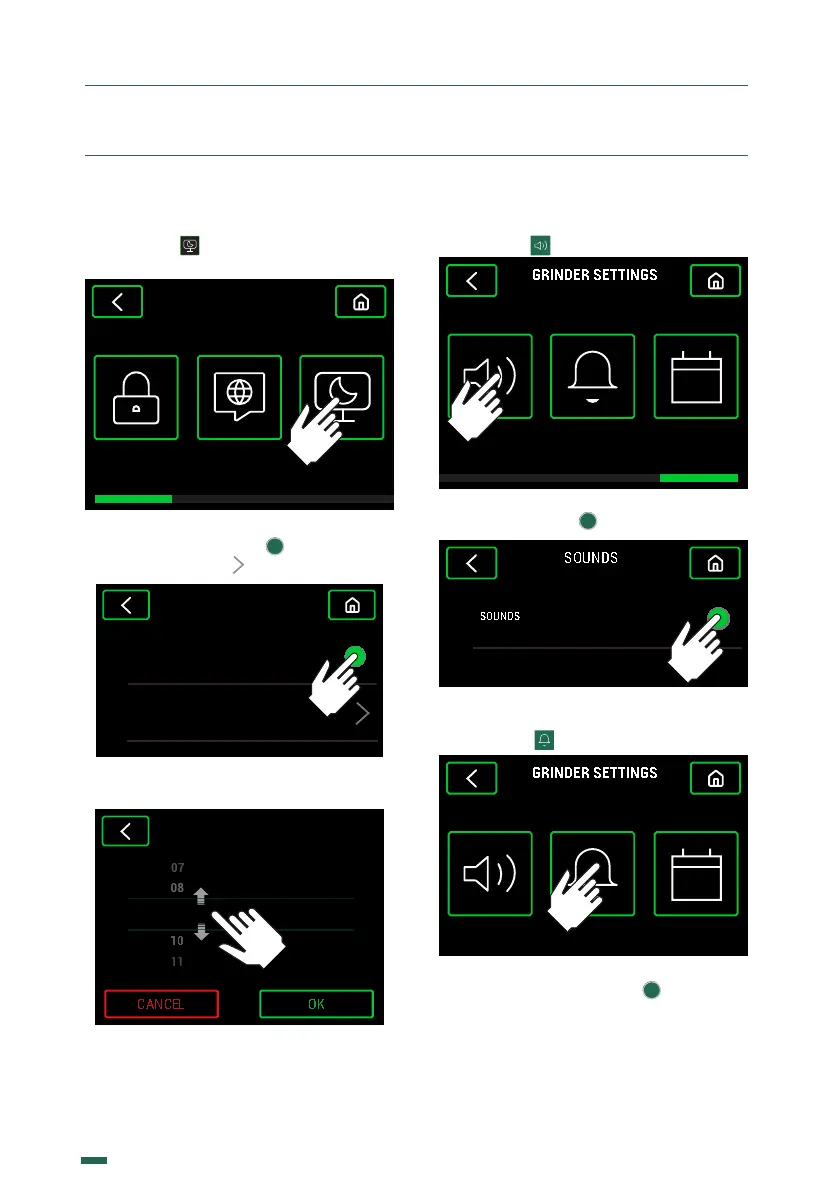
10.10.1. Press
SCREENSAVERLANGUAGEPASSWORD
GRINDER SETTINGS
10.10.2. Activate or deactivate the
Screensaver by pressing . To modify the
activation time press
SCREENSAVER
ACTIVATION TIME 05 MIN
10.10.3. Change the minutes by sliding up or
down and press the button OK to confirm.
SCREENSAVER
MINUTES09
ACTIVATION TIME
.. SOUNDS
10.11.1. Press
SOUNDS DOSE ALARM DATE/HOUR
10.11.2. Activate or deactivate the sound by
pressing the button
.. BURRS CHANGE ALARM
10.12.1. Press
SOUNDS DOSE ALARM DATE/HOUR
10.12.2. Activate or deactivate the Burrs
change alarm by pressing , adjust the
Weight of the Dose 2, the Burrs change
alarm Kg or Reset Alarm.



 To Next Page