23
K09657H02 | PROC-CAL/002/03 USER MANUAL | V. 11/07/2023
. SETTINGS
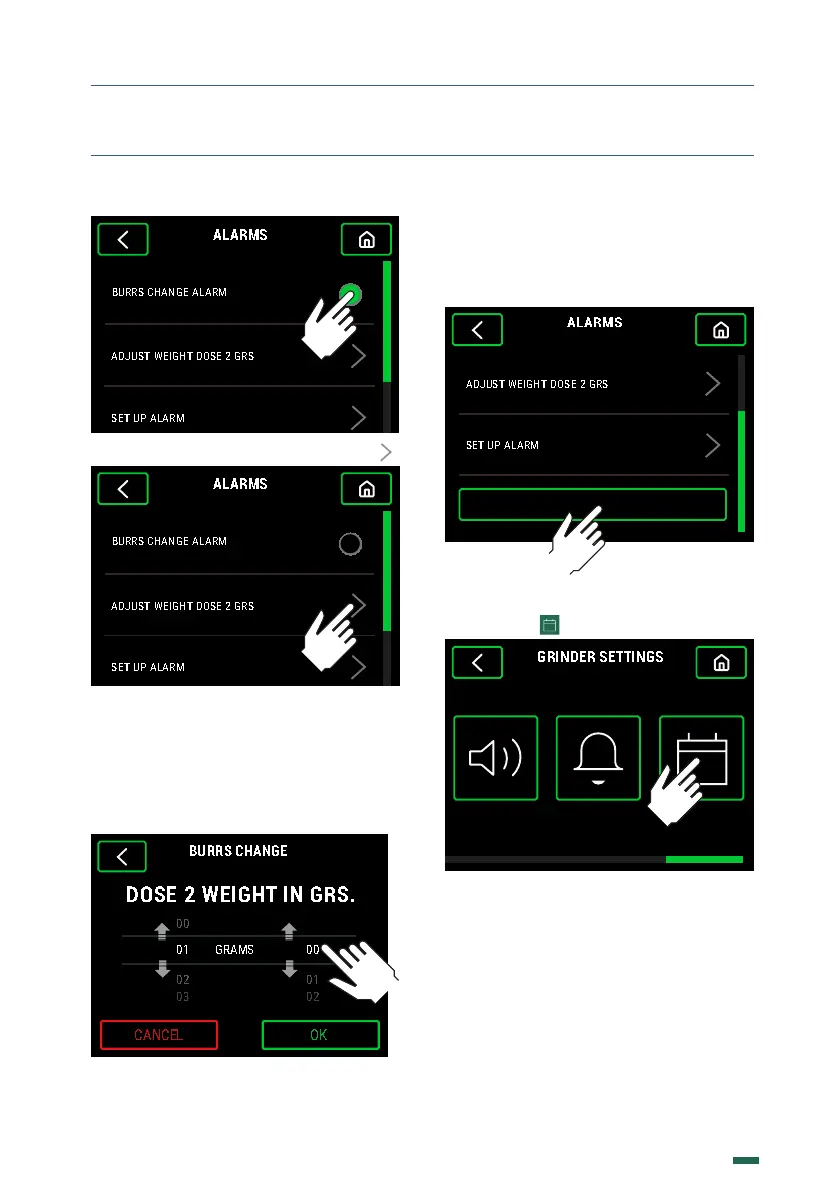
10.12.3. To set the Weight of Dose 2 press
10.12.4. Change the grams of Dose 2 by
sliding the grams or tenths of a gram up or
down until the desired weight is reached and
press the button OK to accept.
Dose 2 will be the average weight used to
determine burr wear.
10.12.5. To delete the stored data of the Burr
change alarm, i.e. once replaced the current
set of Burrs, scroll vertically, press the Reset
Alarm button and then enter the Password.
RESET ALARM
.. DATE/HOUR
10.13.1. Press
SOUNDS DOSE ALARM DATE/HOUR


 To Next Page