MNC-0300-036 22 of 26 Revision E
Unpacking and Installation
Redundant configuration
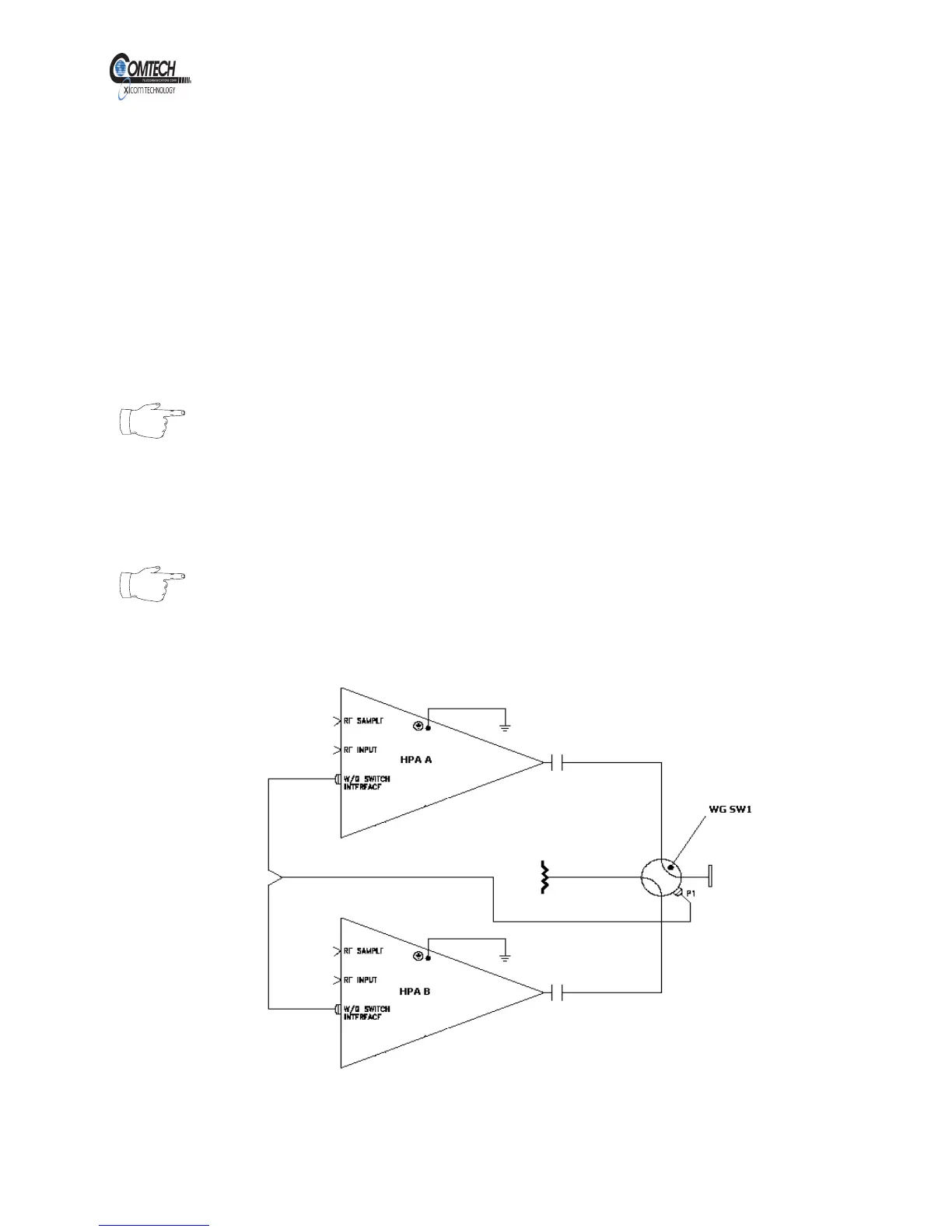
Refer to Figure 16. The XTD-250KA amplifier has built-in Waveguide
switch control and indicator functions. Two HPAs can be configured in a
1:1 redundant system without an external system controller. In
Redundant configuration one amplifier constantly monitors the operation
of the other amplifier so that if the online amplifier becomes faulted, the
backup amplifier will take its place. This automatic switching requires that
the backup amplifier must be operational (not faulted) and in automatic
mode. Please refer to the system manual for more details on redundant
switching.
Note
The waveguide switch interface J6 provides the control and
monitoring of two waveguide switches SW1 and SW2.
Only SW1 can be used in a 1:1 redundant configuration.
SW2 can be added as an offline switch. It cannot be
configured as a 1:1 or 1:2 system with 3 HPA.
Note
The Auto mode can be selected via serial interface. Please
refer to the Protocol and Operation chapters for more
details.
Figure 16, Switching System in 1:1 Configuration
EAR EXPORT CONTROLLED: The information contained in this Manual refers or relates to a product that is subject
to the U.S. Export Administration Regulations (EAR). Transfer of data herein by any means to a Foreign Person,
whether in the U.S. or abroad, may require an export license from the U.S. Department of Commerce.



 To Next Page